Data … as usual

All things about data by Laurent Leturgez

Category Archives: Oracle

Active Average Session trending in Statspack

Active Average Session (AAS) is one of the first statistic you have to look when you analyze a performance issue.

In Oracle Standard Edition (or Enterprise Edition without Diagnostic pack), you cannot query V$ACTIVE_SESSION_HISTORY and DBA_HIST_ACTIVE_SESS_HISTORY views, nor execute ashrpt script.

If you have installed statspack and if you take snapshots, you can find Active Average Session between 2 snapshots.

AAS is calculated with the formula : DB Time / elapsed time. So, if you have recorded a db time of 300 seconds in 900 seconds (elapsed time between two snapshots), AAS is 0,33.

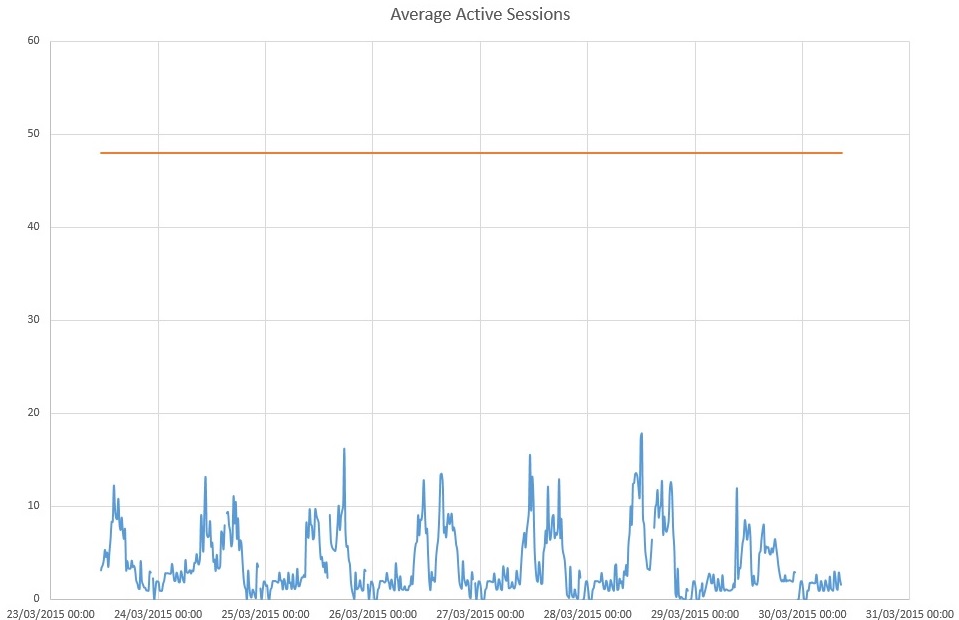
So it’s easy to calculate AAS between two snapshot, but the most important thing is to have AAS trending during a period.

To do that, I wrote a small PL/SQL function based on SYS_TIME_MODEL_DIF function available in STATSPACK package definition (in spcpkg.sql script).

create or replace function SYS_TIME_MODEL_DIF(i_name varchar2, bid number, eid number, db_ident number, inst_num number) RETURN number is

/* Returns the difference between statistics for the Time Model statistic
   name specified for the interval between the begin and end
   snapshot id's (bid, eid)

   In the case the data being queried is from a prior release
   which did not have the statistic requested, this function
   returns 0.
*/

beg_val_missing   boolean := false;
end_val_missing   boolean := false;
bval           number;
eval           number;

cursor SY (i_snap_id number) is
select value
  from stats$sys_time_model      stm
     , stats$time_model_statname tms
where stm.snap_id         = i_snap_id
   and stm.dbid            = db_ident
   and stm.instance_number = inst_num
   and stm.stat_id         = tms.stat_id
   and tms.stat_name       = i_name;

begin
   /* Get start value */
   open SY (bid); fetch SY into bval;
   if SY%notfound then
      beg_val_missing := true;
   end if; close SY;

   /* Get end value */
   open SY (eid); fetch SY into eval;
   if SY%notfound then
      end_val_missing := true;
   end if; close SY;

   if     beg_val_missing = true
      and end_val_missing = true      then

         /* this is likely a newer statitic which did not exist for this database version    */
        return 0;

   elsif     beg_val_missing = true
         and end_val_missing = false  then
         return -1;
   elsif     beg_val_missing = false
         and end_val_missing = true   then
         return -1;
   else

        /* Return difference */
        return eval - bval;

   end if;

end SYS_TIME_MODEL_DIF;
/

When this function has been created, you can call it to get Db time (or any value in the time model) between two snapshots (identified by their snapshot_id : bid (begin id) and eid (end id)) , for example :

SQL> select SYS_TIME_MODEL_DIF('DB time',791,792,1386309985,1) from dual;

SYS_TIME_MODEL_DIF('DBTIME',791,792,1386309985,1)
-------------------------------------------------
 10245630292

SQL> select SYS_TIME_MODEL_DIF('DB CPU',791,792,1386309985,1) from dual;

SYS_TIME_MODEL_DIF('DBCPU',791,792,1386309985,1)
------------------------------------------------
 3698356113

SQL> select SYS_TIME_MODEL_DIF('parse time elapsed',791,792,1386309985,1) from dual;

SYS_TIME_MODEL_DIF('PARSETIMEELAPSED',791,792,1386309985,1)
-----------------------------------------------------------
 211981805

Note that time is given in microseconds.

Next step, I wrote an anonymous PL/SQL script that executes this function accross all the snapshots taken between two snap_id and prints DB Time, DB CPU, and AAS in CSV format (you can adapt this script to adapt your output format):

declare
 -- Constants
 usec_to_sec number := 1000000;
 day_to_sec number := 86400;
 db_id number := &dbid;
 --
 dbtim number;
 dbcpu number;
 cursor SN_tim(sn_id number) is select snap_time from stats$snapshot where snap_id=sn_id;
 cursor snaps(sn1 number, sn2 number) is select snap_id from stats$snapshot where snap_id between sn1 and sn2 order by snap_id;
 b_time date;
 e_time date;
 bid number;
 eid number;
 cur_nf number;
begin
dbms_output.put_line('BEGIN_TIME;END_TIME;DBTIME;DBCPU;AAS');
open snaps(&start,&end);
loop
fetch snaps into bid;
exit when snaps%notfound;
 cur_nf := 0;
 fetch snaps into eid;

 open SN_tim(bid); fetch SN_tim into b_time;
 if SN_tim%notfound then
 cur_nf := 1;
 end if;
 close SN_tim;

 open SN_tim(eid); fetch SN_tim into e_time;
 if SN_tim%notfound then
 cur_nf := 1;
 end if;
 close SN_tim;

 dbtim := SYS_TIME_MODEL_DIF('DB time',bid,eid,db_id,1);
 dbcpu := SYS_TIME_MODEL_DIF('DB CPU',bid,eid,db_id,1);
 if ((dbtim>0 or dbcpu>0) and cur_nf = 0) then
 dbms_output.put_line(b_time||';'||e_time||';'||round(dbtim/usec_to_sec,2) ||';'||round(dbcpu/usec_to_sec,2) ||';'|| round((dbtim/usec_to_sec) / ((e_time-b_time)*day_to_sec),2) );
 else
 dbms_output.put_line(b_time||';'||e_time||';N/A;N/A' );
 end if;
end loop;
end;

Then you can graph it in Excel or Tableau (for example) and you will get the AAS trend:

aas

Keep in touch with My Oracle Support updates

This post is related to My Oracle Support (MOS) and one of the features every DBA has to configure is the Hot Topic email.

This feature will send you an email every day ou week (depending on how you configure it) with all the new stuff published or updated on MOS (Knowledge base article, bugs, alerts …).

Of course, you can filter on the products you want to subscribe and select the number of items you want to receive by category.

To configure this fonction, log in to MOS with your account and click on the “settings” tab, ,the select the “Hot Topic Email” link on the left … see in the screenshot below (green box):

hot_topics

Then, you will see the “hot topics” part and here you can configure it:

  • On the first part (1), you can configure the frequency of the mail and its format. You can also configure the content you want to include in this mail: favorites and Service requests
  • Next, on the second part (2), which is for me the most important part, you will select the products you want to subscribe and what kind of information you want to receive (knowledge articles, alerts, bugs etc.)
  • Finally, on the third part (3), you will choose the number of items the mail will includes. In the previous screenshot, I will receive 25 bugs (for all the products I selected), 25 knowledge articles etc. (Usually the bug and knowledge articles are the most important parts… yes, there are a lot of bugs updated every day 😉 )

As a result, I receive this kind of email every day:

Alerts

Alert Product Area Last Updated
Bug 20830449 – Disk corruption possible when a disk media error occurs while synchronous I/O is performed Oracle Exadata Storage Server Software Fri, 26 Jun 2015 18:44 GMT+01:00


Bugs

Bug Product Area Bug ID Last Updated
ORACLE PROCESS RUNNING OUT OF OS KERNEL I/O RESOURCES EVEN AFTER APPLY 6343215 Oracle Database – Enterprise Edition 7523755 Sat, 27 Jun 2015 13:10 GMT+01:00
MESSAGES IN AQ$_ALERT_QT_E ARE NOT BEING PURGED IN A RAC CLUSTER Oracle Database – Enterprise Edition 19904389 Sat, 27 Jun 2015 13:10 GMT+01:00
ORA-01792 OCCURED WHEN USING RIGHT OUTER JOIN Oracle Database – Enterprise Edition 9256994 Sat, 27 Jun 2015 12:55 GMT+01:00
ORA-600 [KLAPRS_11]/[KLAPRS_12] BEING HIT DURING IMPDP Oracle Database – Enterprise Edition 6944948 Sat, 27 Jun 2015 12:54 GMT+01:00
ORA-00600 [KDTIGETROW-2] AFTER UPGRADE TO 11.2.0.3 BUNDLE 22 Oracle Database – Enterprise Edition 17343797 Sat, 27 Jun 2015 12:52 GMT+01:00
MERGE SQL WITH BOTH AN INSERT AND UPDATE AND LOGGING ENABLED CAN CAUSE INT. ERR Oracle Database – Enterprise Edition 17397545 Sat, 27 Jun 2015 12:52 GMT+01:00
WRONG PRECISION RETURNED FOR QUERY AFTER DB UPGRADE TO 12.1.0.2 Oracle Database – Enterprise Edition 21241579 Sat, 27 Jun 2015 12:49 GMT+01:00
NUMA MESSAGES IN THE ALERT LOG AFTER 11.2.0.4 UPGRADE Oracle Database – Enterprise Edition 17475024 Sat, 27 Jun 2015 12:49 GMT+01:00
ORA-600 [QKSVCREPLACEVC0] USING SQL TUNING ADVISOR Oracle Database – Enterprise Edition 17401718 Sat, 27 Jun 2015 12:45 GMT+01:00
ORA-600 [QKSVCREPLACEVC0] WHEN AUTOMATIC SQL TUNING ADVISOR EXECUTED Oracle Database – Enterprise Edition 16491690 Sat, 27 Jun 2015 12:45 GMT+01:00
ORA-00600 [QKSVCREPLACEVC0] Oracle Database – Enterprise Edition 13959984 Sat, 27 Jun 2015 12:45 GMT+01:00
INSTANCE CRASHES WITH ORA-600 [KJBRWRDONE:SC2] ON LMS Oracle Database – Enterprise Edition 17027916 Sat, 27 Jun 2015 12:35 GMT+01:00
WITH 11.2.0.4, THE CAPTURE MECHANISM STARTS UP TOO MANY PARALLEL QUERY SERVERS Oracle Database – Enterprise Edition 19587324 Sat, 27 Jun 2015 12:28 GMT+01:00
WAIT DEPENDENCY ON APPLY INSERT AFTER UPGRADE TO 11.2.0.4 Oracle Database – Enterprise Edition 19442102 Sat, 27 Jun 2015 12:28 GMT+01:00
FAILED TO RAISE ORA-1 FOR PK UPDATE WHEN CONSTRAINT=IMMEDIATE Oracle Database – Enterprise Edition 19440386 Sat, 27 Jun 2015 12:28 GMT+01:00
INTEGRATED REPLICAT INVALIDATES DEPENDENT PACKAGES RESULTING IN AN ORA-4068 Oracle Database – Enterprise Edition 19277336 Sat, 27 Jun 2015 12:28 GMT+01:00
PGA MEMORY LEAK ON APPLY SERVER ON KOH-KGHU CALL – KNGLXRCOL Oracle Database – Enterprise Edition 18973548 Sat, 27 Jun 2015 12:28 GMT+01:00
LOGMINER DDL TRACKING NOT SCALABLE, SESSIONS BLOCK EACHOTHER DURING DDL APPLY Oracle Database – Enterprise Edition 16674686 Sat, 27 Jun 2015 12:28 GMT+01:00
MALFORMED KTU-KRVMISC TRANSACTION FINALIZATION MARKER Oracle Database – Enterprise Edition 14705949 Sat, 27 Jun 2015 12:28 GMT+01:00
ORA 7445 [__INTEL_SSSE3_REP_MEMCPY] WITH CLUSTER TABLE CREATION Oracle Database – Enterprise Edition 21041573 Sat, 27 Jun 2015 12:27 GMT+01:00
ORA-600 [17285] RUNNING DIFFERENT APPLICATION PACKAGES Oracle Database – Enterprise Edition 19475971 Sat, 27 Jun 2015 12:09 GMT+01:00
WRONG RESULTS USING FUNCTION BASED INDEX WITH LOWER FUNCTION Oracle Database – Enterprise Edition 18550648 Sat, 27 Jun 2015 12:06 GMT+01:00
PGA MEMORY SPIKE WHEN CONSISTENTLY RUNNING A JAVA STORED PROCEDURE Oracle Database – Enterprise Edition 20806625 Sat, 27 Jun 2015 12:06 GMT+01:00
LOADJAVA FAILS WITH ORA-12154 WHEN USING NAME-VALUE PAIR IN CONNECTION STRING. Oracle Database – Enterprise Edition 21072270 Sat, 27 Jun 2015 12:05 GMT+01:00
ORA-600 [KSSADD: NULL PARENT] DURING HIGH DATABASE ACTIVITY Oracle Database – Enterprise Edition 16590736 Sat, 27 Jun 2015 11:50 GMT+01:00


Knowledge Articles

Knowledge Article Product Area Last Updated
Does Weblogic Server support SAML2.0 Single Logout Protocol? Oracle WebLogic Server Sat, 27 Jun 2015 02:52 GMT+01:00
How to use the DBMS_SQLPA (SQL Performance Analyzer) API to test database upgrade using CONVERT SQLSET Oracle Database – Enterprise Edition Sat, 27 Jun 2015 02:37 GMT+01:00
12c ACFS Configuration on ASM Flex Architecture (White Paper) Oracle Database – Enterprise Edition Fri, 26 Jun 2015 23:37 GMT+01:00
Best Practices and Recommendations for RAC databases using very large SGA (e.g. 100 GB) Oracle Database – Enterprise Edition Fri, 26 Jun 2015 23:24 GMT+01:00
Receive “There are Issues with the Configuration of The Static Files…” After Upgrading to APEX 5.0 Oracle Application Express (formerly HTML DB) Oracle REST Data Services Oracle HTTP Server Oracle Database – Enterprise Edition Fri, 26 Jun 2015 23:19 GMT+01:00
Cluster Health Monitor (CHM) FAQ Oracle Database – Enterprise Edition Fri, 26 Jun 2015 23:16 GMT+01:00
ODA: “oakcli show repo” Does Not Show Any Repository After Restart Oracle Database Appliance Software Oracle Database Appliance X3-2 Fri, 26 Jun 2015 22:34 GMT+01:00
NTP leap second event causing Oracle Clusterware node reboot Oracle Database – Enterprise Edition Fri, 26 Jun 2015 22:29 GMT+01:00
ODA (Oracle Database Appliance): Leap Second adjustment impact Oracle Database Appliance Oracle Database Appliance Software Fri, 26 Jun 2015 22:01 GMT+01:00
Bug 20830449 – Disk corruption possible when a disk media error occurs while synchronous I/O is performed Oracle Exadata Storage Server Software Fri, 26 Jun 2015 18:44 GMT+01:00
Exadata 12.1.2.1.2 release and patch (20748218) Oracle Exadata Storage Server Software Fri, 26 Jun 2015 18:40 GMT+01:00
11gR2 Grid Infrastructure Does not Use ulimit Setting Appropriately Oracle Database – Standard Edition Oracle Database – Enterprise Edition Fri, 26 Jun 2015 18:33 GMT+01:00
Exadata Database Machine and Exadata Storage Server Supported Versions Oracle Exadata Hardware Exadata Database Machine X2-2 Hardware Oracle Platinum Services Oracle Exadata Storage Server Software Oracle Database – Enterprise Edition Fri, 26 Jun 2015 18:32 GMT+01:00
Disable SSLv3 And Enable TLSv2 / TLSv1.1/ TLSv1.2 Oracle WebLogic Server Fri, 26 Jun 2015 18:30 GMT+01:00
ORA-7445 Troubleshooting Tool Oracle Database – Enterprise Edition Fri, 26 Jun 2015 17:13 GMT+01:00
ORA-600 Troubleshooting Tool Oracle Database – Enterprise Edition Fri, 26 Jun 2015 16:58 GMT+01:00
hp-ux: Database Instance Startup is Slow in 11gR2 as DBW0 Has High Wait “Disk file operations I/O” Oracle Database – Enterprise Edition Fri, 26 Jun 2015 16:49 GMT+01:00
ODA (Oracle Database Appliance): Unable to Delete VM Oracle Database Appliance Software Fri, 26 Jun 2015 16:49 GMT+01:00
WLS Admin Server Deadlock Detected Waiting To Acquire Lock Java.util.concurrent.CopyOnWriteArrayList Oracle WebLogic Server Fri, 26 Jun 2015 16:43 GMT+01:00
[WLS-10.3.6] -JAXB Marshaller Returns The Class Name Instead Of The Objects In The List Oracle WebLogic Server Fri, 26 Jun 2015 16:14 GMT+01:00
Oracle Advance Security Licence Components Oracle Database – Enterprise Edition Fri, 26 Jun 2015 16:11 GMT+01:00
Steps to Implement Address Windowing Extensions (AWE) / VLM on 32-bit Windows Platforms Oracle Database – Enterprise Edition Fri, 26 Jun 2015 15:50 GMT+01:00
DBMS_AUDIT_MGMT does not release the space occupied by LOB segment Oracle Database – Standard Edition Fri, 26 Jun 2015 15:47 GMT+01:00
WLS 10.3.6.0 Wtc-l10n.jar Missing Oracle WebLogic Server Fri, 26 Jun 2015 15:26 GMT+01:00
Egypt cancels DST in 2015 – Impact on Oracle RDBMS Oracle Database – Standard Edition Oracle Database – Enterprise Edition Fri, 26 Jun 2015 15:21 GMT+01:00


SIMD Extensions in and out Oracle 12.1.0.2

First of all, I would like to thank Tanel Pöder from Enkitec Accenture for its review of this post and some precious information he gave me.

—-

Recently I posted a link on twitter which explains basics of SIMD Programming (https://www.kernel.org/pub/linux/kernel/people/geoff/cell/ps3-linux-docs/CellProgrammingTutorial/BasicsOfSIMDProgramming.html), and I had a reply which asked me if it was Oracle 12c style, and the answer is … yes and no.

What is a SIMD extension?

A SIMD Extension is a CPU instruction that computes many data in only one instruction (Single Instruction Multiple Data). Imagine, you have 2 arrays of 4 integers, and you want to compute a sum of those 2 arrays. A classical way will be to loop on each value and add them one by one and to get the result in another array. This operation will produce 4 operations.

Now Imagine, your arrays are now located in a vector of 4 integers, those 2 vectors are in fact specific registers and with only one CPU instruction, you will add those 2 vectors by producing only one vector. You reduce CPU instructions by 4 … for the same result.

If it’s not clear, don’t go away … I have written small C sample code to demonstrate this.

A bit of history

SIMD extensions are not quite recent. They have been created in 1970 with vector programming.

In 1996, SIMD extensions have been widely deployed with MMX extensions (which are SIMD extensions), then Alvitec systems with motorola processors and IBM Power systems have developed more powerful instructions. Then Intel reveals its new SSE extensions in 1999 that have been improved by other extension SSE2, SSE3, SSSE3, SSE4 and now AVX, AVX2 and AVX512 extensions.

So Oracle is not using a specific extension but those which are available on your platform, because all CPUs are not offering the same extensions. For example, modern processors have AVX extensions, but most recent extension (AVX-512) are only available in Xeon Phi Knights Landing and Xeon Skylake microarchitectures (broadwell successors).

Data Structures

SIMD extensions are based on data structures or vectors.

A vector is an array data structure (don’t be confused with an array datatype) which have a fixed length and which is, in fact, a succession of scalars of one type.

For example, if you have a vector of 64 bits (8 bytes), you can put in it 2 integers because an integer has a 4 bytes size (in x86-64 arch), 8 chars (1 bytes) but only one double (8 bytes long).

Those data structures are located is CPU registers dedicated for those SIMD instructions.

Let’s take an example, you want to process the sum of two vectors in a processor which uses only MMX instructions (old one 😉 ) have 8 registers (MM0 through MM7). Each register holds 64 bits.

First vector content is 1,2 and second one is 1,2. First vector is copied from memory to MM0 register and the second in MM1, and then the CPU launch the SIMD instruction that will produce in MM0 the sum on MM1 and MM0, and then MM0 is copied in memory as a result.

Now imagine, your vector doesn’t hold 64 bits but 128, 256, 512 or 1024 … you will put in it more data and those data will be computed with only one operation …

It’s one of the key of SIMD evolution, MMX uses 64 bits registers (MM0 to MM7), SSE (1/2/3 and 4) uses 128 bits registers (XMM), AVX (1/2) uses 256 bits registers (YMM), and AVX-512 uses 512 bits registers (ZMM).

For Intel processors, vector datatypes are __m64, __mm128, __mm256, and __mm512 (each vector will contain floating point value aka float), you have the equivalent for double precision values (__mm128d, __mm256d, __mm512d) and for other types : int, short, char (__mm128i, __mm256i, __mm512i).

Note: Note that all those types are automatically aligned on a 8, 16, 32 or 64 bytes boundaries.

Now computing data

Now you know how will be computed your data, you can perform operation on it. You can add, multiply your vectors, perform bit shifting etc.

You have the choice to do “classical” operations, or you can use Intel’s intrinsics which are functions which computes a specific operation (basic mathematics, bit shifting, comparisons etc.). All of Intel’s Intrinsics are available at this URL: https://software.intel.com/sites/landingpage/IntrinsicsGuide/. On this page you can also see performance information of each function on different processors.

 Examples

For all examples above, I used C langage.

Compiling “SIMD aware” programs (with GCC)

If you want to compile SIMD aware program, you have to include “immintrin.h” header file which is available with GCC. This header will test which extension you have, and you have used for you compilation. (Just find this file and open it). Depending on your CPU and compilation, it will include another header file:

  • mmintrin.h for MMX instructions and datatypes:
  • xmmintrin.h for SSE
  • emmintrin.h for SSE2
  • pmmintrin.h for SSE3
  • tmmintrin.h for SSSE3
  • smmintrin.h for SSE4.1 and SSE4.2
  • avxintrin.h for AVX

When you compile your program, some extensions are not included by default. Indeed if your CPU supports AVX extensions, if you don’t give the correct option to the compiler, AVX won’t be used.

Main options are:

  • O3: this option enable vectorization loops optimization.
  • msse4.1: this option enable SSE4.1 extension
  • msse4.2: this option enable SSE4.2 extension
  • mavx: this option enable AVX extension
  • mavx2: this option enable AVX2 extension

Other options are available here: https://gcc.gnu.org/onlinedocs/gcc-4.4.7/gcc/i386-and-x86_002d64-Options.html

To demonstrate this, I used a small program:


#include <stdio.h>
#include <stdlib.h>
#include <immintrin.h>

void print_extensions () {
#ifdef __MMX__
printf("MMX ... OK\n");
#else
printf("MMX ... KO\n");
#endif

#ifdef __SSE__
printf("SSE ... OK\n");
#else
printf("SSE ... KO\n");
#endif

#ifdef __SSE2__
printf("SSE2 ... OK\n");
#else
printf("SSE2 ... KO\n");
#endif

#ifdef __SSE3__
printf("SSE3 ... OK\n");
#else
printf("SSE3 ... KO\n");
#endif

#ifdef __SSSE3__
printf("SSSE3 ... OK\n");
#else
printf("SSSE3 ... KO\n");
#endif

#if defined (__SSE4_2__) || defined (__SSE4_1__)
printf("SSE4_1/2 ... OK\n");
#else
printf("SSE4_1/2 ... KO\n");
#endif

#if defined (__AES__) || defined (__PCLMUL__)
printf("AES/PCLMUL ... OK\n");
#else
printf("AES/PCLMUL ... KO\n");
#endif

#ifdef __AVX__
printf("AVX ... OK\n");
#else
printf("AVX ... KO\n");
#endif
}

int main(int argc, char** argv) {
print_extensions();
return 0;
}

If you run it with only O3 optimization, you will get this result:


macbook-laurent:simd $ sysctl -a | egrep 'cpu.*features'
machdep.cpu.features: FPU VME DE PSE TSC MSR PAE MCE CX8 APIC SEP MTRR PGE MCA CMOV PAT PSE36 CLFSH DS ACPI MMX FXSR SSE SSE2 SS HTT TM PBE SSE3 PCLMULQDQ DTES64 MON DSCPL VMX SMX EST TM2 SSSE3 FMA CX16 TPR PDCM SSE4.1 SSE4.2 x2APIC MOVBE POPCNT AES PCID XSAVE OSXSAVE SEGLIM64 TSCTMR AVX1.0 RDRAND F16C
machdep.cpu.leaf7_features: SMEP ENFSTRG RDWRFSGS TSC_THREAD_OFFSET BMI1 HLE AVX2 BMI2 INVPCID RTM
machdep.cpu.extfeatures: SYSCALL 1GBPAGE EM64T LAHF RDTSCP TSCI

macbook-laurent:simd $ cc -O3 -o simd_ext simd_ext.c
macbook-laurent:simd $ ./simd_ext
MMX ... OK
SSE ... OK
SSE2 ... OK
SSE3 ... OK
SSSE3 ... OK
SSE4_1/2 ... KO
AES/PCLMUL ... KO
AVX ... KO

If you run with correct options, your program can use AVX or SSE4 extensions:

macbook-laurent:simd $ cc -O3 -msse4.2 -o simd_ext simd_ext.c
macbook-laurent:simd $ ./simd_ext
MMX ... OK
SSE ... OK
SSE2 ... OK
SSE3 ... OK
SSSE3 ... OK
SSE4_1/2 ... OK
AES/PCLMUL ... KO
AVX ... KO
macbook-laurent:simd $ cc -O3 -mavx -o simd_ext simd_ext.c
macbook-laurent:simd $ ./simd_ext
MMX ... OK
SSE ... OK
SSE2 ... OK
SSE3 ... OK
SSSE3 ... OK
SSE4_1/2 ... OK
AES/PCLMUL ... KO
AVX ... OK

Note that if you enable AVX extension, SSE4 extensions are enabled by default.

Example of SSE2 usage in a basic operation (sum)

The C code above will show you how to perform a sum of two arrays of 16 integers each without using Intel intrinsics:


void func2_sse() {
int a[16] = {1,2,3,4,5,6,7,8,9,10,11,12,13,14,15,16};
int b[16] = {1,1,1,1,1,1,1,1,1,1,1,1,1,1,1,1};
__m128i* aptr;
__m128i* bptr;
int i;
int loopcnt=0;
printf("sizeof(__m128i)=%lu\n",sizeof(__m128i));
printf("sizeof(a)=%lu\n",sizeof(a));

// Above, we cast integer arrays to vectors of integers

aptr=(__m128i*)a;
bptr=(__m128i*)b;

// and now we compute the sum
for (i=0;i<sizeof(a)/sizeof(__m128i);i++) {
loopcnt++;
bptr[i]=aptr[i]+bptr[i];
}

int* c=(int*)bptr;

printf("loopcount = %d\nresult= ",loopcnt);
for (i=0;i<16;i++) {
printf("%d ",c[i]);
}
printf("\n");
}

and the result, my sum has been computed in only 4 loops:


SSE
--------------------
sizeof(__m128i)=16
sizeof(a)=64
loopcount = 4
result= 2 3 4 5 6 7 8 9 10 11 12 13 14 15 16 17

Same example with AVX extension:


void func2_avx() {
 int a[16] = {1,2,3,4,5,6,7,8,9,10,11,12,13,14,15,16};
 int b[16] = {1,1,1,1,1,1,1,1,1,1,1,1,1,1,1,1};
 __m256i* aptr;
 __m256i* bptr;
 int i;
 int loopcnt=0;
 printf("sizeof(__m256i)=%lu\n",sizeof(__m256i));
 printf("sizeof(a)=%lu\n",sizeof(a));
 aptr=(__m256i*)a;
 bptr=(__m256i*)b;

 for (i=0;i<sizeof(a)/sizeof(__m256i);i++) {
 loopcnt++;
 bptr[i]=aptr[i]+bptr[i];
 }

 int* c=(int*)bptr;

 printf("loopcount = %d\nresult= ",loopcnt);
 for (i=0;i<16;i++) {
 printf("%d ",c[i]);
 }
 printf("\n");
}

and the result, my sum has been computed in only 2 loops:


AVX
--------------------
sizeof(__m256i)=32
sizeof(a)=64
loopcount = 2
result= 2 3 4 5 6 7 8 9 10 11 12 13 14 15 16 17

 Now, let’s compare two data sets with SIMD extension

Next code sample concerns a vector where we want to search the value 10. To do that, we use a comparison function and a function to build a 256bits (AVX) vector full of the value we search. The comparison function works with 32bits packets (useful to compare integers) and returns 0xFFFFFFFF if both values are equal, 0x0 otherwise. As it’s an AVX function, our initial vector composed by 16 values is processed in only 2 CPU cycles.

void func2_compare_32bitsPack() {
    int a[16] = {1,2,3,4,5,6,7,8,9,10,11,12,13,14,15,16};
    __m256i* aptr;
    __m256i b;
    int i;
    int loopcnt=0;
    aptr=(__m256i*)a;
    // b is a vector full off int(32bits) equal to 10 (the value we search)
    b=_mm256_set1_epi32(10);

    for (i=0;i<sizeof(a)/sizeof(__m256i);i++) {
        loopcnt++;
        // comparison intrinsic function: packed by 32 bits(specific for int: if equal set 0xFFFFFFFF, 0x0 otherwise)
        aptr[i]=_mm256_cmpeq_epi32(aptr[i],b);
    }

    // print results
    int* c=(int*)aptr;

    printf("loopcount = %d\nresult= ",loopcnt);
    for (i=0;i<16;i++) {
        printf("0x%x   ",c[i]);
    }
    printf("\n");
}

And the result:


macbook-laurent:simd $ ./simd
Comparison
loopcount = 2
result= 0x0 0x0 0x0 0x0 0x0 0x0 0x0 0x0 0x0 0xffffffff 0x0 0x0 0x0 0x0 0x0 0x0

It becomes easy to identify that the value 10 is located at the index 10 in our initial array.

Ok, and how SIMD extensions are used in Oracle 12c In Memory ?

If you have read my last post on how to activate SSE4 extensions on VirtualBox guests (https://laurent-leturgez.com/2015/04/14/enable-simd-sse4-extension-in-oracle-virtualbox/) , and Tanel Pöder’s post (https://blog.tanelpoder.com/2014/10/05/oracle-in-memory-column-store-internals-part-1-which-simd-extensions-are-getting-used/), you have noticed that Oracle can run IM with only SSE2 extension (default), but if your CPUs have SSE4, or AVX extensions, Oracle will use some specific libraries that uses SSE4 (libshpksse4212.so) and AVX (libshpkavx12.so).

If we have a look at functions in those libraries, we will see that every function starts with “kdzk”

[oracle@oel64-112 ~]$ readelf -a /u01/app/oracle/product/12.1.0/dbhome_1/lib/libshpksse4212.a | grep FUNC
 6: 0000000000000030 256 FUNC LOCAL DEFAULT 3 kdzk_overload_opc_name
 23: 0000000000000130 80 FUNC LOCAL DEFAULT 3 kdzk_flag_name
 26: 0000000000000180 112 FUNC LOCAL DEFAULT 3 kdzk_enc_name
 31: 00000000000001f0 320 FUNC LOCAL DEFAULT 3 kdzk_datawidth_name
 64: 0000000000002b70 544 FUNC LOCAL DEFAULT 3 kdzk_eq_dict_1bit
 65: 0000000000002d90 544 FUNC LOCAL DEFAULT 3 kdzk_lt_dict_1bit
 66: 0000000000002fb0 544 FUNC LOCAL DEFAULT 3 kdzk_gt_dict_1bit
 67: 00000000000031d0 592 FUNC LOCAL DEFAULT 3 kdzk_le_dict_1bit
 68: 0000000000003420 592 FUNC LOCAL DEFAULT 3 kdzk_ge_dict_1bit
 69: 0000000000003670 544 FUNC LOCAL DEFAULT 3 kdzk_ne_dict_1bit
 70: 0000000000003890 224 FUNC LOCAL DEFAULT 3 kdzk_gt_lt_dict_1bit
 71: 0000000000003970 576 FUNC LOCAL DEFAULT 3 kdzk_gt_le_dict_1bit
 72: 0000000000003bb0 576 FUNC LOCAL DEFAULT 3 kdzk_ge_lt_dict_1bit
 73: 0000000000003df0 992 FUNC LOCAL DEFAULT 3 kdzk_ge_le_dict_1bit
 74: 00000000000041d0 512 FUNC LOCAL DEFAULT 3 kdzk_eq_dict_1bit_null
 75: 00000000000043d0 192 FUNC LOCAL DEFAULT 3 kdzk_lt_dict_1bit_null
 76: 0000000000004490 512 FUNC LOCAL DEFAULT 3 kdzk_gt_dict_1bit_null
 77: 0000000000004690 512 FUNC LOCAL DEFAULT 3 kdzk_le_dict_1bit_null
 78: 0000000000004890 464 FUNC LOCAL DEFAULT 3 kdzk_ge_dict_1bit_null
 79: 0000000000004a60 512 FUNC LOCAL DEFAULT 3 kdzk_ne_dict_1bit_null
 80: 0000000000004c60 192 FUNC LOCAL DEFAULT 3 kdzk_gt_lt_dict_1bit_null
 81: 0000000000004d20 528 FUNC LOCAL DEFAULT 3 kdzk_gt_le_dict_1bit_null
 82: 0000000000004f30 192 FUNC LOCAL DEFAULT 3 kdzk_ge_lt_dict_1bit_null
 83: 0000000000004ff0 528 FUNC LOCAL DEFAULT 3 kdzk_ge_le_dict_1bit_null
 84: 0000000000005200 848 FUNC LOCAL DEFAULT 3 kdzk_eq_dict_2bit_selecti
 85: 0000000000005550 960 FUNC LOCAL DEFAULT 3 kdzk_eq_dict_2bit
 89: 0000000000005910 848 FUNC LOCAL DEFAULT 3 kdzk_lt_dict_2bit_selecti
 90: 0000000000005c60 1056 FUNC LOCAL DEFAULT 3 kdzk_lt_dict_2bit
 91: 0000000000006080 848 FUNC LOCAL DEFAULT 3 kdzk_gt_dict_2bit_selecti
 92: 00000000000063d0 1008 FUNC LOCAL DEFAULT 3 kdzk_gt_dict_2bit
 93: 00000000000067c0 848 FUNC LOCAL DEFAULT 3 kdzk_le_dict_2bit_selecti
 94: 0000000000006b10 1024 FUNC LOCAL DEFAULT 3 kdzk_le_dict_2bit
 95: 0000000000006f10 848 FUNC LOCAL DEFAULT 3 kdzk_ge_dict_2bit_selecti
 96: 0000000000007260 1056 FUNC LOCAL DEFAULT 3 kdzk_ge_dict_2bit
 97: 0000000000007680 848 FUNC LOCAL DEFAULT 3 kdzk_ne_dict_2bit_selecti
 98: 00000000000079d0 960 FUNC LOCAL DEFAULT 3 kdzk_ne_dict_2bit
 99: 0000000000007d90 928 FUNC LOCAL DEFAULT 3 kdzk_gt_lt_dict_2bit_sele
 100: 0000000000008130 1328 FUNC LOCAL DEFAULT 3 kdzk_gt_lt_dict_2bit
 101: 0000000000008660 928 FUNC LOCAL DEFAULT 3 kdzk_gt_le_dict_2bit_sele
 102: 0000000000008a00 1296 FUNC LOCAL DEFAULT 3 kdzk_gt_le_dict_2bit
 103: 0000000000008f10 928 FUNC LOCAL DEFAULT 3 kdzk_ge_lt_dict_2bit_sele
 104: 00000000000092b0 1328 FUNC LOCAL DEFAULT 3 kdzk_ge_lt_dict_2bit</pre>

kdzk is the Oracle component that manages compression:


SQL> oradebug doc components

.../...

Components in library ADVCMP:
--------------------------
 ADVCMP_MAIN Archive Compression (kdz)
 ADVCMP_COMP Archive Compression: Compression (kdzc, kdzh, kdza)
 ADVCMP_DECOMP Archive Compression: Decompression (kdzd, kdzs)
 ADVCMP_DECOMP_HPK Archive Compression: HPK (kdzk)
 ADVCMP_DECOMP_PCODE Archive Compression: Pcode (kdp)

An interesting thing to see is that, even you use an Oracle Kernel without any SSE4 nor AVX extension active (so your process doesn’t use libshpksse4212.so nor libshpkavx12.so library), you use kdz functions when you query and filter a table which is managed in Memory.

In a session I run the statements above:


SQL> select segment_name,BYTES,BYTES_NOT_POPULATED from v$im_segments

SEGMENT_NAME         BYTES         BYTES_NOT_POPULATED
-------------------- ------------- -------------------
S                         37748736                   0

SQL> select spid from v$process where addr=(select paddr from v$session where sid=sys_context('USERENV','SID'));

SPID
------------------------
3619

SQL> select count(*) from s where amount_sold>1700;

Just before launching the command, I attach my process and run gdb to catch every call to kdz functions:


[oracle@oel64-112 ~]$ pmap -x 3619 | egrep 'sse|avx'

[oracle@oel64-112 ~]$ gdb -pid 3619
GNU gdb (GDB) Red Hat Enterprise Linux (7.2-64.el6_5.2)
Copyright (C) 2010 Free Software Foundation, Inc.
License GPLv3+: GNU GPL version 3 or later <http://gnu.org/licenses/gpl.html>
.../...
Loaded symbols for /u01/app/oracle/product/12.1.0/dbhome_1/lib/libnque12.so
0x000000362ea0e740 in __read_nocancel () from /lib64/libpthread.so.0
Missing separate debuginfos, use: debuginfo-install glibc-2.12-1.132.el6_5.4.x86_64 libaio-0.3.107-10.el6.x86_64 numactl-2.0.7-8.el6.x86_64
(gdb) rbreak ^kdz

.../...

(gdb) commands
Type commands for breakpoint(s) 1-2165, one per line.
End with a line saying just "end".
>continue
>end

If you study the output, you will see that a lot of functions are called, and in the list, you will find some interesting functions: kdzdcol_get_minval, kdzdcol_get_maxval, kdzk_build_vector etc. Oracle clearly uses vectors to process IM compression units.

In my opinion, it’s normal to use functions related to compression because the kernel manipulates “Compression Units”, and it should integrates SIMD functions in its libraries.

A last curiosity with Oracle 12c (12.1.0.2)

Ok now you had a look to your installation, your machine is “AVX enabled”, and Oracle processes uses the AVX compatible library (libshpkavx212.so), everything is OK and you think you will use all this stuff.

But if you use objdump on this library, and you search for AVX registers, you won’t find anything:


[oracle@oel64-112 ~]$ grep -i ymm objdump_out.1 | wc -l
0

Tanel Pöder gave me the answer !!! Oracle database code is compiled to be compatible with Redhat/Oracle Linux 5, so it must be compatible with kernel 2.6.18. But linux scheduler can work with YMM registers from version 2.6.30 onwards.

You can use new instructions without the kernel knowing about us, but you can’t use registers that are not yet supported by the kernel.

I think next version of Oracle will improve this, maybe in 12.2.

To conclude, there is not Oracle 12c style for SIMD instructions. Oracle has developed functions that uses SIMD instructions, for Intel CPUs, they uses SSE, SSE2, SSE3, SSE4 or AVX depending on the CPU architecture, on IBM AIX these libraries use VMX extension (SIMD instruction on Power) etc.

Sources:

http://blog.tanelpoder.com/2014/10/05/oracle-in-memory-column-store-internals-part-1-which-simd-extensions-are-getting-used/

http://en.wikipedia.org/wiki/Data_structure_alignment

http://en.wikipedia.org/wiki/Advanced_Vector_Extensions

http://en.wikipedia.org/wiki/Streaming_SIMD_Extensions

http://en.wikipedia.org/wiki/SIMD

https://software.intel.com/sites/landingpage/IntrinsicsGuide/

https://www.kernel.org/pub/linux/kernel/people/geoff/cell/ps3-linux-docs/CellProgrammingTutorial/BasicsOfSIMDProgramming.html

https://laurent-leturgez.com/2015/04/14/enable-simd-sse4-extension-in-oracle-virtualbox/
Enable SIMD SSE4 extension in Oracle VirtualBox

If like me you are using Virtualbox for your Oracle labs, maybe you have seen than SSE extensions are activated, but neither SSE4 (1 and 2) nor AVX extensions are activated in your VMs. But you have a modern CPU in your laptop and you cannot use these extensions in your VM (specially Oracle 12c with in Memory option) :

[oracle@oel64-112 ~]$ grep flags /proc/cpuinfo | uniq
flags : fpu vme de pse tsc msr pae mce cx8 apic sep mtrr pge mca cmov pat pse36 clflush mmx fxsr sse sse2 ht syscall nx rdtscp lm constant_tsc rep_good nopl pni ssse lahf_lm

Only SSE, SSE2, and SSSE3 are active and this can be seen in details in your Oracle utilization:


SQL> select display_name,value from v$mystat ms, v$statname n where ms.statistic#=n.statistic#
 2 and display_name in ('IM scan CUs columns accessed',
 3 'IM scan segments minmax eligible',
 4 'IM scan CUs pruned');

DISPLAY_NAME                                                          VALUE
---------------------------------------------------------------- ----------
IM scan CUs columns accessed                                              0
IM scan CUs pruned                                                        0
IM scan segments minmax eligible                                          0

SQL> select count(*) from s where amount_sold>1700;

COUNT(*)
----------
 2095

SQL> select display_name,value from v$mystat ms, v$statname n where ms.statistic#=n.statistic#
 2 and display_name in ('IM scan CUs columns accessed',
 3 'IM scan segments minmax eligible',
 4 'IM scan CUs pruned');

DISPLAY_NAME                                                          VALUE
---------------------------------------------------------------- ----------
IM scan CUs columns accessed                                              4
IM scan CUs pruned                                                        5
IM scan segments minmax eligible                                          9

SQL> select spid from v$process where addr=(select paddr from v$session where sid=sys_context('USERENV','SID'));

SPID
------------------------
23693


[oracle@oel64-112 ~]$ pmap -x 23693 | awk {'print $6;'} | grep lib | uniq
libpthread-2.12.so
libaio.so.1.0.1
libc-2.12.so
libm-2.12.so
libnuma.so.1
libnsl-2.12.so
librt-2.12.so
libnque12.so
libnss_files-2.12.so
libdl-2.12.so
libons.so
libocrutl12.so
libocrb12.so
libocr12.so
libskgxn2.so
libhasgen12.so
libdbcfg12.so
libclsra12.so
libipc1.so
libmql1.so
libskjcx12.so
libskgxp12.so
libcell12.so
libodmd12.so

Our server process doesn’t use libshpksse4212.so nor  libshpkavx12.so librairies. (nevertheless, SIMD extensions are used because we can see IM CU pruning). More details about this here: http://blog.tanelpoder.com/2014/10/05/oracle-in-memory-column-store-internals-part-1-which-simd-extensions-are-getting-used/ 

This is because Oracle VirtualBox doesn’t support officially  SSE4_1, SSE4_2, and AVX extension.

But if you read VirtualBox User Manual, we can see that, Starting with VirtualBox 4.3.8, SSE4 extensions can be activated on you VM guests. (This is experimental).

To do this, you have to execute those commands with VirtualBox CLI :


$ VBoxManage setextradata "OEL6.4 Oracle DB (192.168.99.8)" VBoxInternal/CPUM/SSE4.1 1

$ VBoxManage setextradata "OEL6.4 Oracle DB (192.168.99.8)" VBoxInternal/CPUM/SSE4.2 1

$ VBoxManage getextradata "OEL6.4 Oracle DB (192.168.99.8)" enumerate
Key: GUI/LastCloseAction, Value: PowerOffRestoringSnapshot
Key: GUI/LastGuestSizeHint, Value: 720,400
Key: GUI/LastNormalWindowPosition, Value: 10,31,720,442
Key: GUI/MiniToolBarAlignment, Value: bottom
Key: GUI/SaveMountedAtRuntime, Value: yes
Key: GUI/ShowMiniToolBar, Value: yes
Key: VBoxInternal/CPUM/SSE4.1, Value: 1
Key: VBoxInternal/CPUM/SSE4.2, Value: 1

Note: If you want to get the list of your VM, you can use this command: VBoxManage list vms

Now start your VM, and let’s check:


[oracle@oel64-112 ~]$ grep flags /proc/cpuinfo | uniq
flags : fpu vme de pse tsc msr pae mce cx8 apic sep mtrr pge mca cmov pat pse36 clflush mmx fxsr sse sse2 ht syscall nx rdtscp lm constant_tsc rep_good nopl pni ssse3 sse4_1 sse4_2 lahf_lm

and now on the oracle server process side:


$ sqlplus / as sysdba

SQL*Plus: Release 12.1.0.2.0 Production on Tue Apr 14 11:13:40 2015

Copyright (c) 1982, 2014, Oracle. All rights reserved.

Connected to:
Oracle Database 12c Enterprise Edition Release 12.1.0.2.0 - 64bit Production
With the Partitioning, OLAP, Advanced Analytics and Real Application Testing options

SQL> select spid from v$process where addr=(select paddr from v$session where sid=sys_context('USERENV','SID'));

SPID
------------------------
3363


$ pmap -x 3363 | awk {'print $6;'} | grep lib | uniq
libpthread-2.12.so
libaio.so.1.0.1
libc-2.12.so
libm-2.12.so
libnuma.so.1
libnsl-2.12.so
librt-2.12.so
>>>>>  libshpksse4212.so <<<<<
libnque12.so
libnss_files-2.12.so
libdl-2.12.so
libons.so
libocrutl12.so
libocrb12.so
libocr12.so
libskgxn2.so
libhasgen12.so
libdbcfg12.so
libclsra12.so
libipc1.so
libmql1.so
libskjcx12.so
libskgxp12.so
libcell12.so
libodmd12.so

Ok, our database server is now using SSE4 SIMD extensions, but what about AVX ?

AVX extensions are not yet supported on VirtualBox at the moment, and it’s not announced to be (even in experimental mode) with VirtualBox 5.

So for the moment, if you want to use AVX extensions in your guests VM, you need to use VMWare Fusion or parallels (for Mac OS Users) but they are not free tools. (I didn’t search any hypervisor  on Windows or Linux that supports AVX extensions), if you know one … let me know.


Bind variables and SQL Injection

Every Oracle DBA knows that using bind variables in SQL statements improves database performance. At the opposite, using literals increases hard parsing and usually causes problems in memory management.

But using literals can induce the opportunity to inject malicious SQL code.

Now imagine, a simple app to know the commission percentage of an employee (in HR schema).

This (very simple) app is based on 2 script :

  • form.php which design the form (ok it could have been a basic html scripts
<HTML>
 <HEAD>
 <TITLE>Employees Commissions</TITLE>
 </HEAD>
 <BODY>
 <H1>Employees Commissions</H1>
 <FORM action="resp.php" method="POST">
 Last Name : <INPUT type="text" name="lname" style="width:500px">
 <BR/><BR/>
 <INPUT type="submit" value="Submit">
 </FORM>
 </BODY>
</HTML>
  • resp.php which is the php script that connects to the database and format html response.
<?php
 ## Database OCI Connection
 $conn = oci_connect('hr', 'hr', '192.168.99.8/orcl');
 if (!$conn) {
 $e = oci_error();
 trigger_error(htmlentities($e['message'], ENT_QUOTES), E_USER_ERROR);
 }

 ## Get HTML Post variables
 $referer = $_SERVER['HTTP_REFERER'];
 $lname = $_POST['lname'];

 # Exception trap for HTML Post variable
 if( ( !$lname ))
 {
 header( "Location:$referer");
 exit();
 }

 $stmt = "select FIRST_NAME, LAST_NAME,COMMISSION_PCT FROM employees where last_name='".$lname."'";

 echo "DEBUG (EXECUTED STATEMENT) = ".$stmt."<br><br><br>";

 # OCI STATEMENT PARSE AND EXECUTE
 $stid = oci_parse( $conn, $stmt);
 $r=oci_execute($stid);

 # Exception trap
 if (!$r) {
 $e = oci_error($stid); // For oci_execute errors pass the statement handle
 echo htmlentities($e['message']);
 echo "\n<pre>\n";
 echo htmlentities($e['sqltext']);
 printf("\n%".($e['offset']+1)."s", "^");
 echo "\n</pre>\n";
 }

 # preparing output text (FETCH)
 $html_txt= "<table border=1>\n";
 $ncols = oci_num_fields($stid);
 echo "<tr>\n";
 for ($i = 1; $i <= $ncols; ++$i) {
 $colname = oci_field_name($stid, $i);
 $html_txt = $html_txt . " <td><b>".htmlentities($colname, ENT_QUOTES)."</b></td>\n";
 }
 echo "</tr>\n";

 while (($row = oci_fetch_array($stid, OCI_BOTH)) != false) {
 $html_txt = $html_txt . "<tr>";
 $html_txt = $html_txt . "<td>" . $row['FIRST_NAME'] ."</td>\n";
 $html_txt = $html_txt . "<td>" . $row['LAST_NAME'] ."</td>\n";
 $html_txt = $html_txt . "<td>" . $row['COMMISSION_PCT'] . "</td>\n";
 $html_txt = $html_txt . "</tr>";
 }
 $html_txt = $html_txt . "</table>";
?>

<HTML>
 <HEAD>
 <TITLE>Application Main Page</TITLE>
 </HEAD>
 <BODY>
 <?php echo($html_txt); ?>
 </BODY>
</HTML>

which produces the next form :

bind_1

and the result for employee King:

bind_2

Identifying the sql statement that produced this result is not a difficult thing to do.

As the fact it used literals, the statement is build by a concatenation of a SQL text and the HTML Post variable.

</pre>
$stmt = "select FIRST_NAME, LAST_NAME,COMMISSION_PCT FROM employees where last_name='".$lname."'";


So SQL injection becomes easy, indeed if I replace “King” in the form by ” ‘ union select table_name as first_name,null as last_name,0 as commission_pct from user_tables where ‘x’=’x 

It will produce this SQL Statement : ” select FIRST_NAME, LAST_NAME,COMMISSION_PCT FROM employees where last_name=” union select table_name as first_name,null as last_name,0 as commission_pct from user_tables where ‘x’=’x’ ” and the result will be the entire list of the schema’s tables:

bind_3


Interesting, there’s a table which is named “PASSWD”.

Now I will inject this in the form : ” ‘ union select column_name as first_name,data_type as last_name,0 as commission_pct from user_tab_columns where table_name=’PASSWD ” and this will produce this SQL Statement : ” select FIRST_NAME, LAST_NAME,COMMISSION_PCT FROM employees where last_name=” union select column_name as first_name,data_type as last_name,0 as commission_pct from user_tab_columns where table_name=’PASSWD’ ” and this result:

bind_4

Now it’s easy to read the content of the PASSWD table, let’s inject this string in the form ” ‘ union select username as first_name,password as last_name,0 as commission_pct from PASSWD where ‘x’=’x ” … wonderful, all users and password (uncrypted or not but it’s another thing):

bind_5


If I use a modified resp.php script which uses bind variables (see above), SQL injection is not possible:


<?php
 ## Database OCI Connection
 $conn = oci_connect('hr', 'hr', '192.168.99.8/orcl');
 if (!$conn) {
 $e = oci_error();
 trigger_error(htmlentities($e['message'], ENT_QUOTES), E_USER_ERROR);
 }

## Get HTML Post variables
 $referer = $_SERVER['HTTP_REFERER'];
 $lname = $_POST['lname'];

# Exception trap for HTML Post variable
 if( ( !$lname ))
 {
 header( "Location:$referer");
 exit();
 }

$stmt = "select FIRST_NAME, LAST_NAME,COMMISSION_PCT FROM employees where last_name=:name";

echo "DEBUG (EXECUTED STATEMENT) = ".$stmt."<br><br><br>";

# OCI STATEMENT PARSE AND EXECUTE
 $stid = oci_parse($conn,$stmt);
 oci_bind_by_name($stid,':name',$lname);
 $r=oci_execute($stid);

# Exception trap
 if (!$r) {
 $e = oci_error($stid); // For oci_execute errors pass the statement handle
 echo htmlentities($e['message']);
 echo "\n<pre>\n";
 echo htmlentities($e['sqltext']);
 printf("\n%".($e['offset']+1)."s", "^");
 echo "\n</pre>\n";
 }

 # preparing output text (FETCH)
 $html_txt= "<table border=1>\n";
 $ncols = oci_num_fields($stid);
 echo "<tr>\n";
 for ($i = 1; $i <= $ncols; ++$i) {
 $colname = oci_field_name($stid, $i);
 $html_txt = $html_txt . " <td><b>".htmlentities($colname, ENT_QUOTES)."</b></td>\n";
 }
 echo "</tr>\n";

while (($row = oci_fetch_array($stid, OCI_BOTH)) != false) {
 $html_txt = $html_txt . "<tr>";
 $html_txt = $html_txt . "<td>" . $row['FIRST_NAME'] ."</td>\n";
 $html_txt = $html_txt . "<td>" . $row['LAST_NAME'] ."</td>\n";
 $html_txt = $html_txt . "<td>" . $row['COMMISSION_PCT'] . "</td>\n";
 $html_txt = $html_txt . "</tr>";
 }
 $html_txt = $html_txt . "</table>";
?>

<HTML>
 <HEAD>
 <TITLE>Application Main Page</TITLE>
 </HEAD>
 <BODY>
 <?php echo($html_txt); ?>
 </BODY>
</HTML>


To conclude, using bind variables improves database performance and, in some cases, improves security.