Data … as usual

All things about data by Laurent Leturgez

Oracle 12cR1, Shutdown abort of a PDB seems to perform commit

A rapid post to show you a little thing I detect today.

In an oracle pluggable database, syntaxes to control them are :

alter pluggable database open
alter pluggable database open read write
alter pluggable database open read only
alter pluggable database open restrict
alter pluggable database close
alter pluggable database close immediate

But if you are an experienced oracle dba, you usually use STARTUP and SHUTDOWN commands and these ones are still available is a PDB.

To close a PDB, SHUTDOWN and SHUTDOWN IMMEDIATE makes sense, but SHUTDOWN ABORT doesn’t because the transactional layer is managed by the root container. But SHUTDOWN ABORT seems to be functional in a PDB context with a strange behaviour.

[oracle@oel64-12c ~]$ sqlplus / as sysdba

SQL*Plus: Release 12.1.0.1.0 Production on Fri Jan 10 20:47:08 2014

Copyright (c) 1982, 2013, Oracle.  All rights reserved.

Connected to:
Oracle Database 12c Enterprise Edition Release 12.1.0.1.0 - 64bit Production
With the Partitioning, OLAP, Advanced Analytics and Real Application Testing options

SQL> alter session set container=ORCL_PDB;

Session altered.

SQL> alter session set current_schema=HR;

Session altered.

SQL> select * from regions;

 REGION_ID REGION_NAME
---------- -------------------------
         1 Europe
         2 Americas
         3 Asia
         4 Middle East and Africa

SQL> update regions set region_name=region_name||'*';

4 rows updated.

SQL> shutdown abort;
Pluggable Database closed.
So, if you are an Oracle DBA with a little bit of oracle knowledge and if I ask you what will be the content of the REGIONS table, you will answer me that each region_name will not have any * at the end.
But ….
SQL> connect / as sysdba
Connected.
SQL> alter session set container=ORCL_PDB;

Session altered.

SQL> startup
Pluggable Database opened.
SQL> show con_name

CON_NAME
------------------------------
ORCL_PDB
SQL> alter session set current_schema=HR;

Session altered.

SQL> select * from regions;

 REGION_ID REGION_NAME
---------- -------------------------
         1 Europe*
         2 Americas*
         3 Asia*
         4 Middle East and Africa*
The transaction has been commited even with the shutdown abort command !
Stranger … if you try to do that with a SHUTDOWN IMMEDIATE, the transaction is committed too !
Ok, It’s my fault … I have to write correct statement with the official syntax … let’do it !
[oracle@oel64-12c ~]$ sqlplus / as sysdba

SQL*Plus: Release 12.1.0.1.0 Production on Fri Jan 10 20:58:41 2014

Copyright (c) 1982, 2013, Oracle.  All rights reserved.

Connected to:
Oracle Database 12c Enterprise Edition Release 12.1.0.1.0 - 64bit Production
With the Partitioning, OLAP, Advanced Analytics and Real Application Testing options

SQL> alter session set container=ORCL_PDB;

Session altered.

SQL> alter session set current_schema=HR;

Session altered.

SQL> select * from regions;

 REGION_ID REGION_NAME
---------- -------------------------
         1 Europe
         2 Americas
         3 Asia
         4 Middle East and Africa

SQL> update regions set region_name=region_name||'*';

4 rows updated.

SQL> alter pluggable database close immediate;

Pluggable database altered.
Now the result:
SQL> alter pluggable database orcl_pdb open;

Pluggable database altered.

SQL> alter session set container=orcl_pdb;

Session altered.

SQL> alter session set current_schema=HR;

Session altered.

SQL> select * from regions;

 REGION_ID REGION_NAME
---------- -------------------------
         1 Europe*
         2 Americas*
         3 Asia*
         4 Middle East and Africa*
Same problem …
Let’s see what’s the official doc say:
IMMEDIATE If you specify the optional IMMEDIATE keyword, then this clause is the PDB equivalent of the SQL*Plus SHUTDOWN command with the immediate mode. Otherwise, the PDB is shut down with the normal mode.
So the pluggable database should have been closed with the immediate behaviour so with a rollback of my transaction, or throw an ORA-01097: cannot shutdown while in a transaction – commit or rollback first … but it’s not the case, worse it acts like an implicit commit.
Fortunately, if you perform the shutdown from another session, the transaction is correctly rolled back.
I don’t know if it’s a bug (I did’nt find anything in MOS) or a feature … but it’s weird !

Step by step Solaris 11.1 installation guide on a virtual box VM (x86-64)

Solaris is an OS with many tools like dtrace. In my case, I installed it because I would like to test Oracle 12c and solaris specific views that detect long IO operation: V$KERNEL_IO_OUTLIER.

First of all, you need to download the installation medium which is available at https://edelivery.oracle.com. You need to download the Interactive text install medium :

S11_00

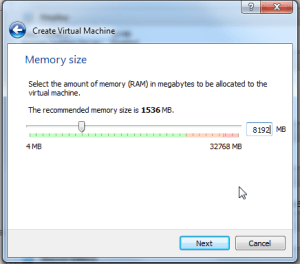
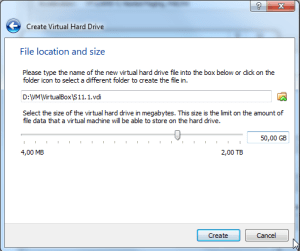
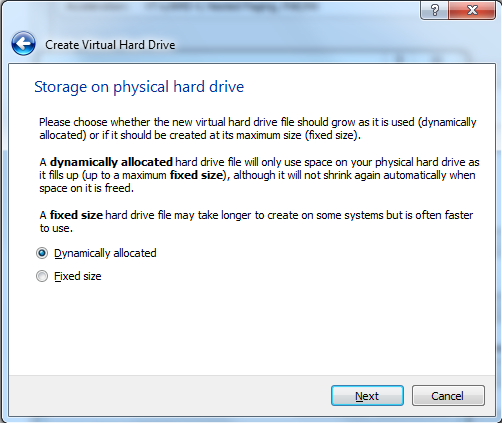
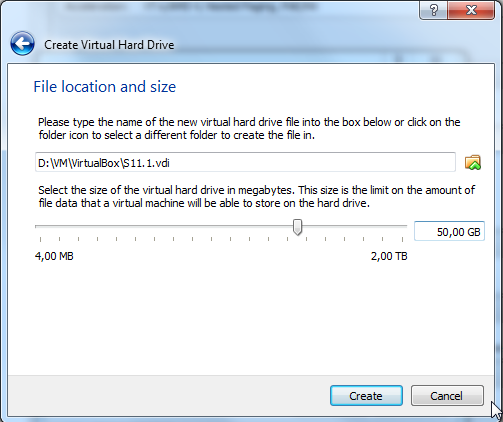
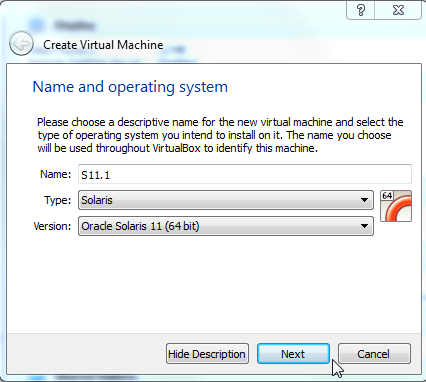
Next, you have to create a new VM. This can be done by following steps below:

S11_01

S11_02

S11_03

S11_04

S11_05

S11_06

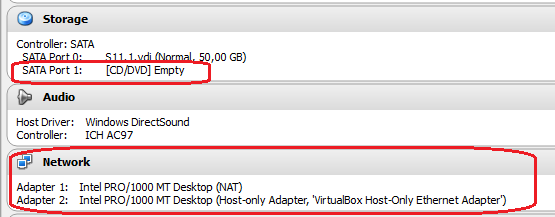
Ok, the VM is created, now let’s configure it by attaching the S11.1 installation media, and adding a network adapter (I will add a another NIC later for my LAN access) :

S11_07

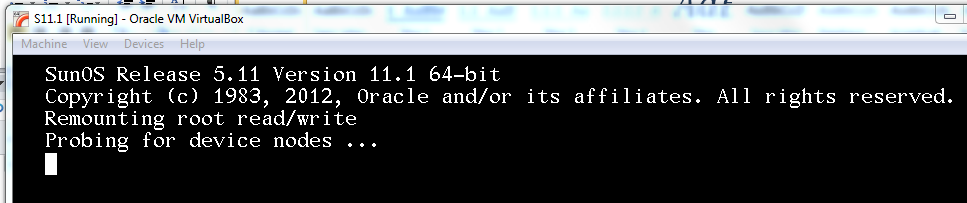
And boot the VM …

After booting the VM, the installation process will prompt you for many information (keyboard, hostname etc.):

S11_08

S11_09

Select your keyboard layout

S11_10

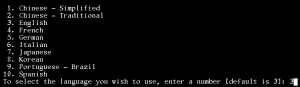
And the language for your installation.

S11_11

Select 1 to install Oracle Solaris

S11_12

During the installation process, you can go to the next step by pressing F2 and go back by pressing F3. Everything you can do is mentioned on the bottom of the screen :

S11_13

S11_14

In the next screen, I will use the local discovery method because my disk is locally attached.

S11_15

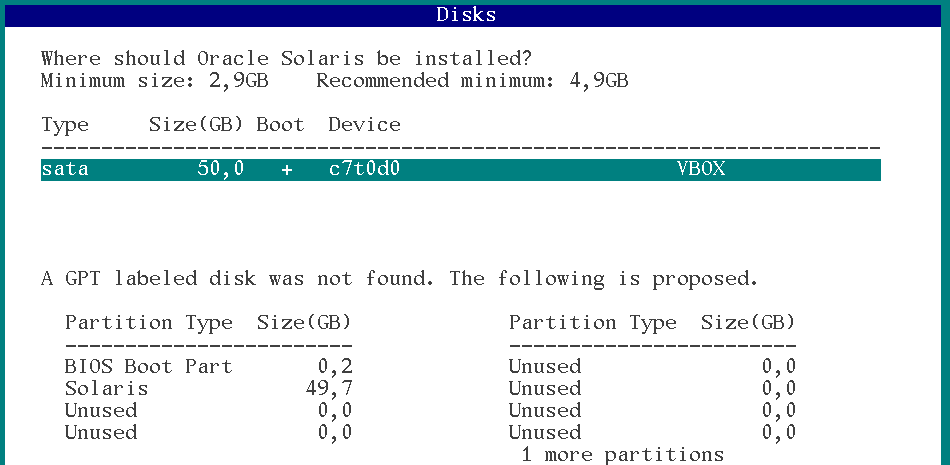
Select the discovered disk where you want to install S11 and then press F2.

S11_16

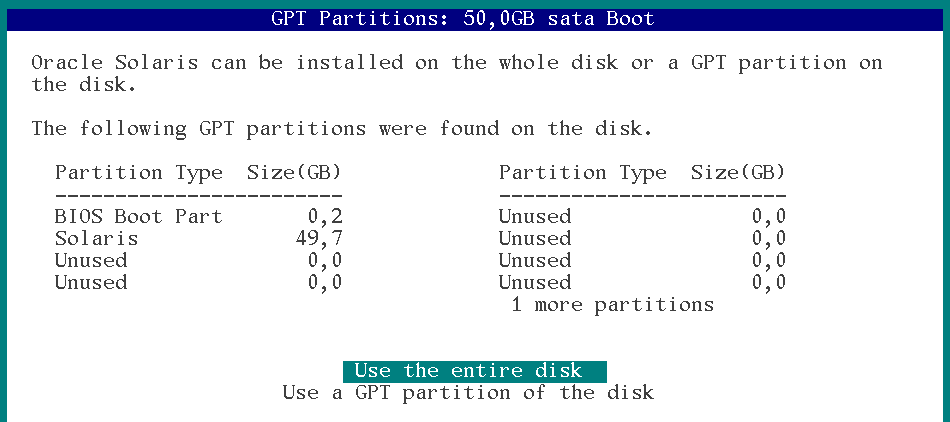
In this screen, I choose to use the entire disk for my installation. You can select another partition by selecting “Use a GPT partition of the disk”.
S11_17

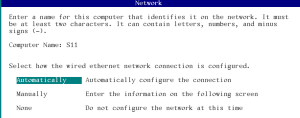
Enter the computer name (short name), and choose how you want to configure your network. I decided to configure my network automatically (DHCP).

S11_18

No alternative naming service.

S11_19

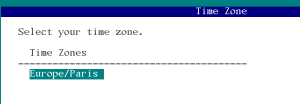
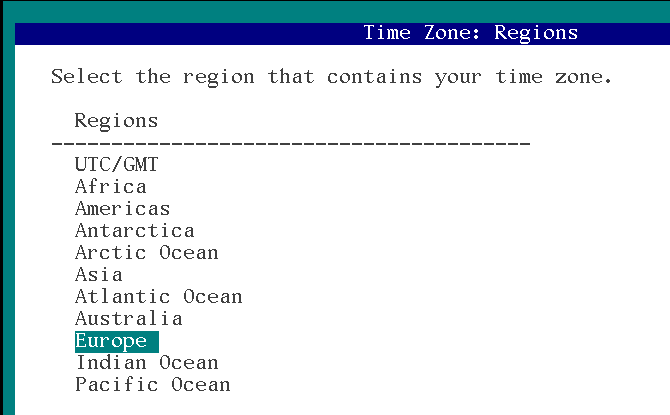
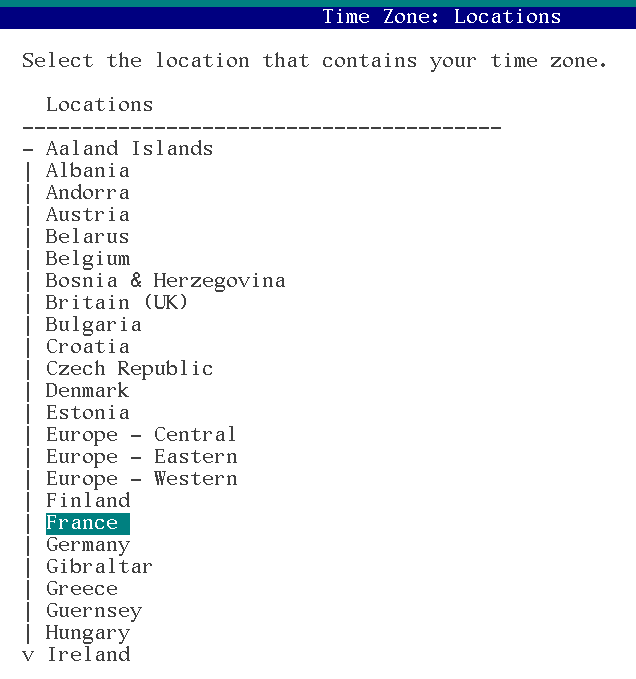
Ok, now it’s time to configure time related information, first of all … Time zone

S11_20

S11_21

Ok timezone set.

S11_22

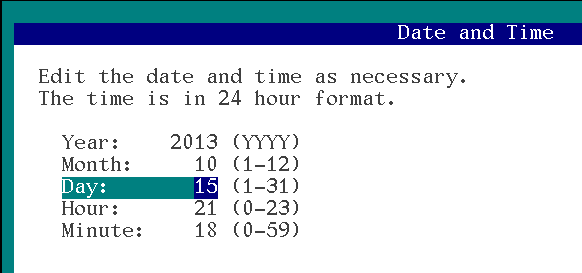
next, set date and time.

S11_23

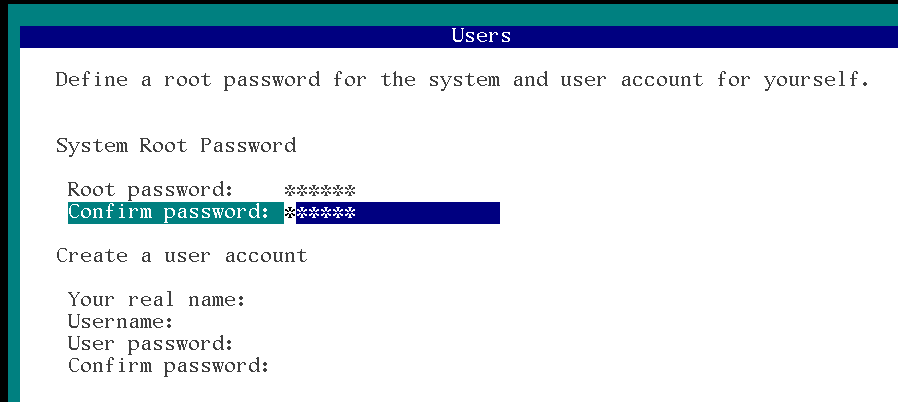
Set the root password and eventually, create a user account.
S11_24

No need to register your system … it’s a VM

S11_25

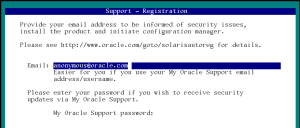
Next screen is to configure the method to access oracle servers for OCM and Automatic SR features. Here it doesn’t make sense.
S11_26

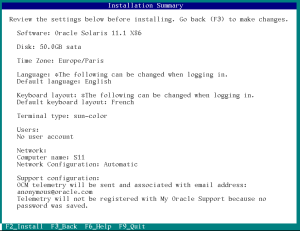
Review your configuration and press F2 to install.
S11_27

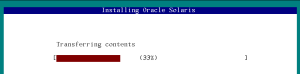
Install in progress …

At the end of the process, you have to reboot your VM by pressing F8. In my case, instead of rebooting the server, I shut it down and took the time to detach the installation medium and to configure another Network adapter plugged into my LAN.

S11_28

Now I can boot my VM … I’m ready to configure it.

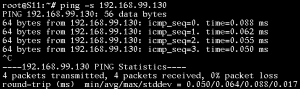
To configure network, I used the same method I described in this blog post : https://laurent-leturgez.com/2012/08/01/build-a-basic-network-configuration-on-solaris-11/

S11_29

Net1/v4 has to be configured S11_30

Link is up,so we can configure this NIC.

S11_31

S11_32

As we configured DHCP client on a NAT Virtualbox NIC, we retrieved DNS information:

S11_33

Now I can access to my VM from a putty client. But root access is disabled by default in sshd config. So you have to modify the sshd config  and restart the daemon

S11_34

Next thing I recommend to configure is the package repository. By default, if you have an internet access configured to your machine (which is my case because of my NATted network adapter), you don’t have to configure anything because your default repository is already configured to access Oracle remote repository.

root@S11:~# pkg publisher
PUBLISHER                   TYPE     STATUS P LOCATION
solaris                     origin   online F http://pkg.oracle.com/solaris/release/

root@S11:~# pkg publisher solaris

            Publisher: solaris
                Alias:
           Origin URI: http://pkg.oracle.com/solaris/release/
              SSL Key: None
             SSL Cert: None
          Client UUID: ddee2130-0292-11e2-b9e5-80144f013e20
      Catalog Updated: November  9, 2011 03:34:27 PM
              Enabled: Yes

If you want to configure other repositories (for example local repo), you can follow instructions at this link : http://docs.oracle.com/cd/E23824_01/html/E21802/publisher-config.html

Maybe you will need to install basic XWindow libraries (for example, if you want to export a display to your local X Server). If your repository is configured, you can execute the commands below:

root@S11:~# pkg install SUNWarc SUNWbtool SUNWhea SUNWlibms SUNWmfrun SUNWxorg-client-programs SUNWxorg-clientlibs SUNWxwfsw pkg://solaris/SUNWxwplt truetype/fonts-core
           Packages to install: 65
       Create boot environment: No
Create backup boot environment: No
            Services to change:  5

DOWNLOAD                                PKGS         FILES    XFER (MB)   SPEED
Completed                              65/65     5045/5045    40.9/40.9  280k/s

PHASE                                          ITEMS
Installing new actions                     6797/6797
Updating package state database                 Done
Updating image state                            Done
Creating fast lookup database                   Done

Then logoff and re-login, you can now export your display and launch X Programs:

$ ssh root@192.168.99.130
Last login: Wed Oct 16 14:14:47 2013 from 192.168.99.1
Oracle Corporation      SunOS 5.11      11.1    September 2012
root@S11:~# echo $DISPLAY
localhost:10.0
root@S11:~# xlogo

To conclude this installation, if you want to configure a complete Desktop Manager, you have to install the slim_install package which deploys 315 packages to your system … so it can take a while.

root@S11:~# pkg install slim_install
           Packages to install: 315
       Create boot environment:  No
Create backup boot environment: Yes
            Services to change:  13

DOWNLOAD                                PKGS         FILES    XFER (MB)   SPEED
Completed                            315/315   50633/50633  524.2/524.2  259k/s

PHASE                                          ITEMS
Installing new actions                   81666/81666
Updating package state database                 Done
Updating image state                            Done
Creating fast lookup database                   Done

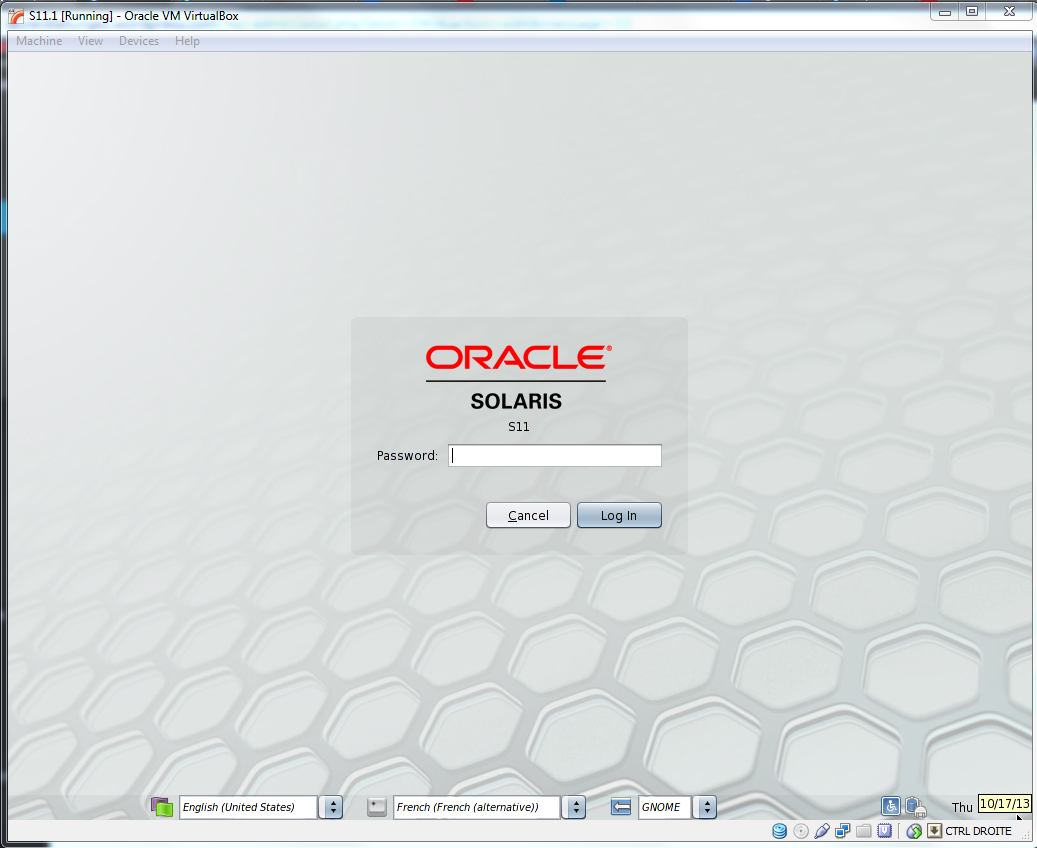
Reboot your machine and you will display a nice Desktop manager environment:
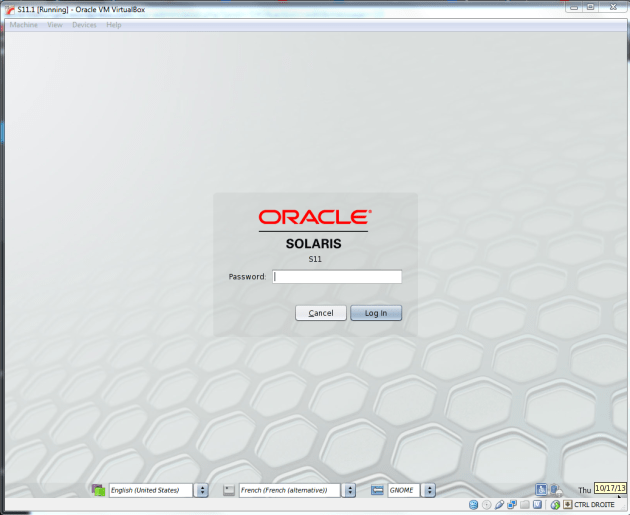
S11_36

This step by step guide is available at this address : http://www.slideshare.net/lolo115/install-solat

Oracle extra cost options licensing on multitenant databases

Oracle database 12c has been announced few weeks ago with its main feature: multitenant database. This feature is build to consolidate many databases (aka. pluggable databases or PDB) into a unique container database (CDB).
Multitenancy is an extra cost option for the Enterprise Edition if you use more than one pdb in your container. But if you want to consolidate, you probably want to consolidate all the options you bought before for many servers.
In Oracle server, each usage of a specific feature you made is recorded in a dictionary table and can be accessed through the view: DBA_FEATURE_USAGE_STATISTICS.
In a Standard Edition database, features of the Enterprise Edition are tracked. If you want to use an extra cost option, you will probably raise an ORA-00439 (Feature not enabled):
SQL> SELECT * FROM PRODUCT_COMPONENT_VERSION;

PRODUCT              VERSION              STATUS
-------------------- -------------------- --------------------
NLSRTL               12.1.0.1.0           Production
Oracle Database 12c  12.1.0.1.0           64bit Production
PL/SQL               12.1.0.1.0           Production
TNS for Linux:       12.1.0.1.0           Production
We are working on a Standard Edition.
SQL> select NAME,DETECTED_USAGES,CURRENTLY_USED,LAST_USAGE_DATE
  2  from dba_feature_usage_statistics
  3  where name in ('Segment Shrink')
  4  /
NAME                                               DETECTED_USAGES CURRE LAST_USAGE_DATE
-------------------------------------------------- --------------- ----- -------------------
Segment Shrink                                                   0 FALSE

SQL> alter table t shrink space;
Table altered.
SQL> exec dbms_feature_usage_internal.sample_one_feature('Segment Shrink');

PL/SQL procedure successfully completed.

SQL> select NAME,DETECTED_USAGES,CURRENTLY_USED,LAST_USAGE_DATE
   2  from dba_feature_usage_statistics
   3  where name in ('Segment Shrink')
   4  /

NAME                                               DETECTED_USAGES CURRE LAST_USAGE_DATE
 -------------------------------------------------- --------------- ----- -------------------
 Segment Shrink                                                   1 TRUE  2013-10-09 20:46:22
SQL> BEGIN
  2   DBMS_PRIVILEGE_CAPTURE.CREATE_CAPTURE(
  3    name          => 'public_privs_capture',
  4    description   => 'Captures privilege use by PUBLIC',
  5    type          => DBMS_PRIVILEGE_CAPTURE.G_ROLE,
  6    roles         => role_name_list('public')
  7  );
  8  end;
  9  /
BEGIN
*
ERROR at line 1:
ORA-00439: feature not enabled: Privilege Analysis
ORA-06512: at "SYS.DBMS_PRIVILEGE_CAPTURE", line 3
ORA-06512: at line 2
Notice that I used dbms_feature_usage_internal.sample_one_feature to force the update of feature usage data (They are normally updated every 7 days).
In an Enterprise Edition database, the behaviour is similar but only extra cost options usages are recorded, features included in the Edition are not (for example, Segment Shrink will stay at 0).
Now let’s see how it’s recorded in a multitenant database. In my case, I have a container database (ORACLE_SID=cdb) which hosts 10 pluggable databases. Those PDBs have been consolidated from many databases hosted on dedicated servers. As we bought database vault option for the database consolidated into PDB10 (for example), we would like to use Privilege analysis function (included in database vault option).
Let’s check how it works in the PDB10:
idle> connect sys/oracle@oel63:1521/pdb10 as sysdba
Connected.

[SYS@PDB10 | SID:CDB]> BEGIN
  2    DBMS_PRIVILEGE_CAPTURE.CREATE_CAPTURE(
  3     name          => 'public_privs_capture',
  4     description   => 'Captures privilege use by PUBLIC',
  5     type          => DBMS_PRIVILEGE_CAPTURE.G_ROLE,
  6     roles         => role_name_list('public')
  7     );
  8  END;
  9  /

PL/SQL procedure successfully completed.

[SYS@PDB10 | SID:CDB]> EXEC DBMS_PRIVILEGE_CAPTURE.ENABLE_CAPTURE ('public_privs_capture');

PL/SQL procedure successfully completed.

[SYS@PDB10 | SID:CDB]> exec dbms_feature_usage_internal.sample_one_feature('Privilege Capture');
BEGIN dbms_feature_usage_internal.sample_one_feature('Privilege Capture'); END;

*
ERROR at line 1:
ORA-20009: Unknown Feature
ORA-06512: at "SYS.DBMS_FEATURE_USAGE_INTERNAL", line 614
ORA-06512: at line 1
Well it seems that we cannot call this package in a PDB. So we will do it the CDB$ROOT and check DBA_FEATURE_USAGE_STATISTICS (in the PDB) and CDB_FEATURE_USAGE_STATISTICS (in the CDB$ROOT).
[SYS@CDB$ROOT | SID:CDB]> select con_id,NAME,DETECTED_USAGES,CURRENTLY_USED,LAST_USAGE_DATE
  2  from cdb_feature_usage_statistics
  3  where name in ('Privilege Capture')
  4  order by 1;

    CON_ID NAME                                               DETECTED_USAGES CURRE LAST_USAGE_DATE
---------- -------------------------------------------------- --------------- ----- -------------------
         1 Privilege Capture                                                1 FALSE 2013-10-09 21:59:40
         2 Privilege Capture                                                0 FALSE
         3 Privilege Capture                                                0 FALSE
         4 Privilege Capture                                                0 FALSE
         5 Privilege Capture                                                0 FALSE
         6 Privilege Capture                                                0 FALSE
         7 Privilege Capture                                                0 FALSE
         8 Privilege Capture                                                0 FALSE
         9 Privilege Capture                                                0 FALSE
        10 Privilege Capture                                                0 FALSE
        11 Privilege Capture                                                0 FALSE
        12 Privilege Capture                                                0 FALSE

12 rows selected.

[SYS@CDB$ROOT | SID:CDB]> connect sys/oracle@oel63:1521/pdb10 as sysdba
Connected.
[SYS@PDB10 | SID:CDB]> select NAME,DETECTED_USAGES,CURRENTLY_USED,LAST_USAGE_DATE
  2  from dba_feature_usage_statistics
  3  where name in ('Privilege Capture')
  4  /

NAME                                               DETECTED_USAGES CURRE LAST_USAG
-------------------------------------------------- --------------- ----- ---------
Privilege Capture                                                0 FALSE
We have the proof that feature usage is recorded in the root container and licensing is logically done at the CDB$ROOT level.
If I bought database vault option in my 11g database for 2 CPUs, and now my multitenant is located on a strong server with 24 CPUs, I have to buy 22CPUs of this option, even if it run on a single. On the other side, you can use the option and all of its features in all your PDBs even you don’t need it 😉
To proove it, I will reproduce the same steps in another PDB (the PDB4 for example), and we will see that usage is recorded in the CDB.
idle> connect sys/oracle@oel63:1521/pdb4 as sysdba
Connected.
[SYS@PDB4 | SID:CDB]> BEGIN
  2    DBMS_PRIVILEGE_CAPTURE.CREATE_CAPTURE(
  3     name          => 'public_privs_capture',
  4     description   => 'Captures privilege use by PUBLIC',
  5     type          => DBMS_PRIVILEGE_CAPTURE.G_ROLE,
  6     roles         => role_name_list('public')
  7     );
  8  END;
  9  /

PL/SQL procedure successfully completed.

[SYS@PDB4 | SID:CDB]> EXEC DBMS_PRIVILEGE_CAPTURE.ENABLE_CAPTURE ('public_privs_capture');

PL/SQL procedure successfully completed.

[SYS@PDB4 | SID:CDB]> connect sys/oracle as sysdba
Connected.
[SYS@CDB$ROOT | SID:CDB]> exec dbms_feature_usage_internal.sample_one_feature('Privilege Capture');

PL/SQL procedure successfully completed.

[SYS@CDB$ROOT | SID:CDB]> alter session set nls_date_format='YYYY-MM-DD HH24:MI:SS';

Session altered.

[SYS@CDB$ROOT | SID:CDB]> set lines 500
[SYS@CDB$ROOT | SID:CDB]> set pages 500
[SYS@CDB$ROOT | SID:CDB]> select con_id,NAME,DETECTED_USAGES,CURRENTLY_USED,LAST_USAGE_DATE
  2  from cdb_feature_usage_statistics
  3  where name in ('Privilege Capture')
  4  order by 1;

    CON_ID NAME                                               DETECTED_USAGES CURRE LAST_USAGE_DATE
---------- -------------------------------------------------- --------------- ----- -------------------
         1 Privilege Capture                                                2 TRUE  2013-10-09 22:11:37
         2 Privilege Capture                                                0 FALSE
         3 Privilege Capture                                                0 FALSE
         4 Privilege Capture                                                0 FALSE
         5 Privilege Capture                                                0 FALSE
         6 Privilege Capture                                                0 FALSE
         7 Privilege Capture                                                0 FALSE
         8 Privilege Capture                                                0 FALSE
         9 Privilege Capture                                                0 FALSE
        10 Privilege Capture                                                0 FALSE
        11 Privilege Capture                                                0 FALSE
        12 Privilege Capture                                                0 FALSE

12 rows selected.
If you plan to implement multitenant database, you have to be clever and think about options you bought and how you will implement them into your consolidated databases.

How Oracle 11.2 clusterware starts, find voting file and ASM SPfile

On a recent discussion on linkedin RACSIG page, Jim Williams explained how ASM SPFILE and Voting files are discovered during OHASD startup phase.

With one of my colleague (Pierre Labrousse), we have built a little video which explain this.

You can see this video here :

Tools to aggregate Oracle CRS logfiles in one file, filter it, sort it, and display it.

If you already faced RAC problems, you had to analyze log files from the entry points which are the alert.log files.

But as Oracle clusterware logs its events in many logfiles (usually one per process), and you have a logfile directory on each server, it can be difficult to detect the causes, and specially the root cause of a specific problem.

Recently I created a little perl script that will help me for this purpose. This script is named “crs_log_aggregator.pl” and is available for download at this URL : https://app.box.com/s/xi3h7bpssrqtkp55q43c.

This script works like this. As input, it takes one or n directories to analyze recursively. Those directories are containing all crs log files of all cluster nodes you want to analyze.

For each directory, it parses each log files (except the alert.log) and each history log files (with file extension: l??). Parsing will get the timestamp mentioned in the read line, if there’s no timestamp (because message is written in many lines for example), the perl script will use the preceding timestamp. (If there were no timestamp for example, in the file header, it will flag the timestamp as ‘N/A’). Every analyzed line in the log file, is completed by its origin represented by the relative file path.

As a result, an analyzed line, is represented in the output file by three parts:

  • the timestamp of the message
  • the origin file of the message
  • the message

As a separator, I used a “<SEP>” tag.

So at this step, each line is recorded in a single unsorted file. If a filter expression has been given to the program as input, which is highly recommended, the filter is applied during the parsing process.

Next, the program will sort the output file by timestamp and will produce a single output file which is now filtered (or not) and this file can be analyzed.

Well, let’s see how it works:

For example, let’s consider a two nodes RAC (hostnames are rac1 and rac2).

As alert.log files are not analyzed, you need to analyze them before to see when the problem occurs.

In my case, I want to analyze 2 days: 2013-05-30 and 2013-05-31.

So first step is to copy is a filesystem, or on your desktop, all the logfiles.

I recommend to put in a single directory all the directories related to a single hostname. Here, I have two directories coming from both cluster nodes ($GRID_HOME/log) :

[oracle@rac1 aggregator]$ tree -d .
.
|-- rac1
|   |-- acfslog
|   |-- acfsrepl
|   |-- acfsreplroot
|   |-- acfssec
|   |-- admin
|   |-- agent
|   |   |-- crsd
|   |   |   |-- oraagent_oracle
|   |   |   |-- orarootagent_root
|   |   |   `-- scriptagent_oracle
|   |   `-- ohasd
|   |       |-- oraagent_oracle
|   |       |-- oracssdagent_root
|   |       |-- oracssdmonitor_root
|   |       `-- orarootagent_root
|   |-- client
|   |-- crflogd
|   |-- crfmond
|   |-- crsd
|   |-- cssd
|   |-- ctssd
|   |-- cvu
|   |   |-- cvulog
|   |   `-- cvutrc
|   |-- diskmon
|   |-- evmd
|   |-- gipcd
|   |-- gnsd
|   |-- gpnpd
|   |-- mdnsd
|   |-- ohasd
|   |-- racg
|   |   |-- racgeut
|   |   |-- racgevtf
|   |   `-- racgmain
|   `-- srvm
`-- rac2
    |-- acfslog
    |-- acfsrepl
    |-- acfsreplroot
    |-- acfssec
    |-- admin
    |-- agent
    |   |-- crsd
    |   |   |-- oraagent_oracle
    |   |   |-- orarootagent_root
    |   |   `-- scriptagent_oracle
    |   `-- ohasd
    |       |-- oraagent_oracle
    |       |-- oracssdagent_root
    |       |-- oracssdmonitor_root
    |       `-- orarootagent_root
    |-- client
    |-- crflogd
    |-- crfmond
    |-- crsd
    |-- cssd
    |-- ctssd
    |-- cvu
    |   |-- cvulog
    |   `-- cvutrc
    |-- diskmon
    |-- evmd
    |-- gipcd
    |-- gnsd
    |-- gpnpd
    |-- mdnsd
    |-- ohasd
    |-- racg
    |   |-- racgeut
    |   |-- racgevtf
    |   `-- racgmain
    `-- srvm

74 directories
[oracle@rac1 aggregator]$ ls -l
total 20
drwxr-xr-x 24 oracle oinstall 4096 Sep 8 14:39 rac1
drwxr-xr-x 24 oracle oinstall 4096 Sep 8 14:00 rac2
If you want some help about this tool, you can use the -h option:
[oracle@rac1 aggregator]$ ./crs_log_aggregator.pl -h

RAC Logs consolidator
---------------------------------------------

Usage

./crs_log_aggregator.pl -c dir1[,dir2,dir3,...,dirN] -o outputfile [-f filter]

[MANDATORY]: -c dir1,dir2,...,dirN
                 comma separated values of source directories to analyze
[MANDATORY]: -o outputfile
                 unique sorted and filtered output file
[OPTIONAL] : -f filter
                 regex filter to apply
[OPTIONAL] : -h
                 print this help

Examples:
$ ./crs_log_aggregator.pl -c data/ -o outfile
         will sort without any filter all log files (*.log, *.l??) recursively found in the data directory. outfile is produced in the current directory as a result.
$ ./crs_log_aggregator.pl -c data/rac1/cssd,data/rac1/crsd -o outfile
         will sort without any filter only the content of data/rac1/cssd,data/rac1/crsd  directories.
$ ./crs_log_aggregator.pl -c data/ -o outfile_filtered -f '2012-10-26|2012-10-27'
         will sort with a filter (regex) that will filter 2 days 2012-10-26 and 2012-10-27.

        more information on perl regex: http://perldoc.perl.org/perlre.html
Next, I will launch the program with the good options:
[oracle@rac1 aggregator]$ ./crs_log_aggregator.pl -c ./rac1,./rac2 -o output_file -f '2013-05-30|2013-05-31'

---------Alert.log : ./rac1/alertrac1.log excluded from analyze

---------Alert.log : ./rac2/alertrac2.log excluded from analyze

[oracle@rac1 aggregator]$ ls -lh output_file
-rw-r--r-- 1 oracle oinstall 243M Sep  8 15:16 output_file
Please note that, if an alert.log file is found, it will be excluded and mentioned in the standard output.
I highly recommend you to use a filter to reduce the amount of data to sort (It can burn lot of CPU and memory). The -f option is use to do this, and takes a regexp style filter (it ‘s used directly in the perl script, so if you are not aware with regexp used in perl script, you can have a look at this URL: http://perldoc.perl.org/perlre.html).
As a result, you have this kind of messages in the output file:
2013-05-31 09:14:59.573<SEP>../rac2/cssd/ocssd.log<SEP> [    CSSD][1111411008]clssgmRPCBroadcast: rpc(0x2a1002a), status(0), sendcount(0), filtered by specific properties:
2013-05-31 09:14:59.573<SEP>../rac2/cssd/ocssd.log<SEP> [    CSSD][1111411008]clssgmFreeRPCIndex: freeing rpc 673
2013-05-31 09:14:59.573<SEP>../rac2/cssd/ocssd.log<SEP> [    CSSD][1111411008]clssgmDeleteGrock: (0x7f3f38637990) grock(EVMDMAIN2) deleted
2013-05-31 09:14:59.576<SEP>../rac1/crfmond/crfmond.log<SEP> [ COMMCRS][1105488192]clsc_connect: (0x7f23b40531f0) no listener at (ADDRESS=(PROTOCOL=ipc)(KEY=rac1DBG_LOGD))
2013-05-31 09:14:59.576<SEP>../rac1/crfmond/crfmond.log<SEP> [ default][1083722048]clsdmc_send error code: -7
2013-05-31 09:14:59.576<SEP>../rac1/crfmond/crfmond.log<SEP> [ default][1083722048]Mond is being shutdown by default
2013-05-31 09:14:59.695<SEP>../rac1/agent/ohasd/orarootagent_root/orarootagent_root.l01<SEP> [ USRTHRD][1102350656] {0:0:2} Thread:[DaemonCheck:crf]Daemon Select Thread exiting
2013-05-31 09:14:59.695<SEP>../rac1/agent/ohasd/orarootagent_root/orarootagent_root.l01<SEP> [ USRTHRD][1102350656] {0:0:2} Thread:[DaemonCheck:crf]Skipping Agent Initiated a check action
2013-05-31 09:14:59.695<SEP>../rac1/agent/ohasd/orarootagent_root/orarootagent_root.l01<SEP> [ USRTHRD][1102350656] {0:0:2} Thread:[DaemonCheck:crf]isRunning is reset to false here
2013-05-31 09:15:00.270<SEP>../rac2/ctssd/octssd.l01<SEP> [    CTSS][1096657216]sclsctss_gvss1: NTP default config file found
2013-05-31 09:15:00.270<SEP>../rac2/ctssd/octssd.l01<SEP> [    CTSS][1096657216]sclsctss_gvss8: Return [0] and NTP status [2].
2013-05-31 09:15:00.270<SEP>../rac2/ctssd/octssd.l01<SEP> [    CTSS][1096657216]ctss_check_vendor_sw: Vendor time sync software is detected. status [2].
2013-05-31 09:15:00.314<SEP>../rac2/ctssd/octssd.l01<SEP> [    CTSS][1109387584]ctsselect_vermon7: Expecting clssgsevGRPPRIV event. Ignoring 2 event.
2013-05-31 09:15:00.314<SEP>../rac2/ctssd/octssd.l01<SEP> [    CTSS][1109387584]ctsselect_vermon7: Expecting clssgsevGRPPRIV event. Ignoring 3 event.
2013-05-31 09:15:00.314<SEP>../rac2/ctssd/octssd.l01<SEP> [    CTSS][1109387584]ctsselect_vermon7: Expecting clssgsevGRPPRIV event. Ignoring 1 event.
2013-05-31 09:15:00.345<SEP>../rac2/gipcd/gipcd.l04<SEP> [ CLSINET][1093364032] Returning NETDATA: 1 interfaces
2013-05-31 09:15:00.345<SEP>../rac2/gipcd/gipcd.l04<SEP> [ CLSINET][1093364032] # 0 Interface 'eth2',ip='10.10.10.12',mac='08-00-27-92-f1-98',mask='255.255.255.0',net='10.10.10.0',use='cluster_interconnect'
2013-05-31 09:15:00.354<SEP>../rac2/agent/ohasd/orarootagent_root/orarootagent_root.l01<SEP> [ora.crf][1089526080] {0:0:613} [stop] (:CLSN00108:) clsn_agent::stop }
2013-05-31 09:15:00.354<SEP>../rac2/agent/ohasd/orarootagent_root/orarootagent_root.l01<SEP> [    AGFW][1089526080] {0:0:613} Command: stop for resource: ora.crf 1 1 completed with status: SUCCESS

Now, you can analyze the output file directly, but I have developed another app (in Java). This app is available at this URL: https://app.box.com/s/xi3h7bpssrqtkp55q43c.
To launch it, you need to use java 1.7.
This app will show in a more beautiful interface the result of the output file. Messages that are coming from the same file are colored with the same color:
[oracle@rac1 aggregator]$ java -jar Aggr_visualisator.jar
 Aggr_visualisator
Update:
  • in v0.2, I implemented a filter function. This filter is active on the “Message” column.
  • I implemented a colorization function for the “Message” column.
    • if the term “error” is found, the cell will be colored in red
    • If the term “warn” is found, the cell will be colored in orange
    • and if the term “fail” is found, the cell wil be colored in yellow
v0.2 is available at this URL : https://app.box.com/s/xi3h7bpssrqtkp55q43c
two snapshots of this version below 😉
  • Messages colorization:
Aggr_visualisator_0.2_1
  • Filtering messages (based on a regexp)
Aggr_visualisator_0.2_2
If you have any suggestion to improve these tools, send me an email or a comment. I will study them.
I hope this will help you 😉