Data … as usual

All things about data by Laurent Leturgez

Category Archives: Oracle

Trace Oracle Internal triggers

When you create a replication between two tables, a snapshot log for your materialized views, etc. Oracle creates and manages internal triggers that execute SQL statements. For example, when you insert a row in a table with a snapshot log, sql statements are executed in the related snapshot log table (MLOG$ table).

But if you trace it with 10046 event, nothing will appear in the trace file.

SQL> create materialized view log on OBJ$CLONE;

Materialized view log created.

SQL> select * from mlog$_OBJ$CLONE;

no rows selected

SQL> @10046_on.sql

Session altered.

SQL> delete from OBJ$CLONE where obj#=3000;

1 row deleted.

SQL> insert into OBJ$CLONE select * from sys.obj$ where obj#=3000;

1 row created.

SQL> commit;

Commit complete.

SQL> @10046_off.sql
The tracefile doesn’t mention  any DML operation on the table MLOG$_OBJ$CLONE (see the tkprof output below):
SQL ID: 46m19q6258mvs Plan Hash: 4136978372

SELECT /* OPT_DYN_SAMP */ /*+ ALL_ROWS IGNORE_WHERE_CLAUSE
  NO_PARALLEL(SAMPLESUB) opt_param('parallel_execution_enabled', 'false')
  NO_PARALLEL_INDEX(SAMPLESUB) NO_SQL_TUNE */ NVL(SUM(C1),0), NVL(SUM(C2),0)
FROM
 (SELECT /*+ NO_PARALLEL("MLOG$_OBJ$CLONE") FULL("MLOG$_OBJ$CLONE")
  NO_PARALLEL_INDEX("MLOG$_OBJ$CLONE") */ 1 AS C1, 1 AS C2 FROM
  "LAURENT"."MLOG$_OBJ$CLONE" "MLOG$_OBJ$CLONE") SAMPLESUB

call     count       cpu    elapsed       disk      query    current        rows
------- ------  -------- ---------- ---------- ---------- ----------  ----------
Parse        2      0.00       0.05          0          0          0           0
Execute      2      0.00       0.00          0          0          0           0
Fetch        2      0.00       0.00          0         14          0           2
------- ------  -------- ---------- ---------- ---------- ----------  ----------
total        6      0.00       0.05          0         14          0           2

Misses in library cache during parse: 1
Optimizer mode: ALL_ROWS
Parsing user id: SYS   (recursive depth: 2)
Number of plan statistics captured: 2

Rows (1st) Rows (avg) Rows (max)  Row Source Operation
---------- ---------- ----------  ---------------------------------------------------
         1          1          1  SORT AGGREGATE (cr=7 pr=0 pw=0 time=204 us)
         4          4          5   TABLE ACCESS FULL MLOG$_OBJ$CLONE (cr=7 pr=0 pw=0 time=105 us cost=2 size=0 card=82)

********************************************************************************

SQL ID: 2ya3sb8sagzxw Plan Hash: 3957508444

delete from OBJ$CLONE
where
 obj#=3000

call     count       cpu    elapsed       disk      query    current        rows
------- ------  -------- ---------- ---------- ---------- ----------  ----------
Parse        1      0.01       0.07          0          8          0           0
Execute      1      0.00       0.00          0          3          8           1
Fetch        0      0.00       0.00          0          0          0           0
------- ------  -------- ---------- ---------- ---------- ----------  ----------
total        2      0.01       0.07          0         11          8           1

Misses in library cache during parse: 1
Optimizer mode: ALL_ROWS
Parsing user id: 90
Number of plan statistics captured: 1

Rows (1st) Rows (avg) Rows (max)  Row Source Operation
---------- ---------- ----------  ---------------------------------------------------
         0          0          0  DELETE  OBJ$CLONE (cr=3 pr=0 pw=0 time=372 us)
         1          1          1   INDEX UNIQUE SCAN PK_OBJ$CLONE (cr=2 pr=0 pw=0 time=34 us cost=1 size=13 card=1)(object id 127619)

Elapsed times include waiting on following events:
  Event waited on                             Times   Max. Wait  Total Waited
  ----------------------------------------   Waited  ----------  ------------
  SQL*Net message to client                       1        0.00          0.00
  SQL*Net message from client                     1        3.68          3.68
********************************************************************************

SQL ID: 4n7u7f6u7kd2y Plan Hash: 1218588913

insert into OBJ$CLONE select * from sys.obj$ where obj#=3000

call     count       cpu    elapsed       disk      query    current        rows
------- ------  -------- ---------- ---------- ---------- ----------  ----------
Parse        1      0.00       0.00          0          8          4           0
Execute      1      0.00       0.00          0          5          8           1
Fetch        0      0.00       0.00          0          0          0           0
------- ------  -------- ---------- ---------- ---------- ----------  ----------
total        2      0.00       0.00          0         13         12           1

Misses in library cache during parse: 1
Optimizer mode: ALL_ROWS
Parsing user id: 90
Number of plan statistics captured: 1

Rows (1st) Rows (avg) Rows (max)  Row Source Operation
---------- ---------- ----------  ---------------------------------------------------
         0          0          0  LOAD TABLE CONVENTIONAL  (cr=5 pr=0 pw=0 time=518 us)
         1          1          1   TABLE ACCESS BY INDEX ROWID OBJ$ (cr=3 pr=0 pw=0 time=75 us cost=3 size=86 card=1)
         1          1          1    INDEX RANGE SCAN I_OBJ1 (cr=2 pr=0 pw=0 time=46 us cost=2 size=0 card=1)(object id 36)

Elapsed times include waiting on following events:
  Event waited on                             Times   Max. Wait  Total Waited
  ----------------------------------------   Waited  ----------  ------------
  SQL*Net message to client                       1        0.00          0.00
  SQL*Net message from client                     1        2.44          2.44
********************************************************************************

SQL ID: 23wm3kz7rps5y Plan Hash: 0

commit

call     count       cpu    elapsed       disk      query    current        rows
------- ------  -------- ---------- ---------- ---------- ----------  ----------
Parse        1      0.00       0.00          0          0          0           0
Execute      1      0.00       0.00          0          0          1           0
Fetch        0      0.00       0.00          0          0          0           0
------- ------  -------- ---------- ---------- ---------- ----------  ----------
total        2      0.00       0.00          0          0          1           0

Misses in library cache during parse: 0
Parsing user id: 90

Elapsed times include waiting on following events:
  Event waited on                             Times   Max. Wait  Total Waited
  ----------------------------------------   Waited  ----------  ------------
  SQL*Net message to client                       1        0.00          0.00
  SQL*Net message from client                     1        4.10          4.10
********************************************************************************
but there are some datas in this table:
SQL> select * from mlog$_OBJ$CLONE;

      OBJ# SNAPTIME$ D O CHANGE_VECTOR$$                     XID$$
---------- --------- - - ------------------------------ ----------
      3000 01-JAN-00 D O 000000                         5.6296E+15
      3000 01-JAN-00 I N FEFFFF                         5.6296E+15
And internal triggers is created to do this:
SQL> select * from user_internal_triggers;

TABLE_NAME                     INTERNAL_TRIGGER_TY
------------------------------ -------------------
OBJ$CLONE                      MVIEW LOG
By searching in USER_INTERNAL_TRIGGERS  code, we can see that this view references internal triggers on ‘DEFERRED RPC QUEUE’, ‘MVIEW LOG’, ‘UPDATABLE MVIEW LOG’ and ‘CONTEXT’. (based on the TAB$ table’s TRIGFLAG column).
select dbms_metadata.get_ddl('VIEW','USER_INTERNAL_TRIGGERS','SYS') ddl from dual

DDL
------------------------------------------------------------------------------------------------------------------------

  CREATE OR REPLACE FORCE VIEW "SYS"."USER_INTERNAL_TRIGGERS" ("TABLE_NAME", "INTERNAL_TRIGGER_TYPE") AS
  select o.name, 'DEFERRED RPC QUEUE'
from sys.tab$ t, sys.obj$ o
where o.owner# = userenv('SCHEMAID')
      and t.obj# = o.obj#
      and bitand(t.trigflag,1) = 1
union
select o.name, 'MVIEW LOG'
from sys.tab$ t, sys.obj$ o
where o.owner# = userenv('SCHEMAID')
      and t.obj# = o.obj#
      and bitand(t.trigflag,2) = 2
union
select o.name, 'UPDATABLE MVIEW LOG'
from sys.tab$ t, sys.obj$ o
where o.owner# = userenv('SCHEMAID')
       and t.obj# = o.obj#
       and bitand(t.trigflag,4) = 4
union
select o.name, 'CONTEXT'
from sys.tab$ t, sys.obj$ o
where o.owner# = userenv('SCHEMAID')
      and t.obj# = o.obj#
      and bitand(t.trigflag,8) = 8
If you want to trace what is really done by the internal trigger, you have a bunch of undocumented events that will trace specific triggers (Note there are events for repcat or synchronous replication for which there is no trigflag definition in USER_INTERNAL_TRIGGERS view code):
10302, 00000, "trace create or drop internal trigger"
// *Document: NO
// *Cause:
// *Action:

10303, 00000, "trace loading of library cache for internal triggers"
// *Document: NO
// *Cause:
// *Action:

10304, 00000, "trace replication trigger"
// *Document: NO
// *Cause:
// *Action:

10305, 00000, "trace updatable materialized view trigger"
// *Document: NO
// *Cause:
// *Action:

10306, 00000, "trace materialized view log trigger"
// *Document: NO
// *Cause:
// *Action:

10307, 00000, "trace RepCat execution"
// *Document: NO
// *Cause:
// *Action:

10308, 00000, "replication testing event"
// *Document: NO
// *Cause:
// *Action:

10309, 00000, "Trigger Debug event"
// *Document: NO
// *Cause:
// *Action:
// *Comment: This event replaces the earlier event number 10250
//           which had multiple definitions

10310, 00000, "trace synchronous change table trigger"
// *Document: NO
// *Cause:
// *Action:
I have chosen the 10306 event to trace internal triggers on Materialized view log (but you can use others depending on what you want to trace):
SQL> create materialized view log on OBJ$CLONE;

Materialized view log created.

SQL> select * from user_internal_triggers;

TABLE_NAME                     INTERNAL_TRIGGER_TY
------------------------------ -------------------
OBJ$CLONE                      MVIEW LOG

SQL> alter session set events '10306 trace name context forever, level 10';

Session altered.

SQL> delete from OBJ$CLONE where obj#=3000;

1 row deleted.

SQL> insert into OBJ$CLONE select * from sys.obj$ where obj#=3000;

1 row created.

SQL> commit;

Commit complete.
The related trace file shows SQL statements now executed on MLOG$_OBJ$CLONE table:
kntgslm()+
  ccl_kntsl = 1
  kntzcid =
        1
  lcc_kntsl = 0
  kntzlcs =
  kntzlcm =
  cpk_kntsl = 1
  pkc_kntsl =
        1
  flg_kntsl = 270434
  len_kntsl = 220
  sql_kntsl = INSERT /*+ IDX(%d) */ INTO "LAURENT"."MLOG$_OBJ$CLONE" (dmltype$$,old_new$$,snaptime$$,change_vector$$,xid$$,"OBJ#") VALUES (:d,:o,to_date('4000-01-01:00:00:00','YYYY-MM-DD:HH24:MI:SS'),:c,:x%s,:1)
  len2_kntsl = 0
  sql2_kntsl =
kntgslm()-
kntkca()
  ccl_kntsl = 1
  kntzcid =
        1
  lcc_kntsl = 0
  kntzlcs =
  kntzlcm =
  cpk_kntsl = 1
  pkc_kntsl =
        1
  flg_kntsl = 270434
  len_kntsl = 220
  sql_kntsl = INSERT /*+ IDX(%d) */ INTO "LAURENT"."MLOG$_OBJ$CLONE" (dmltype$$,old_new$$,snaptime$$,change_vector$$,xid$$,"OBJ#") VALUES (:d,:o,to_date('4000-01-01:00:00:00','YYYY-MM-DD:HH24:MI:SS'),:c,:x%s,:1)
  len2_kntsl = 0
  sql2_kntsl =
kntxslt()
  ccl_kntsl = 1
  kntzcid =
        1
  lcc_kntsl = 0
  kntzlcs =
  kntzlcm =
  cpk_kntsl = 1
  pkc_kntsl =
        1
  flg_kntsl = 270434
  len_kntsl = 220
  sql_kntsl = INSERT /*+ IDX(%d) */ INTO "LAURENT"."MLOG$_OBJ$CLONE" (dmltype$$,old_new$$,snaptime$$,change_vector$$,xid$$,"OBJ#") VALUES (:d,:o,to_date('4000-01-01:00:00:00','YYYY-MM-DD:HH24:MI:SS'),:c,:x%s,:1)
  len2_kntsl = 0
  sql2_kntsl =

*** 2013-01-16 11:53:21.065
kntkca()
  ccl_kntsl = 1
  kntzcid =
        1
  lcc_kntsl = 0
  kntzlcs =
  kntzlcm =
  cpk_kntsl = 1
  pkc_kntsl =
        1
  flg_kntsl = 270434
  len_kntsl = 220
  sql_kntsl = INSERT /*+ IDX(%d) */ INTO "LAURENT"."MLOG$_OBJ$CLONE" (dmltype$$,old_new$$,snaptime$$,change_vector$$,xid$$,"OBJ#") VALUES (:d,:o,to_date('4000-01-01:00:00:00','YYYY-MM-DD:HH24:MI:SS'),:c,:x%s,:1)
  len2_kntsl = 0
  sql2_kntsl =
kntxslt()
  ccl_kntsl = 1
  kntzcid =
        1
  lcc_kntsl = 0
  kntzlcs =
  kntzlcm =
  cpk_kntsl = 1
  pkc_kntsl =
        1
  flg_kntsl = 270434
  len_kntsl = 220
  sql_kntsl = INSERT /*+ IDX(%d) */ INTO "LAURENT"."MLOG$_OBJ$CLONE" (dmltype$$,old_new$$,snaptime$$,change_vector$$,xid$$,"OBJ#") VALUES (:d,:o,to_date('4000-01-01:00:00:00','YYYY-MM-DD:HH24:MI:SS'),:c,:x%s,:1)
  len2_kntsl = 0
  sql2_kntsl =
You can notice we have 5 instructions in sql_kntsl for 2 rows modified. Each statement seems to be controlled by 2 internal functions:  kntkca() and kntxslt(). There is one more function used to start this sequence kntgslm().
If I trace only one DML instruction in my OBJ$CLONE table, the result is one call to kntgslm() followed by a call to kntkca() and kntxslt().
So the sequence might start with a call to kntgslm followed by a call to  kntkca() and kntxslt() per row in the source table.
Finally, there’s a last problem: the sql text mentioned in sql_kntsl. It seems to be incomplete because of %d or %s in text but with those events, we can find in the sql statements executed we didn’t fin in the sql trace of the original statement.

EM 12c agent diagnostic with emctl

On an Oracle Enterprise Manager 12c platform, agents represent a main part of the architecture. Sometimes, you need information about its status to diagnose a problem.

In this blog post, I will present commands based on emctl executable and tips you can use to get health and performance indicators.

  • The first and well known command is “emctl status agent”. This command shows a summary of the agent status

In this summary, you can see the agent availability status, uploads and XML related files status, OMS address etc.

[oracle@oel agent_inst]$ emctl status agent
Oracle Enterprise Manager Cloud Control 12c Release 2
Copyright (c) 1996, 2012 Oracle Corporation. All rights reserved.
---------------------------------------------------------------
Agent Version : 12.1.0.2.0
OMS Version : 12.1.0.2.0
Protocol Version : 12.1.0.1.0
Agent Home : /u01/app/oracle/product/agent12c/agent_inst
Agent Binaries : /u01/app/oracle/product/agent12c/core/12.1.0.2.0
Agent Process ID : 24845
Parent Process ID : 24799
Agent URL : https://oel.localdomain:3872/emd/main/
Repository URL : https://cloudcontrol12c.localdomain:4900/empbs/upload
Started at : 2012-12-16 13:23:55
Started by user : oracle
Last Reload : 2012-12-16 14:16:11
Last successful upload : 2012-12-16 14:33:04
Last attempted upload : 2012-12-16 14:33:04
Total Megabytes of XML files uploaded so far : 0.62
Number of XML files pending upload : 0
Size of XML files pending upload(MB) : 0
Available disk space on upload filesystem : 20.09%
Collection Status : Collections enabled
Heartbeat Status : Ok
Last attempted heartbeat to OMS : 2012-12-16 14:36:04
Last successful heartbeat to OMS : 2012-12-16 14:36:04
Next scheduled heartbeat to OMS : 2012-12-16 14:37:04

---------------------------------------------------------------
Agent is Running and Ready
  • emctl status agent target TGT_NAME,TGT_TYPE

This command is useful to see status of a specific target (target type is based on EM12c internal name), and metric collected for this specific target.

[oracle@oel agent_inst]$ emctl status agent target orcl,oracle_database
Oracle Enterprise Manager Cloud Control 12c Release 2
Copyright (c) 1996, 2012 Oracle Corporation. All rights reserved.
---------------------------------------------------------------
Target Name : orcl
Target Type : oracle_database
Current severity state
----------------------
Metric Column name Key State Timestamp
--------------------------------------------------------------------------------
DeferredTrans deftrans_count n/a CLEAR Sun Dec 16 13:46:44 CET 2012
DeferredTrans errortrans_count n/a CLEAR Sun Dec 16 13:46:44 CET 2012
Response State n/a CLEAR Sun Dec 16 13:46:26 CET 2012
Response Status n/a CLEAR Sun Dec 16 13:46:26 CET 2012
Temporary_File_Status STATUS 1 CLEAR Sun Dec 16 14:00:44 CET 2012
UserAudit username SYS_oel WARNING Sun Dec 16 14:32:46 CET 2012
UserLocks maxBlockedDBTime TM CLEAR Sun Dec 16 13:52:08 CET 2012
UserLocks maxBlockedDBTime TX CLEAR Sun Dec 16 13:52:08 CET 2012
UserLocks maxBlockedDBTime UL CLEAR Sun Dec 16 13:52:08 CET 2012
UserLocks maxBlockedSess TM CLEAR Sun Dec 16 13:52:08 CET 2012
UserLocks maxBlockedSess TX CLEAR Sun Dec 16 13:52:08 CET 2012
UserLocks maxBlockedSess UL CLEAR Sun Dec 16 13:52:08 CET 2012
archFull archUsedPercent NOARCHIVELOG CLEAR Sun Dec 16 13:58:01 CET 2012
audit_failed_logins failed_login_count 2012-12-16 12:58:30 GMT CLEAR Sun Dec 16 13:58:30 CET 2012
audit_failed_logins failed_login_count 2012-12-16 13:28:30 GMT CLEAR Sun Dec 16 14:28:30 CET 2012
dbjob_status broken n/a CLEAR Sun Dec 16 14:03:01 CET 2012
dbjob_status failed n/a CLEAR Sun Dec 16 14:03:01 CET 2012
dumpFull dumpAvail background CLEAR Sun Dec 16 13:52:51 CET 2012
dumpFull dumpAvail core CLEAR Sun Dec 16 13:52:51 CET 2012
dumpFull dumpAvail user CLEAR Sun Dec 16 13:52:51 CET 2012
dumpFull dumpUsedPercent background CLEAR Sun Dec 16 13:52:51 CET 2012
dumpFull dumpUsedPercent core CLEAR Sun Dec 16 13:52:51 CET 2012
dumpFull dumpUsedPercent user CLEAR Sun Dec 16 13:52:51 CET 2012
wait_sess_cls dbtime_waitclass_pct Concurrency WARNING Sun Dec 16 14:21:05 CET 2012
wait_sess_cls dbtime_waitclass_pct Other CLEAR Sun Dec 16 14:02:04 CET 2012

---------------------------------------------------------------
Agent is Running and Ready
  • emctl status agent scheduler

This command shows all past and future schedule for the agent. Schedules can be general (e.g. Ping OMS or SchedulerHeartBeat) or target specific (metric collection : oracle_database:orcl:tbspAllocation)

[oracle@oel agent_inst]$ emctl status agent scheduler
Oracle Enterprise Manager Cloud Control 12c Release 2
Copyright (c) 1996, 2012 Oracle Corporation. All rights reserved.
---------------------------------------------------------------
Number of currently running scheduled items :: 0
Number of currently ready scheduled items :: 0
Number of scheduled items :: 134
Schedule Attempts Delay Percentage :: 0.000%
Running entries::
Ready entries::
Scheduled entries::
2012-12-16 14:32:26.901 : oracle_database:orcl:observer_11g
2012-12-16 14:32:27.297 : oracle_database:orcl:Response
2012-12-16 14:32:27.570 : oracle_emd:oel.localdomain:3872:z#TaskRuntimeMap
2012-12-16 14:32:28.542 : SchedulerHeartbeat
2012-12-16 14:32:32.981 : oracle_emd:oel.localdomain:3872:EMDStatusCollection
2012-12-16 14:32:39.979 : oracle_listener:LISTENER_oel.localdomain:Load
2012-12-16 14:32:45.888 : oracle_emd:oel.localdomain:3872:z#AgentStat_AgentHeapUsage
2012-12-16 14:32:46.485 : oracle_database:orcl:service_10i
2012-12-16 14:32:46.547 : oracle_database:orcl:UserAudit
2012-12-16 14:32:47.066 : HTTP Listener
2012-12-16 14:32:52.613 : oracle_emd:oel.localdomain:3872:z#UploadSystemStats
2012-12-16 14:32:59.369 : AgentSystemMonitorTask
2012-12-16 14:33:00.312 : oracle_database:orcl:rac_global_cache_10i
2012-12-16 14:33:01.830 : oracle_database:orcl:dbjob_status
2012-12-16 14:33:03.276 : oracle_emd:oel.localdomain:3872:z#ThreadPoolStatistics
2012-12-16 14:33:03.868 : Ping OMS
2012-12-16 14:33:04.300 : oracle_emd:oel.localdomain:3872:EMDUploadSystemMonitor

.../...

2012-12-16 14:47:03.241 : host:oel.localdomain:NetworkLinux
2012-12-16 14:47:19.120 : osm_instance:+ASM_oel.localdomain:Instance_Volumes_Summary
2012-12-16 14:47:21.555 : host:oel.localdomain:DiskActivityLinux
2012-12-16 14:53:59.251 : CollectionManager.PersistSchedule
2012-12-16 14:58:30.259 : oracle_database:orcl:audit_failed_logins
2012-12-16 15:06:24.048 : oracle_database:orcl:DatabaseVaultRealmConfigurationIssue_collection
2012-12-16 15:10:11.728 : oracle_database:orcl:segment_advisor_count
2012-12-16 15:11:06.604 : oracle_database:orcl:DatabaseVaultCommandRuleViolation_collection
2012-12-16 15:11:50.888 : oracle_database:orcl:DatabaseVaultCommandRuleConfigurationIssue_collection
2012-12-16 15:13:14.610 : oracle_database:orcl:DatabaseVaultRealmViolation_collection
2012-12-16 15:16:51.178 : oracle_listener:LISTENER_1526_oel.localdomain:TNSERRORS
2012-12-16 15:18:17.660 : oracle_database:orcl:DatabaseVaultPolicyChanges_collection
2012-12-16 15:20:28.584 : osm_instance:+ASM_oel.localdomain:ofs_performance_metrics
2012-12-16 15:23:16.786 : oracle_listener:LISTENER_oel.localdomain:TNSERRORS
2012-12-16 15:31:11.126 : MetricReporter.Task
2012-12-16 18:00:46.334 : oracle_database:orcl:haconfig1_collection
2012-12-16 18:02:10.092 : oracle_database:orcl:audit_failed_logins_historical
2012-12-16 21:47:39.678 : oracle_database:orcl:feature_usage_collection_item
2012-12-16 21:50:39.668 : osm_instance:+ASM_oel.localdomain:Disk_Path
2012-12-16 21:51:21.248 : oracle_database:orcl:exadataCollection
2012-12-16 21:53:43.531 : host:oel.localdomain:Swap_Area_StatusLinux
2012-12-16 22:00:41.994 : host:oel.localdomain:HostStorageSupport
2012-12-16 22:01:04.098 : oracle_database:orcl:invalid_objects_rollup
2012-12-16 22:15:12.757 : oracle_database:orcl:ocm_instrumentation
2012-12-16 22:15:27.932 : oracle_database:orcl:problemSegTbsp
2012-12-17 13:23:59.377 : PurgeADR
2012-12-17 13:43:26.423 : host:oel.localdomain:host_storage
2012-12-17 13:48:53.710 : oracle_database:orcl:ha_dg_target_summary
2012-12-17 13:49:58.180 : oracle_listener:LISTENER_1526_oel.localdomain:has_resources
2012-12-17 13:51:04.127 : oracle_database:orcl:oracle_storage
2012-12-17 13:51:44.509 : host:oel.localdomain:oracle_security
2012-12-17 13:52:09.276 : oracle_database:orcl:oracle_dbconfig
2012-12-17 13:52:28.613 : oracle_emd:oel.localdomain:3872:oracle_emd_config
2012-12-17 13:53:48.140 : oracle_home:agent12c1_5_oel:oracle_home_config
2012-12-17 13:56:38.819 : oracle_database:orcl:mgmt_database_listener_config
2012-12-17 13:59:21.165 : oracle_listener:LISTENER_oel.localdomain:has_resources
2012-12-17 13:59:53.042 : host:oel.localdomain:ll_host_config
2012-12-17 14:01:43.076 : osm_instance:+ASM_oel.localdomain:osm_osmconfig
2012-12-17 14:02:28.165 : oracle_home:Ora11g_gridinfrahome2_3_oel:oracle_home_config
2012-12-17 14:03:13.080 : host:oel.localdomain:DiscoverTargets
2012-12-17 14:03:14.031 : oracle_listener:LISTENER_oel.localdomain:mgmt_listener_config
2012-12-17 14:08:21.054 : oracle_database:orcl:has_resources
2012-12-17 14:10:19.581 : osm_instance:+ASM_oel.localdomain:osm_osminstconfig
2012-12-17 14:11:45.115 : oracle_listener:LISTENER_1526_oel.localdomain:mgmt_listener_config
2012-12-17 14:12:37.800 : osm_instance:+ASM_oel.localdomain:has_resources
2012-12-17 14:12:46.933 : oracle_database:orcl:mgmt_sql
2012-12-17 14:16:38.959 : oracle_home:OraDb11g_home2_4_oel:oracle_home_config
2012-12-18 21:42:55.497 : oracle_emd:oel.localdomain:3872:EMDCertExp
2012-12-18 21:48:46.106 : oracle_emd:oel.localdomain:3872:EMDUserLimits
2012-12-18 22:03:43.800 : oracle_emd:oel.localdomain:3872:EMDIdentity
2012-12-18 22:13:08.810 : oracle_database:orcl:tbspAllocation
2012-12-23 13:47:26.765 : osm_instance:+ASM_oel.localdomain:oracle_osm

---------------------------------------------------------------
Agent is Running and Ready
  • emctl startschedule agent TGT_NAME,TGT_TYPE

This command is used to schedule a collection on a specified target.

[oracle@oel agent_inst]$ emctl startschedule agent orcl,oracle_database
Oracle Enterprise Manager Cloud Control 12c Release 2
Copyright (c) 1996, 2012 Oracle Corporation. All rights reserved.
Start Schedule Target succeeded
  • emctl startschedule agent -type TGT_TYPE

This command is the same than previous one, but it schedules collection for all target of type mentioned by TGT_TYPE (e.g. oracle_database or oracle_emd)

[oracle@oel agent_inst]$ emctl startschedule agent -type oracle_database
Oracle Enterprise Manager Cloud Control 12c Release 2
Copyright (c) 1996, 2012 Oracle Corporation. All rights reserved.
Start Schedule TargetType succeeded
  • emctl getmetric agent TGT_NAME,TGT_TYPE,METRIC

This command gets real time metric for a specific target.

[oracle@oel agent_inst]$ emctl getmetric agent oel.localdomain:3872,oracle_emd,EMDStatus
Oracle Enterprise Manager Cloud Control 12c Release 2
Copyright (c) 1996, 2012 Oracle Corporation. All rights reserved.
Timestamp,Transfer time from Agent to OMS (msec),% of Collection Interval spent in Execution,CPU_Used,Java_Used_Pct,Collections scheduled for next hour,Ping response (mSec),UploadQueueSize
2012-12-16 14:22:32,164.328,0.047,0.122,37.2,1276,58.390,21603
2012-12-16 14:23:32,163.176,0.041,0.203,37.3,1275,58.817,27822
2012-12-16 14:24:32,158.634,0.041,0.126,30.9,1275,58.213,-5633
2012-12-16 14:25:32,158.634,0.042,0.084,34.6,1275,58.371,-4844
2012-12-16 14:26:32,158.634,0.042,0.083,38.1,1275,58.524,-4596
2012-12-16 14:27:32,158.634,0.042,0.072,40.4,1275,58.016,-4286
2012-12-16 14:28:32,158.634,0.042,0.113,44.3,1275,58.477,-2151
2012-12-16 14:29:32,158.634,0.042,0.107,32.2,1275,58.667,-128
2012-12-16 14:30:32,157.769,0.042,0.122,39.7,1275,58.806,4493
2012-12-16 14:31:32,157.769,0.038,0.405,42.0,1275,59.221,5611
  • emctl status agent cpu

To be able to run this command, you have to set “topMetricReporter=true” in emd.properties file (located in $AGENT_HOME/sysman/config)

[oracle@oel agent_inst]$ emctl status agent cpu -depth 5
Oracle Enterprise Manager Cloud Control 12c Release 2
Copyright (c) 1996, 2012 Oracle Corporation. All rights reserved.
---------------------------------------------------------------
Report generated at: /u01/app/oracle/product/agent12c/agent_inst/sysman/emd/topMetric/1355665421178_metricSummaryReport.html
---------------------------------------------------------------
Agent is Running and Ready

[oracle@oel agent_inst]$ emctl status agent cpu -full_cpu_report
Oracle Enterprise Manager Cloud Control 12c Release 2
Copyright (c) 1996, 2012 Oracle Corporation. All rights reserved.
---------------------------------------------------------------
Report generated at: /u01/app/oracle/product/agent12c/agent_inst/sysman/emd/topMetric/1355665536091_metricSummaryReport.html
---------------------------------------------------------------
Agent is Running and Ready

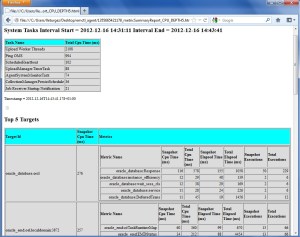
This command will give you cpu statistics for every task and top metrics. It can be used to print full details (-full_cpu_report) or a top-n values (-depth N). The command generates an html based report :

status_cpu_depth5jpg

  • emctl status agent dbconnections
[oracle@oel agent_inst]$ emctl status agent dbconnections
Oracle Enterprise Manager Cloud Control 12c Release 2
Copyright (c) 1996, 2012 Oracle Corporation. All rights reserved.
---------------------------------------------------------------
DBConnection Cache contents as of: Sun Dec 16 14:46:52 CET 2012
------------------------------------------------------------
Connection Cache Name = (DESCRIPTION=(ADDRESS=(PROTOCOL=TCP)(HOST=oel.localdomain)(Port=1521))(CONNECT_DATA=(SERVICE_NAME=+ASM)(INSTANCE_NAME=+ASM)(UR=A)))
 :276b5b206e103eb650eec1cec74a7d1
MinCacheLimit = 0
MaxPoolSize = 10
InitialLimit = 0
ConnectionWaitTimeout = 300
ValidationConnection = true
InactivityTimeout = 300
AbandonedTimeout = 0
TimeToLiveTimeout = 300
PropertyCheckInterval = 300
Number of active connections = 0
Number of available connections = 1
Number of abandoned connections = 0
Average connection waittime (mSecs) = 1
Peak connection waittime (mSecs) = 3
Average useage time (mSecs) = 998
Pending requests = 0
Total connections returned = 18
Connection Last Established at 2012-12-16 14:45:22
Connection Last Relinqueshed at 2012-12-16 14:45:22
------------------------------------
  • emctl pingOMS

This command shows every connection details established by the agent to targets (ASM or database).

[oracle@oel agent_inst]$ emctl pingOMS
 Oracle Enterprise Manager Cloud Control 12c Release 2
 Copyright (c) 1996, 2012 Oracle Corporation. All rights reserved.
 ---------------------------------------------------------------
 EMD pingOMS completed successfully

This commands tries to ping the OMS and checks the connectivity to the Oracle Management Server.

  • emctl listplugins agent

This command shows plugins deployed on the agent: name, version and installation directory.

[oracle@oel agent_inst]$ emctl listplugins agent
Oracle Enterprise Manager Cloud Control 12c Release 2
Copyright (c) 1996, 2012 Oracle Corporation. All rights reserved.
---------------------------------------------------------------
oracle.sysman.oh 12.1.0.2.0 /u01/app/oracle/product/agent12c/plugins/oracle.sysman.oh.agent.plugin_12.1.0.2.0
oracle.sysman.db 12.1.0.2.0 /u01/app/oracle/product/agent12c/core/12.1.0.2.0/../../plugins/oracle.sysman.db.agent.plugin_12.1.0.2.0
  • emctl dumpstate agent
[oracle@oel agent_inst]$ emctl dumpstate agent
Oracle Enterprise Manager Cloud Control 12c Release 2
Copyright (c) 1996, 2012 Oracle Corporation. All rights reserved.
Dumpstate succeeded
[oracle@oel agent_inst]$ ls -ltr /u01/app/oracle/product/agent12c/agent_inst/sysman/emd/dumps/
total 8696
-rw-r----- 1 oracle oinstall 4440752 Dec 16 13:51 SystemDump_1355662309788.xml
-rw-r----- 1 oracle oinstall 4433309 Dec 16 14:32 SystemDump_1355664774563.xml

This command dumps agent state. The dump is a complex XML file generated in $AGENT_HOME/sysman/emd/dumps

  • EM Agent browser

All information mentioned above can be obtained by using the EM Agent Browser. These information are available with a web browser through a specific URL. This URL is build on the agent URL (see emctl status agent) by adding the “browser” keyword between emd and main :

Agent URL         : https://oel.localdomain:3872/emd/main

Agent Browser URL :  https://oel.localdomain:3872/emd/browser/main

Access to this browser is authenticated by agent unix hostname owner (e.g. oracle in my case).

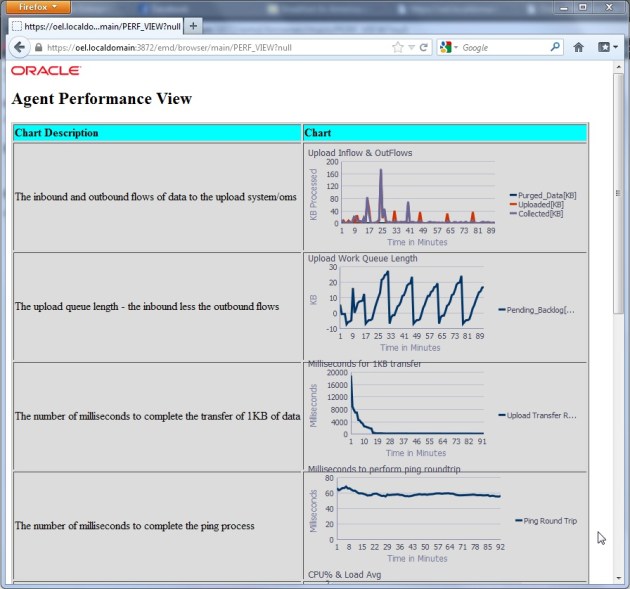
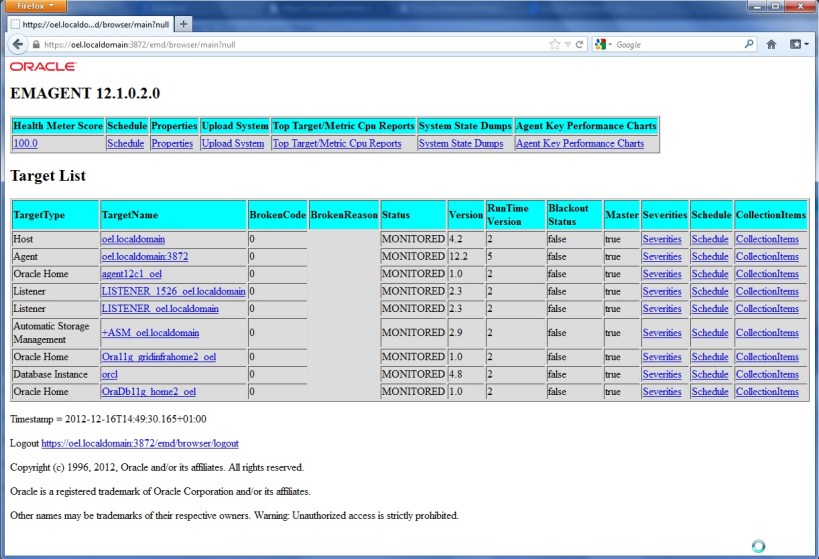
Below two screenshot of what you can see. Using this browser can be very useful if some metrics are not collected, or if your agent is in a pending status.

emd_browser1

emd_browser2

How ASM disk header block repair works

In this post, I will explain one of my last works about the ASM disk header block.

First, I will create a TEST tablespace in my orcl database. The TEST’s datafile will be managed by ASM.

[oracle@oel ~]$ . oraenv
ORACLE_SID = [+ASM] ? orcl
The Oracle base remains unchanged with value /u01/app/oracle
[oracle@oel ~]$ sqlplus / as sysdba
SQL> create tablespace test datafile '+data' size 5M autoextend on maxsize unlimited;
Tablespace created.

SQL>  select instance_name from v$instance;
INSTANCE_NAME
----------------
orcl

SQL> select file_id,tablespace_name,file_name,status,online_status from dba_data_files
  2  /

   FILE_ID TABLESPACE_NAME                FILE_NAME                                          STATUS    ONLINE_
---------- ------------------------------ -------------------------------------------------- --------- -------
         4 USERS                          /u02/oradata/orcl/users01.dbf                      AVAILABLE ONLINE
         3 UNDOTBS1                       /u02/oradata/orcl/undotbs01.dbf                    AVAILABLE ONLINE
         2 SYSAUX                         /u02/oradata/orcl/sysaux01.dbf                     AVAILABLE ONLINE
         1 SYSTEM                         /u02/oradata/orcl/system01.dbf                     AVAILABLE SYSTEM
         5 EXAMPLE                        /u02/oradata/orcl/example01.dbf                    AVAILABLE ONLINE
         6 TEST                           +DATA/orcl/datafile/test.258.798578613             AVAILABLE ONLINE

6 rows selected.

My ASM instance manages two diskgroups DATA (external redundancy) and RL (normal redundancy).

DATA is a 2 disks diskgroup managed by asmlib.

SQL> select group_number,name,type,state from v$asm_diskgroup
  2  /

GROUP_NUMBER NAME TYPE   STATE
------------ ---- ------ -----------
           1 DATA EXTERN MOUNTED
           2 RL   NORMAL MOUNTED
SQL> select path from v$asm_disk where group_number=1;

PATH
---------------------------------
ORCL:ASM1
ORCL:ASM2

And now, we erase the header block of each disk. Header block is the first one of an ASM disk device, and its default size is 4096 bytes (This size is available in _asm_blksize undocumented parameter).

[oracle@oel ~]$ dd if=/dev/zero of=/dev/oracleasm/disks/ASM1 bs=4096 count=1
1+0 records in
1+0 records out
4096 bytes (4.1 kB) copied, 2.2e-05 seconds, 186 MB/s
[oracle@oel ~]$ dd if=/dev/zero of=/dev/oracleasm/disks/ASM2 bs=4096 count=1
1+0 records in
1+0 records out
4096 bytes (4.1 kB) copied, 0.000336 seconds, 12.2 MB/s

Even my block headers destroyed, I can still write in my diskgroup and allocate extents in it.

SQL> alter database datafile 6 resize 10M;

Database altered.

SQL> create table t tablespace TEST as select * from dba_source;

Table created.

SQL> alter system checkpoint;

System altered.

SQL> select file#,checkpoint_time from v$datafile_header where file#=6;

     FILE# CHECKPOINT_TIME
---------- -------------------
         6 05/11/2012 19:27:43

Well, let’s try to restart the rdbms instance:

SQL> shutdown immediate
Database closed.
Database dismounted.
ORACLE instance shut down.
SQL> startup
ORACLE instance started.

Total System Global Area 1068937216 bytes
Fixed Size                  2235208 bytes
Variable Size             377488568 bytes
Database Buffers          683671552 bytes
Redo Buffers                5541888 bytes
Database mounted.
Database opened.
SQL> select count(*) from t;

  COUNT(*)
----------
    702070

Damned ! I can still restart it and read all file extents.

There’s something strange in this demo, my ASM disk header is invalid and I still can read files. I will verify with kfed my headers state (only one ASM disk is shown below):

oracle@oel ~]$ kfed read /dev/oracleasm/disks/ASM1
kfbh.endian:                          0 ; 0x000: 0x00
kfbh.hard:                            0 ; 0x001: 0x00
kfbh.type:                            0 ; 0x002: KFBTYP_INVALID
kfbh.datfmt:                          0 ; 0x003: 0x00
kfbh.block.blk:                       0 ; 0x004: blk=0
kfbh.block.obj:                       0 ; 0x008: file=0
kfbh.check:                           0 ; 0x00c: 0x00000000
kfbh.fcn.base:                        0 ; 0x010: 0x00000000
kfbh.fcn.wrap:                        0 ; 0x014: 0x00000000
kfbh.spare1:                          0 ; 0x018: 0x00000000
kfbh.spare2:                          0 ; 0x01c: 0x00000000
2B469E002400 00000000 00000000 00000000 00000000  [................]
  Repeat 255 times
KFED-00322: Invalid content encountered during block traversal: [kfbtTraverseBlock][Invalid OSM block type][][0]

[oracle@oel ~]$ sudo /u01/app/oracle/product/11.2.0.3/dbhome_1/bin/kfed read /dev/sdb1
kfbh.endian:                          0 ; 0x000: 0x00
kfbh.hard:                            0 ; 0x001: 0x00
kfbh.type:                            0 ; 0x002: KFBTYP_INVALID
kfbh.datfmt:                          0 ; 0x003: 0x00
kfbh.block.blk:                       0 ; 0x004: blk=0
kfbh.block.obj:                       0 ; 0x008: file=0
kfbh.check:                           0 ; 0x00c: 0x00000000
kfbh.fcn.base:                        0 ; 0x010: 0x00000000
kfbh.fcn.wrap:                        0 ; 0x014: 0x00000000
kfbh.spare1:                          0 ; 0x018: 0x00000000
kfbh.spare2:                          0 ; 0x01c: 0x00000000
2B413559C400 00000000 00000000 00000000 00000000  [................]
  Repeat 255 times
KFED-00322: file not found; arguments: [kfbtTraverseBlock] [Invalid OSM block type] [] [0]

So KFED has confirmed my header blocks are invalid. Now, I will try to unmount and remount the diskgroup to see if there’s any effect on diskgroup mount operation.

[oracle@oel ~]$ sqlplus / as sysasm

SQL> alter diskgroup DATA dismount;

Diskgroup altered.

SQL> alter diskgroup DATA mount;
alter diskgroup DATA mount
*
ERROR at line 1:
ORA-15032: not all alterations performed
ORA-15017: diskgroup "DATA" cannot be mounted
ORA-15063: ASM discovered an insufficient number of disks for diskgroup "DATA"

So ASM disk header seems to be important for mounting the diskgroup but without effect on asm extent allocation etc.

Now I will repair asm disks with kfed and repair operation to restore my asm header blocks:

[oracle@oel ~]$ kfed repair /dev/oracleasm/disks/ASM1
[oracle@oel ~]$ kfed repair /dev/oracleasm/disks/ASM2

[oracle@oel ~]$ sqlplus / as sysasm

SQL> alter diskgroup DATA mount;

Diskgroup altered.

So KFED is able to restore the header (with the repair operation).

[oracle@oel ~]$ . oraenv
ORACLE_SID = [+ASM] ? orcl
The Oracle base remains unchanged with value /u01/app/oracle

[oracle@oel ~]$ sqlplus / as sysdba

Connected to an idle instance.

SQL> startup
...
Database opened.
SQL> select count(*) from T;

  COUNT(*)
----------
    702070

And datas in the T table are still there … no problem !

Well, let’s summarize … I erased the header block of both asm disks in my diskgroup without any impact on file extent allocation. The only impact I had was on the mount capability. Next, I have restored the header block of each disk with a kfed repair operation … yes, but without any backup of the disk or the disk header. So I wonder … where was the backup of my header block?

First, I will try a very simple method. I will have a look at all metadata blocks in my asm disk device. I hope I will find another header block. For this purpose, i will use a basic shell script to analyze each block. If the script finds a block with the type KFBTYP_DISKHEAD, it will keep the block position, and print them at the end of script execution:

The basic script:

#!/bin/bash
#set -x
export ORAENV_ASK=NO
export ORACLE_SID=+ASM
. oraenv

i=0
ret=0
tab_cnt=0;
blk_typ='';

while [ "$blk_typ" != "KFBTYP_INVALID" ];
do
  blk_typ=`kfed read $1 blkn=$i | grep kfbh.type | awk '{print $5;}' | sed 's/^ *//g' | sed 's/ *$//g' `
  ret=$?
  if [ "$blk_typ" = "KFBTYP_DISKHEAD" ]; then
    t[$i]=$i
  fi
  let i=$i+1
done
echo "list of header block with KFBTYP_DISKHEAD type"
echo ${t[@]}

Execution results:

[oracle@oel ~]$ ./asm_surgery.sh /dev/oracleasm/disks/ASM1
The Oracle base remains unchanged with value /u01/app/oracle
list of header block with KFBTYP_DISKHEAD type
0 510
[oracle@oel ~]$ ./asm_surgery.sh /dev/oracleasm/disks/ASM2
The Oracle base remains unchanged with value /u01/app/oracle
list of header block with KFBTYP_DISKHEAD type
0 510

Ok, so there is a copy of the header block in the 510th block in my disk. Indeed, as Bane Radulović mentioned it in its blog, a backup copy of ASM disk header is in the second last block of allocation unit 1. So, if my AU is 1Mb and my block size 4096 bytes, a copy of my header block will be available in ((1048576 / 4096) * 2 – 1  = 511), as the block# starts at 0, it is located in the 510th block.

To double check this, I will erase the header block of my first ASM disk, and use kfed repair and strace to see what really happens:

[oracle@oel ~]$ dd if=/dev/zero of=/dev/oracleasm/disks/ASM1 bs=4096 count=1
1+0 records in
1+0 records out
4096 bytes (4.1 kB) copied, 2.3e-05 seconds, 178 MB/s

[oracle@oel ~]$ strace kfed repair /dev/oracleasm/disks/ASM1
.../...

stat("/dev/oracleasm/disks/ASM1", {st_mode=S_IFBLK|0660, st_rdev=makedev(8, 17), ...}) = 0
access("/dev/oracleasm/disks/ASM1", F_OK) = 0
statfs("/dev/oracleasm/disks/ASM1", {f_type=0x958459f6, f_bsize=4096, f_blocks=0, f_bfree=0, f_bavail=0, f_files=0, f_ffree=0, f_fsid={0, 0}, f_namelen=255, f_frsize=4096}) = 0
open("/dev/oracleasm/disks/ASM1", O_RDWR) = 7
lseek(7, 2088960, SEEK_SET)             = 2088960
read(7, "\1\202\1\1\376\200<\206\371\7"..., 4096) = 4096
lseek(7, 0, SEEK_SET)                   = 0
read(7, ""..., 4096) = 4096
lseek(7, 0, SEEK_SET)                   = 0
write(7, "\1\202\1\1\200\302\206\371\7"..., 4096) = 4096
close(7)                                = 0

This is very interesting.

First operation, it opens the device and read the block after 2088960 bytes. But 2088960/4096 = 510, so it reads the 510th block of the disk. Next it reads the block at position 0 (header block), and then writes in it the content of the 510th block.

Well, now I know there’s a copy of each header block in a secret position !!! (block #510) and kfed uses this block to repair the main header block.

During my tests, I noticed that sometimes, asm disks lost their asm label (I don’t know why). As a consequence, repaired disks won’t be recreated by the oracleasm scandisks (or after a reboot).

[root@oel ~]# ls /dev/oracleasm/disks/*
/dev/oracleasm/disks/ASM1  /dev/oracleasm/disks/ASM2  /dev/oracleasm/disks/ASM3  /dev/oracleasm/disks/ASM4
[root@oel ~]# oracleasm scandisks
Reloading disk partitions: done
Cleaning any stale ASM disks...
Cleaning disk "ASM1"
Scanning system for ASM disks...
[root@oel ~]# ls /dev/oracleasm/disks/*
/dev/oracleasm/disks/ASM2  /dev/oracleasm/disks/ASM3  /dev/oracleasm/disks/ASM4

According the fact that you know which device is corresponding to asmlib disk device, you can relabel this disk with oracleasm renamedisk command (be very careful with this command):

[root@oel ~]# oracleasm renamedisk -f /dev/sdb1 ASM1
Writing disk header: done
Instantiating disk "ASM1": done

[root@oel ~]# oracleasm scandisks
Reloading disk partitions: done
Cleaning any stale ASM disks...
Scanning system for ASM disks...

[root@oel ~]# ls /dev/oracleasm/disks/*
/dev/oracleasm/disks/ASM1  /dev/oracleasm/disks/ASM2  /dev/oracleasm/disks/ASM3  /dev/oracleasm/disks/ASM4
Build a basic network configuration on Solaris 11

Here are some commands to create a basic network configuration on Solaris 11.

First of all, the physical network service must be started and the network automagic (nwam) service has to be stopped (for information, nwam is a new solaris 11 service that automates network configuration).

– Check physical network service:

root@S11:~# svcs | grep network/physical
online 20:09:37 svc:/network/physical:upgrade
online 20:09:45 svc:/network/physical:default

– Check nwam:

root@S11:~# svcs | grep nwam
root@S11:~#

If you have to start or stop those services, you can use these commands:

root@S11:~# svcadm disable network/physical:nwam 
root@S11:~# svcadm enable network/physical:default

In my first example, I run a Solaris 11 x86-64 virtual machine with 3 network interfaces (net0 and net1 are used for my own use, and net2 which is used for this example. A fourth interface net3 will be added to illustrate my second example).

First command is dladm which is use to administer data-links. I use the show-phys option to get physical information of my interfaces:

root@S11:~# dladm show-phys
LINK              MEDIA                STATE      SPEED  DUPLEX    DEVICE
net0              Ethernet             up         1000   full      e1000g0
net1              Ethernet             up         1000   full      e1000g1
net2              Ethernet             unknown    0      unknown   e1000g2

There’s another useful option “show-link” which will help you to show your interface status and other information (for example, the MTU).

root@S11:~# dladm show-link
LINK                CLASS     MTU    STATE    OVER
net0                phys      1500   up       --
net1                phys      1500   up       --
net2                phys      1500   unknown  --

(dladm has a lot of option you can explore with the man page or oracle official documentation : http://docs.oracle.com/cd/E23824_01/)

Ok, now we need to create our interface. In this example, we will create an IP interface (We will see later how to create an IPMP interface).

To do this operation, we will use the “ipadm” tool (ipadm is the tool used to configure the IP protocol).

root@S11:~# ipadm create-ip net2
root@S11:~# dladm show-link
LINK                CLASS     MTU    STATE    OVER
net0                phys      1500   up       --
net1                phys      1500   up       --
net2                phys      1500   up       --

Now the link is up but is not active:

root@S11:~# ipadm show-if
IFNAME     CLASS    STATE    ACTIVE OVER
lo0        loopback ok       yes    --
net0       ip       ok       yes    --
net1       ip       ok       yes    --
net2       ip       down     no     --

To finish this basic configuration, we have just to create the address on this interface. We have the choice to use a static configuration or a dynamic one by getting the address from a DHCP Server.

Note that addresses are managed by an address object which is formatted like this : interface/IP protocol

  • Dynamic configuration.
root@S11:~# ipadm create-addr -T dhcp net2/v4

Note: if you want to configure which information will be requested by the client to the DHCP server, you can edit the /etc/default/dhcpagent file (especially the PARAM_REQUEST_LIST parameter).

  • Static configuration.
root@S11:~# ipadm create-addr -T static -a 192.168.99.102/24 net2/v4

Now the address is up and the routing table has been updated:

root@S11:~# ipadm show-addr
ADDROBJ           TYPE     STATE        ADDR
lo0/v4            static   ok           127.0.0.1/8
net0/v4           dhcp     ok           10.0.2.15/24
net1/v4           static   ok           192.168.99.101/24
net2/v4           static   ok           192.168.99.102/24
lo0/v6            static   ok           ::1/128

root@S11:~# netstat -r

Routing Table: IPv4
  Destination           Gateway           Flags  Ref     Use     Interface
-------------------- -------------------- ----- ----- ---------- ---------
default              10.0.2.2             UG        3        169 net0
10.0.2.0             10.0.2.15            U         3          0 net0
S11                  S11                  UH        4        310 lo0
192.168.99.0         192.168.99.102       U         3         63 net2
192.168.99.0         192.168.99.101       U         2       1172 net1

Routing Table: IPv6
  Destination/Mask            Gateway                   Flags Ref   Use    If
--------------------------- --------------------------- ----- --- ------- -----
S11                         S11                         UH      2      14 lo0

On the second example, I will show how to configure an IPMP (IP Multipath address). IPMP interface can be used on a RAC configuration to secure network link.

Well, now you know how to configure an IP address on an IP interface, this will be too easy 😉

First, configure two network IP interfaces and configure two IPv4 addresses on it:

root@S11:~# ipadm create-ip net2
root@S11:~# ipadm create-ip net3
root@S11:~# ipadm create-addr -T static -a 192.168.99.102/24 net2/v4
root@S11:~# ipadm create-addr -T static -a 192.168.99.103/24 net3/v4

Next, create an IPMP interface and add it both interfaces you have just configured:

root@S11:~# ipadm create-ipmp ipmp0
root@S11:~# ipadm add-ipmp -i net2 -i net3 ipmp0

At this step, we have an IPMP interface configured with two “slave” interfaces. Final step is to configure an address on this interface:

root@S11:~# ipadm create-addr -T static -a 192.168.99.105/24 ipmp0/v4
root@S11:~# ifconfig ipmp0
ipmp0: flags=8001000843<UP,BROADCAST,RUNNING,MULTICAST,IPv4,IPMP> mtu 1500 index 11
        inet 192.168.99.105 netmask ffffff00 broadcast 192.168.99.255
        groupname ipmp0

Our ipmp address is now configured and active (you can make some tests or “snoop” the ipmp0 interface to view what’s happening on it).

root@S11:~# ipadm show-if
IFNAME     CLASS    STATE    ACTIVE OVER
lo0        loopback ok       yes    --
net0       ip       ok       yes    --
net1       ip       ok       yes    --
net2       ip       ok       yes    --
net3       ip       ok       yes    --
ipmp0      ipmp     ok       yes    net2 net3

Useful emcli commands in EM Cloud Control 12c

If like me, you are addicted to command line, this post will help you to realize useful operation in EM Cloud Control 12c using emcli tool rather than GUI.

You can use emcli when you need to implement batch scripts on your Oracle Management Server (OMS).

  • Login to EM
$ emcli login -username=sysman
Enter password :
Login successful

OR

$ emcli login -username=sysman -password=XXXXXX
Login successful
  • Synchronize emcli with the OMS
$ emcli sync
Synchronized successfully
  • Logout EM
$ emcli logout
Logout successful
  • List all the targets already promoted
$ emcli get_targets
Status  Status           Target Type           Target Name
 ID
-9      n/a              group                 OFM
1       Up               host                  xxxdb-prod3.mydomain.com
1       Up               host                  xxxdb-prod2.mydomain.com
1       Up               host                  xxxlgc-prod2.mydomain.com
1       Up               host                  xxxdb-prod1.mydomain.com
1       Up               j2ee_application      /EMGC_GCDomain/GCDomain/EMGC_OMS1/e
                                               mgc
1       Up               j2ee_application      /EMGC_GCDomain/GCDomain/EMGC_OMS1/O
                                               CMRepeater
1       Up               j2ee_application      /EMGC_GCDomain/GCDomain/EMGC_OMS1/e
                                               mpbs
-9      n/a              metadata_repository   /EMGC_GCDomain/GCDomain/EMGC_ADMINS
                                               ERVER/mds-sysman_mds
-9      n/a              metadata_repository   /EMGC_GCDomain/GCDomain/EMGC_ADMINS
                                               ERVER/mds-owsm
1       Up               oracle_apache         /EMGC_GCDomain/instance1/ohs1
1       Up               oracle_apm            /EMGC_GCDomain/GCDomain/EMGC_OMS1/o
                                               racle.security.apm(11.1.1.3.0)
1       Up               oracle_beacon         EM Management Beacon
1       Up               oracle_em_service     EM Console Service
1       Up               oracle_em_service     EM Jobs Service
1       Up               oracle_emd            xxxdb-prod1.mydomain.com:1830
1       Up               oracle_emd            xxxdb-prod3.mydomain.com:1830
1       Up               oracle_emd            xxxlgc-prod2.mydomain.com:3872
1       Up               oracle_emd            xxxdb-prod2.mydomain.com:1830
1       Up               oracle_emrep          Management Services and Repository
-9      n/a              oracle_home           agent12g1_9_xxxlgc-prod2
-9      n/a              oracle_home           WebLogicServer10_3_5_0_0_xxxlgc-pro
                                               d2
-9      n/a              oracle_home           oms12g1_3_xxxlgc-prod2
-9      n/a              oracle_home           webtier12g1_20_xxxlgc-prod2
-9      n/a              oracle_ias_farm       EMGC_GCDomain
1       Up               oracle_oms            xxxlgc-prod2.mydomain.com:4889_Managem
                                               ent_Service
1       Up               oracle_oms_console    xxxlgc-prod2.mydomain.com:4889_Managem
                                               ent_Service_CONSOLE
1       Up               oracle_oms_pbs        xxxlgc-prod2.mydomain.com:4889_Managem
                                               ent_Service_PBS
-9      n/a              weblogic_domain       /EMGC_GCDomain/GCDomain
1       Up               weblogic_j2eeserver   /EMGC_GCDomain/GCDomain/EMGC_OMS1
1       Up               weblogic_j2eeserver   /EMGC_GCDomain/GCDomain/EMGC_ADMINSERVER
  • Delete a specific target
$ emcli delete_target -name="/wlstest_wlstest/wlstest/myServer_jvm" -type="java_virtual_machine"
  • Delete an agent and its targets
$ emcli delete_target -name="xxxlgc-prod2.mydomain.com:3872" -type="oracle_emd" -delete_monitored_targets
  • Follow a plugin deployment (on the OMS / on an agent)
-- Oracle Database plugin
$ emcli get_plugin_deployment_status -plugin_id=oracle.sysman.db
-- Oracle Fusion Middleware plugin
$ emcli get_plugin_deployment_status -plugin_id=oracle.sysman.emas
-- My Oracle Support plugin
$ emcli get_plugin_deployment_status -plugin_id=oracle.sysman.mos
  • Import an update (for example: a plugin update) into the software library.
$ emcli import_update -file="p14018177_112000_Generic.zip" -omslocal
  • Deploy a plugin on the OMS
$ emcli deploy_plugin_on_server -plugin=oracle.sysman.db -sys_password=XXXXX
  • Deploy a plugin on EM agent(s)
$ emcli deploy_plugin_on_agent -plugin="oracle.sysman.db"  -agent_names="xxxdb-prod1.mydomain.com:3872;xxxdb-prod2.mydomain.com:3872"
  • List available agents in the library
$ emcli get_supported_platforms
Getting list of platforms ...
Check the logs at /home/oracle/agent.log
About to access self-update code path to retrieve the platforms list..
Getting Platforms list ...
-----------------------------------------------
Version = 12.1.0.1.0
 Platform = Linux x86-64
-----------------------------------------------
Version = 12.1.0.1.0
 Platform = Linux x86
-----------------------------------------------
Version = 12.1.0.1.0
 Platform = IBM AIX on POWER Systems (64-bit)
-----------------------------------------------
Version = 12.1.0.1.0
 Platform = Microsoft Windows (32-bit)
-----------------------------------------------
Version = 12.1.0.1.0
 Platform = Microsoft Windows (64-bit)
-----------------------------------------------
Platforms list displayed successfully
  • Download an agent from the library (used for agentDeploy.sh script method)
$ emcli get_agentimage -destination=/home/oracle -platform="Microsoft Windows x64 (64-bit)" -version="12.1.0.1.0"
Platform:Microsoft Windows x64 (64-bit)
Destination:/home/oracle
 === Partition Detail ===
Space free : 11 GB
Space required : 1 GB
Check the logs at /home/oracle/get_agentimage_2012-06-11_15-18-09-PM.log
Setting property ORACLE_HOME to:/u02/Middleware/oms
calling pulloneoffs with arguments:/u02/Middleware/oms/u02/softLibrary/32/C0C9BF40C6A36668E0439D33010AE58512.1.0.1.0windows_x64
Check this logs for more information: /u02/Middleware/oms/sysman/prov/agentpush/logs
  • Set monitoring credentials for a specific target (example given for an Oracle database instance)
$ emcli set_credential -target_type=oracle_database -target_name="prod1" -credential_set=DBCredsMonitoring -user=sysman -column="Role:SYSDBA;UserName:sys;password:XXXXX" -monitoring