Data … as usual

All things about data by Laurent Leturgez

Category Archives: Oracle

Statistics on fixed objects

On a previous post, I spoke about statistics and I promised new posts about statistics on fixed objects and system stats and their potential impact.

Fixed objects are internal structures where oracle internal data are stored. This objects are the source of data for dynamic performance views (V$SQL, V$ACCESS, and many V$ views).

Let’s see how statistics can be important on this.

To demonstrate this, I used the V$ACCESS view which have the SQL above for definition:

SELECT DISTINCT s.inst_id,
  s.ksusenum,
  o.kglnaown,
  o.kglnaobj,
  o.kglobtyd,
  s.con_id
FROM x$ksuse s,
  x$kglob o,
  x$kgldp d,
  x$kgllk l
WHERE l.kgllkuse=s.addr
AND l.kgllkhdl  =d.kglhdadr
AND l.kglnahsh  =d.kglnahsh
AND o.kglnahsh  =d.kglrfhsh
AND o.kglhdadr  =d.kglrfhdl
First, we’ll have a look at a simple query on V$ACCESS on a 12cR1 instance without any statistics. Notice that I disable cardinality feedback … we’ll see why later.
SQL> exec dbms_stats.delete_fixed_objects_stats;

PL/SQL procedure successfully completed.

SQL> select rowcnt, blkcnt, analyzetime, samplesize
  2  from tab_stats$
  3  where obj# in (select OBJECT_ID from V$FIXED_TABLE)
  4  /

no rows selected

SQL> select /*+ opt_param('_OPTIMIZER_USE_FEEDBACK','FALSE') */ count(*) from v$access;

  COUNT(*)
----------
       845

SQL> select * from table(dbms_xplan.display_cursor);

PLAN_TABLE_OUTPUT
------------------------------------------------------------------------------------------------------------
SQL_ID  bqjbmqr1xtypb, child number 0
-------------------------------------
select /*+ opt_param('_OPTIMIZER_USE_FEEDBACK','FALSE') */ count(*)
from v$access

Plan hash value: 2879213603

-------------------------------------------------------------------------------------
| Id  | Operation                    | Name            | Rows  | Bytes | Cost (%CPU)|
-------------------------------------------------------------------------------------
|   0 | SELECT STATEMENT             |                 |       |       |     1 (100)|
|   1 |  SORT AGGREGATE              |                 |     1 |       |            |
|   2 |   VIEW                       | GV$ACCESS       |     1 |       |     0   (0)|
|   3 |    HASH UNIQUE               |                 |     1 |   697 |     0   (0)|
|   4 |     NESTED LOOPS             |                 |     1 |   697 |     0   (0)|
|   5 |      NESTED LOOPS            |                 |     1 |   108 |     0   (0)|
|   6 |       HASH JOIN              |                 |     1 |    70 |     0   (0)|
|   7 |        FIXED TABLE FULL      | X$KSUSE         |     1 |    45 |     0   (0)|
|   8 |        FIXED TABLE FULL      | X$KGLLK         |   100 |  2500 |     0   (0)|
|   9 |       FIXED TABLE FIXED INDEX| X$KGLDP (ind:1) |     1 |    38 |     0   (0)|
|  10 |      FIXED TABLE FIXED INDEX | X$KGLOB (ind:1) |     1 |   589 |     0   (0)|
-------------------------------------------------------------------------------------

23 rows selected.

SQL> exec dbms_stats.gather_fixed_objects_stats;

PL/SQL procedure successfully completed.

SQL> select /*+ opt_param('_OPTIMIZER_USE_FEEDBACK','FALSE') */ count(*)
  2  from v$access;

  COUNT(*)
----------
       911

SQL> select * from table(dbms_xplan.display_cursor);

PLAN_TABLE_OUTPUT
------------------------------------------------------------------------------------------------------------
SQL_ID  12qyw31bvmptb, child number 0
-------------------------------------
select /*+ opt_param('_OPTIMIZER_USE_FEEDBACK','FALSE') */ count(*)
from v$access

Plan hash value: 2296283840

-----------------------------------------------------------------------------------------------
| Id  | Operation                   | Name            | Rows  | Bytes | Cost (%CPU)| Time     |
-----------------------------------------------------------------------------------------------
|   0 | SELECT STATEMENT            |                 |       |       |     1 (100)|          |
|   1 |  SORT AGGREGATE             |                 |     1 |       |            |          |
|   2 |   VIEW                      | GV$ACCESS       |  1226 |       |     1 (100)| 00:00:01 |
|   3 |    HASH UNIQUE              |                 |  1226 |   335K|     1 (100)| 00:00:01 |
|   4 |     NESTED LOOPS            |                 |  1226 |   335K|     1 (100)| 00:00:01 |
|   5 |      HASH JOIN              |                 |  1226 | 91950 |     1 (100)| 00:00:01 |
|   6 |       HASH JOIN             |                 |  1226 | 52718 |     0   (0)|          |
|   7 |        FIXED TABLE FULL     | X$KSUSE         |   472 |  8496 |     0   (0)|          |
|   8 |        FIXED TABLE FULL     | X$KGLLK         |  1226 | 30650 |     0   (0)|          |
|   9 |       FIXED TABLE FULL      | X$KGLDP         |  4524 |   141K|     0   (0)|          |
|  10 |      FIXED TABLE FIXED INDEX| X$KGLOB (ind:1) |     1 |   205 |     0   (0)|          |
-----------------------------------------------------------------------------------------------

23 rows selected.
Notice that, the cardinality estimation have changed before and after statistics gathering. The second one is more precise and closer from the real value. The plan have changed too but without any effect on execution.
Starting in Oracle 11gR2, cardinality feedback can help to calculate a better cardinality based on previous execution. If a first execution is estimated as a bad execution (ie. estimated cardinality is significantly different from the real cardinality), oracle stores the real cardinality and uses it for a future execution. This feature can be very helpful for the CBO in the case of repeated statement and cardinalities which don’t evolve too much. (See this link for more information: https://blogs.oracle.com/optimizer/entry/cardinality_feedback)
So, you can choose to gather statistics or to leave cardinality feedback do the job.
The next example show how cardinality feedback can have a bad impact on fixed objects cardinality estimation.
SQL> exec dbms_stats.delete_fixed_objects_stats;

PL/SQL procedure successfully completed.

SQL> select count(*) from v$access;

  COUNT(*)
----------
       315

Elapsed: 00:00:00.03
SQL> select * from table(dbms_xplan.display_cursor);

PLAN_TABLE_OUTPUT
------------------------------------------------------------------------------------------------------------------
SQL_ID  dw4h66wchcsm7, child number 0
-------------------------------------
select count(*) from v$access

Plan hash value: 2879213603

-------------------------------------------------------------------------------------
| Id  | Operation                    | Name            | Rows  | Bytes | Cost (%CPU)|
-------------------------------------------------------------------------------------
|   0 | SELECT STATEMENT             |                 |       |       |     1 (100)|
|   1 |  SORT AGGREGATE              |                 |     1 |       |            |
|   2 |   VIEW                       | GV$ACCESS       |     1 |       |     0   (0)|
|   3 |    HASH UNIQUE               |                 |     1 |   697 |     0   (0)|
|   4 |     NESTED LOOPS             |                 |     1 |   697 |     0   (0)|
|   5 |      NESTED LOOPS            |                 |     1 |   108 |     0   (0)|
|   6 |       HASH JOIN              |                 |     1 |    70 |     0   (0)|
|   7 |        FIXED TABLE FULL      | X$KSUSE         |     1 |    45 |     0   (0)|
|   8 |        FIXED TABLE FULL      | X$KGLLK         |   100 |  2500 |     0   (0)|
|   9 |       FIXED TABLE FIXED INDEX| X$KGLDP (ind:1) |     1 |    38 |     0   (0)|
|  10 |      FIXED TABLE FIXED INDEX | X$KGLOB (ind:1) |     1 |   589 |     0   (0)|
-------------------------------------------------------------------------------------

22 rows selected.

Elapsed: 00:00:00.23
 This takes less than a second.
I wait a while and take a coffee. Then, I execute a the same query, cardinality feedback will be used because there’s a significant difference between the first estimation and the real cardinality.
SQL> select count(*) from v$access;

  COUNT(*)
----------
       429

Elapsed: 00:00:10.44
SQL> select * from table(dbms_xplan.display_cursor);

PLAN_TABLE_OUTPUT
------------------------------------------------------------------------------------------------------------
SQL_ID  dw4h66wchcsm7, child number 2
-------------------------------------
select count(*) from v$access

Plan hash value: 1711387798

------------------------------------------------------------------------------------
| Id  | Operation                   | Name            | Rows  | Bytes | Cost (%CPU)|
------------------------------------------------------------------------------------
|   0 | SELECT STATEMENT            |                 |       |       |     1 (100)|
|   1 |  SORT AGGREGATE             |                 |     1 |       |            |
|   2 |   VIEW                      | GV$ACCESS       |   315 |       |     0   (0)|
|   3 |    HASH UNIQUE              |                 |   315 |   214K|     0   (0)|
|   4 |     NESTED LOOPS SEMI       |                 |   470 |   319K|     0   (0)|
|   5 |      HASH JOIN              |                 |   100 | 65900 |     0   (0)|
|   6 |       FIXED TABLE FULL      | X$KGLLK         |   100 |  2500 |     0   (0)|
|   7 |       MERGE JOIN CARTESIAN  |                 |   100 | 63400 |     0   (0)|
|   8 |        FIXED TABLE FULL     | X$KSUSE         |     1 |    45 |     0   (0)|
|   9 |        BUFFER SORT          |                 |   100 | 58900 |     0   (0)|
|  10 |         FIXED TABLE FULL    | X$KGLOB         |   100 | 58900 |     0   (0)|
|  11 |      FIXED TABLE FIXED INDEX| X$KGLDP (ind:1) |   470M|    16G|     0   (0)|
------------------------------------------------------------------------------------

Note
-----
   - statistics feedback used for this statement

27 rows selected.

Elapsed: 00:00:00.04
The query is executed in 10 seconds with a changed plan which is now using a MERGE JOIN CARTESIAN operation.
As these internal structures are used by many views and in internal processes, a misestimation can directly have an impact on the oracle kernel performance.
That’s why it’s recommended to gather these stats every time there’s a significant change on the instance configuration (memory configuration for example), new apps deployment etc. And, if you can, it’s recommended to gather these stats during a representative workload.

Write SQL statements on internal structures in multitenant databases.

In a multitenant configuration, if you are querying X$ structures and fixed tables (OBJ$, TAB$ etc.), you will face differents behaviour depending on the fact you are connected to the root container or to a pluggable database.

  • If you are connected to a root container (CDB$ROOT)
    • In fixed tables, for example OBJ$, there’s no CON_ID column defined in this table so this will give you all objects for your root container, and not for all containers.
SQL> show con_name
CON_NAME
------------------------------
CDB$ROOT
SQL> desc obj$
 Name                                      Null?    Type
 ----------------------------------------- -------- ----------------------------
 OBJ#                                      NOT NULL NUMBER
 DATAOBJ#                                           NUMBER
 OWNER#                                    NOT NULL NUMBER
 NAME                                      NOT NULL VARCHAR2(128)
 NAMESPACE                                 NOT NULL NUMBER
 SUBNAME                                            VARCHAR2(128)
 TYPE#                                     NOT NULL NUMBER
 CTIME                                     NOT NULL DATE
 MTIME                                     NOT NULL DATE
 STIME                                     NOT NULL DATE
 STATUS                                    NOT NULL NUMBER
 REMOTEOWNER                                        VARCHAR2(128)
 LINKNAME                                           VARCHAR2(128)
 FLAGS                                              NUMBER
 OID$                                               RAW(16)
 SPARE1                                             NUMBER
 SPARE2                                             NUMBER
 SPARE3                                             NUMBER
 SPARE4                                             VARCHAR2(1000)
 SPARE5                                             VARCHAR2(1000)
 SPARE6                                             DATE
 SIGNATURE                                          RAW(16)
 SPARE7                                             NUMBER
 SPARE8                                             NUMBER
 SPARE9                                             NUMBER
    • X$ structures will give you information for all containers (ROOT$CDB, SEED and and all pluggable database). And there’s a CON_ID column defined in all those structures.
SQL> show con_name

CON_NAME
------------------------------
CDB$ROOT

SQL> desc x$ksppi
 Name                                      Null?    Type
 ----------------------------------------- -------- ----------------------------
 ADDR                                               RAW(8)
 INDX                                               NUMBER
 INST_ID                                            NUMBER
 CON_ID                                             NUMBER
 KSPPINM                                            VARCHAR2(80)
 KSPPITY                                            NUMBER
 KSPPDESC                                           VARCHAR2(255)
 KSPPIFLG                                           NUMBER
 KSPPILRMFLG                                        NUMBER
 KSPPIHASH                                          NUMBER

SQL> select c.name,KSPPINM
  2  from x$ksppi x, v$containers c
  3  where x.con_id=c.con_id and  KSPPINM='open_cursors';

NAME                           KSPPINM
------------------------------ ------------------------------
CDB$ROOT                       open_cursors
PDB$SEED                       open_cursors
PDB1                           open_cursors
PDB2                           open_cursors
  • If you are connected to a PDB
    • In fixed tables, for example OBJ$, there’s still no CON_ID, so this will give you all objects on your PDB.
    • In X$ structures, there’s a CON_ID column, but if you are connected to a PDB, you will see only the data related to this PDB.
To summarize, static fixed tables contain data for the actual container (CDB$ROOT or PDB), but X$ structures contain data for all containers if you are connected to the CDB$ROOT container, and contain data related to the PDB you are connected to, in case of a PDB.
If you disassemble static views like CDB_TABLES, you will see a new function used to have data for all containers. This is CDB$VIEW function :
SQL> show con_id

CON_ID
------------------------------
1
SQL> show con_name

CON_NAME
------------------------------
CDB$ROOT
SQL> select count(*) from obj$;

  COUNT(*)
----------
     91005

SQL> select con_id,count(*) from CDB$VIEW("SYS"."OBJ$") group by con_id order by 1;

    CON_ID   COUNT(*)
---------- ----------
         1      91005
         2      90708
         3      90960
         4      90948
 Ok, now we have the information for all our containers. But if we want to join an X$ Structure and a CDB$VIEW transformed object, time for execute this is too long:
select x.con_id,o.name,count(*)
from x$bh x, (select name,dataobj#,con_id from CDB$VIEW("SYS"."OBJ$")) o
where x.con_id=o.con_id
and o.dataobj#=x.obj
and o.name like 'T_PDB%'
group by x.con_id,o.name
/
... never ends :(
To execute it in a better time, I used query factorization with a WITH block, and forced materialization of it:
SQL> with o as (select /*+ MATERIALIZE */ name,dataobj#,con_id from CDB$VIEW("SYS"."OBJ$"))
  2  select x.con_id,o.name,count(*)
  3  from x$bh x,o
  4  where x.con_id=o.con_id
  5  and o.dataobj#=x.obj
  6  and o.name like 'T_PDB%'
  7  group by x.con_id,o.name
  8  /

    CON_ID NAME                   COUNT(*)
---------- -------------------- ----------
         4 T_PDB2                        9
         3 T_PDB1                        9

Elapsed: 00:00:02.40

Oracle Database 12c released … some features

If you are an Oracle DBA and you don’t live on earth, you have not heard about Oracle Database 12c … which is finally released today.

For the moment, you can download it on otn (http://www.oracle.com/technetwork/database/enterprise-edition/downloads/index.html) and on edelivery (http://edelivery.oracle.com). Documentation is available here: http://www.oracle.com/pls/db121/homepage.

As a beta tester, I can now speak about some features of this release. Of course, I could write about multitenant database or Information Lifecycle Management … I prefer to write about “smaller” features … but very useful.

  • online datafile move

Before 12c, if you wanted to move a datafile (or rename it), you had to offline it and move it on the OS Side, and then modify the control file data by renaming file, and then online the datafile. Now in 12c … it becomes a little bit easier:

SQL> select file_name from dba_data_files;

FILE_NAME
--------------------------------------------------------------------------------
/u02/oradata/orcl/system01.dbf
/u02/oradata/orcl/sysaux01.dbf
/u02/oradata/orcl/users01.dbf
/u02/oradata/orcl/example01.dbf
/u02/oradata/orcl/undotbs01.dbf

SQL> alter database move datafile '/u02/oradata/orcl/users01.dbf' to '/u02/oradata/newdest/users01.dbf';

Database altered.

SQL> !ls /u02/oradata/newdest
users01.dbf

That’s it 😉

  • write sql statement directly in RMAN
[oracle@oel ~]$ rman target /

Recovery Manager: Release 12.1.0.1.0 - Production on Tue Jun 25 21:57:09 2013

Copyright (c) 1982, 2013, Oracle and/or its affiliates. All rights reserved.

connected to target database: ORCL (DBID=1335655385)

RMAN> select dbid,name from v$database;

using target database control file instead of recovery catalog
      DBID NAME
---------- ---------
1335655385 ORCL
  • impdp in nologging mode

impdp utility have now many transformation functions that offer the opportunity to modify your data directly during the import process. Among these functions, you have a nologging option to reduce the redo information generated during impdp process (which was impossible with previous versions)

$ impdp USERID=\"/ as sysdba\" DIRECTORY=mydir DUMPFILE=expdp.dmp REMAP_SCHEMA=SH:SH2 TRANSFORM=DISABLE_ARCHIVE_LOGGING:Y

That’s it for today ! 🙂

Do you want to use BBED … on Windows ???

Recently, I had to use BBED in a windows 2008 R2 environment (to modify a checkpoint SCN in datafiles headers). To do this, I like to use BBED but this time, it was on a Windows 2008 R2 server on a 11.2 database.

2 problems :

– BBED is not shipped with Oracle since version 9.

– There’s no makefile on windows to compile bbed.

In a previous post, I wrote a little hack to compile bbed on Unix systems and to use it with oracle 9, 10, 11 and every database that have its datafiles located on a mount point (not for ASM).

On windows, to bypass this, you can copy your datafiles on a linux box, repair them with bbed, and copy them back to their original location. But when you work remotely or/and your database size is hundreds of Gigabytes … the problem is different.

So, if you want to use bbed on windows, you need to have many things:

  1. You need a bbed.exe. The only way is to get it from an Oracle 9i installation.
  2. You need to have a bunch of DLL (see above). All thoses DLLs are available in an Oracle 9i installation (in bin directory).
      • oraclient9.dll
      • oracommon9.dll
      • orageneric9.dll
      • ORACORE9.DLL
      • oraldapclnt9.dll
      • oran9.dll
      • ORANCDS9.DLL
      • orancrypt9.dll
      • oranhost9.dll
      • oranl9.dll
      • oranldap9.dll
      • ORANLS9.DLL
      • oranms.dll
      • oranmsp.dll
      • orannzsbb9.dll
      • oranoname9.dll
      • oranro9.dll
      • orantns9.dll
      • ORAPLS9.DLL
      • ORASLAX9.DLL
      • ORASNLS9.DLL
      • ORASQL9.DLL
      • oratrace9.dll
      • ORAUNLS9.DLL
      • oravsn9.dll
      • orawtc9.dll
      • ORAXML9.DLL
      • ORAXSD9.DLL
  3. You need message files for BBED. Thoses files are “bbedus.msb” and “bbedus.msg”. They are located in the mesg directory of an Oracle 9i installation. And you need to copy them in the rdbms\mesg directory of your  ORACLE_HOME.


If you have all these files (if not, let me know 😉 ), put them in a directory for your  bbed installation (let’s say c:\bbed), and set your ORACLE_HOME to the location where have put the message files, and finally launch BBED :

C:\bbed>dir /w
 Volume in drive C has no label.
 Volume Serial Number is 941A-E20F

 Directory of C:\bbed

[.]                [..]               bbed.exe           log.bbd            [mesg]             oraclient9.dll     oracommon9.dll     ORACORE9.DLL
orageneric9.dll    oraldapclnt9.dll   oran9.dll          ORANCDS9.DLL       orancrypt9.dll     oranhost9.dll      oranl9.dll         oranldap9.dll
ORANLS9.DLL        oranms.dll         oranmsp.dll        orannzsbb9.dll     oranoname9.dll     oranro9.dll        orantns9.dll       ORAPLS9.DLL
ORASLAX9.DLL       ORASNLS9.DLL       ORASQL9.DLL        oratrace9.dll      ORAUNLS9.DLL       oravsn9.dll        orawtc9.dll        ORAXML9.DLL
ORAXSD9.DLL        [rdbms]
              30 File(s)     12 870 233 bytes
               4 Dir(s)  26 325 200 896 bytes free
C:\bbed>echo %ORACLE_HOME%
c:\oracle\product\10.2.0\db_1

C:\bbed>dir /w %ORACLE_HOME%\rdbms\mesg
 Volume in drive C has no label.
 Volume Serial Number is 941A-E20F

 Directory of c:\oracle\product\10.2.0\db_1\rdbms\mesg

[.]          [..]         bbedus.msb   bbedus.msg   kfodus.msb   nmaf.msb     nmaus.msb    nmef.msb     nmeus.msb
               7 File(s)         72 222 bytes
               2 Dir(s)  26 404 503 552 bytes free

C:\bbed>systeminfo | findstr /B /C:"OS Name" /C:"OS Version" /C:"System Type"
OS Name: Microsoft Windows Server 2008 R2 Enterprise
OS Version: 6.1.7601 Service Pack 1 Build 7601
System Type: x64-based PC

C:\bbed>.\bbed
Password:

BBED: Release 2.0.0.0.0 - Limited Production on Mon Jun 17 14:46:38 2013

Copyright (c) 1982, 2002, Oracle Corporation. All rights reserved.

************* !!! For Oracle Internal Use only !!! ***************

Now, you have a bbed exe on Windows 2008 R2 server.

Move or reinstall EM 12c Central Agent (installed on the OMS)

Recently, I had to updrade an EM 12cR1 platform to 12cR2. At the end of this procedure, you have to upgrade agents from 12.1.0.1 to 12.1.0.2. But at this customer site, the em agent located on the OMS was’nt installed correctly so I have to remove and reinstall it in the correct directory. Easy ??? of course, but an agent located on the OMS has some peculiarities that a traditional agent doesn’t have.

First, I needed to remove the agent. To do this, I used the MOS Note: How to Manually Remove an Agent From 12C Cloud Control [ID 1380846.1].

Next, I pushed an agent to the new location by using the “add host” function in the EM Console.

Be careful, deploy agent on the Fully qualified name of the server. If you don’t use the same name, internal targets won’t be discovered. You can find this name by querying the repository:

SQL> select p.value OMS_HOST_NAME from mgmt_oms_parameters p where p.name = 'HOST_NAME';
OMS_HOST_NAME
--------------------------------------------------------------------------------
cloudcontrol12c.localdomain

Here was the start of my problems because an agent installed on the OMS have some plugins you will not find in a traditional agent :

[oracle@cloudcontrol12c ~]$ emctl listplugins agent
Oracle Enterprise Manager Cloud Control 12c Release 2
Copyright (c) 1996, 2012 Oracle Corporation. All rights reserved.
---------------------------------------------------------------
oracle.sysman.beacon 12.1.0.2.0 /u01/app/oracle/product/agent12c/core/12.1.0.2.0/../../plugins/oracle.sysman.beacon.agent.plugin_12.1.0.2.0  <<< Plugin for Oracle Beacon 
oracle.sysman.csa 12.1.0.2.0 /u01/app/oracle/product/agent12c/core/12.1.0.2.0/../../plugins/oracle.sysman.csa.agent.plugin_12.1.0.2.0        <<< Plugin for Oracle Client System Analyzer
oracle.sysman.emas 12.1.0.3.0 /u01/app/oracle/product/agent12c/core/12.1.0.2.0/../../plugins/oracle.sysman.emas.agent.plugin_12.1.0.3.0      <<< Plugin for Oracle Fusion Middleware
oracle.sysman.emrep 12.1.0.2.0 /u01/app/oracle/product/agent12c/core/12.1.0.2.0/../../plugins/oracle.sysman.emrep.agent.plugin_12.1.0.2.0    <<< Plugin for Oracle Management Services & Repository
oracle.sysman.oh 12.1.0.2.0 /u01/app/oracle/product/agent12c/core/12.1.0.2.0/../../plugins/oracle.sysman.oh.agent.plugin_12.1.0.2.0          <<< Plugin for Oracle Home
oracle.sysman.db 12.1.0.3.0 /u01/app/oracle/product/agent12c/core/12.1.0.2.0/../../plugins/oracle.sysman.db.agent.plugin_12.1.0.3.0          <<< Plugin for Oracle Database
oracle.em.soav 12.1.0.2.0 /u01/app/oracle/product/agent12c/core/12.1.0.2.0/../../plugins/oracle.em.soav.agent.plugin_12.1.0.2.0              <<< Plugin for Audit Vault

But after installing the agent to its new destination, there’s a lack of plugins :

[oracle@cloudcontrol12c ~]$ emctl listplugins agent
Oracle Enterprise Manager Cloud Control 12c Release 2
Copyright (c) 1996, 2012 Oracle Corporation. All rights reserved.
---------------------------------------------------------------
oracle.sysman.oh 12.1.0.2.0  /opt/oracle/agent12c/core/12.1.0.2.0/../../plugins/oracle.sysman.oh.agent.plugin_12.1.0.2.0
Plugins mentioned above in blue can be easily installed in the agent by using the menu : Setup / Extensibility / Plug-ins. After this, plugins installed on the agent are:
[oracle@cloudcontrol12c ~]$ emctl listplugins agent
Oracle Enterprise Manager Cloud Control 12c Release 2
Copyright (c) 1996, 2012 Oracle Corporation. All rights reserved.
---------------------------------------------------------------
oracle.sysman.oh    12.1.0.2.0 /opt/oracle/agent12c/core/12.1.0.2.0/../../plugins/oracle.sysman.oh.agent.plugin_12.1.0.2.0
oracle.sysman.db 12.1.0.3.0 /opt/oracle/agent12c/core/12.1.0.2.0/../../plugins/oracle.sysman.db.agent.plugin_12.1.0.3.0
oracle.sysman.emas 12.1.0.3.0 /opt/oracle/agent12c/core/12.1.0.2.0/../../plugins/oracle.sysman.emas.agent.plugin_12.1.0.3.0
oracle.em.soav 12.1.0.2.0 /opt/oracle/agent12c/core/12.1.0.2.0/../../plugins/oracle.em.soav.agent.plugin_12.1.0.2.0
oracle.sysman.beacon 12.1.0.2.0 /opt/oracle/agent12c/core/12.1.0.2.0/../../plugins/oracle.sysman.beacon.agent.plugin_12.1.0.2.0

Note: I encountered some trouble by deploying all plugins, I recommend to deploy plugins one by one.

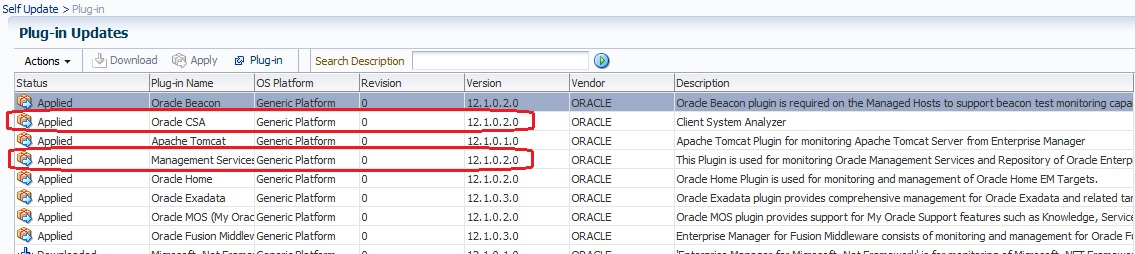
That seems better, but there are 2 plugins I couldn’t find in the plug-ins list (CSA and Management Repository and services). But, I can find them in the plugin list in the Self update interface:

6

The only way to publish them is to used the emcli tool with the plugin sweet name 😉 to deploy it on the agent:

[oracle@cloudcontrol12c ~]$ emcli deploy_plugin_on_agent -plugin="oracle.sysman.csa" -agent_names="cloudcontrol12c.localdomain:3872"
Agent side plug-in deployment is in progress
Use "emcli get_plugin_deployment_status -plugin_id=oracle.sysman.csa" to track plug-in deployment status.

[oracle@cloudcontrol12c ~]$ emcli deploy_plugin_on_agent -plugin="oracle.sysman.emrep" -agent_names="cloudcontrol12c.localdomain:3872"
Agent side plug-in deployment is in progress
Use "emcli get_plugin_deployment_status -plugin_id=oracle.sysman.emrep" to track plug-in deployment status.

Note: same remark, deploy plugins one by one.

After a while, both plugins are deployed on my agent:

[oracle@cloudcontrol12c ~]$ /opt/oracle/agent12c/agent_inst/bin/emctl listplugins agent
Oracle Enterprise Manager Cloud Control 12c Release 2
Copyright (c) 1996, 2012 Oracle Corporation. All rights reserved.
---------------------------------------------------------------
oracle.sysman.oh    12.1.0.2.0 /opt/oracle/agent12c/core/12.1.0.2.0/../../plugins/oracle.sysman.oh.agent.plugin_12.1.0.2.0
oracle.sysman.db 12.1.0.3.0 /opt/oracle/agent12c/core/12.1.0.2.0/../../plugins/oracle.sysman.db.agent.plugin_12.1.0.3.0
oracle.sysman.emas 12.1.0.3.0 /opt/oracle/agent12c/core/12.1.0.2.0/../../plugins/oracle.sysman.emas.agent.plugin_12.1.0.3.0
oracle.em.soav 12.1.0.2.0 /opt/oracle/agent12c/core/12.1.0.2.0/../../plugins/oracle.em.soav.agent.plugin_12.1.0.2.0
oracle.sysman.beacon 12.1.0.2.0 /opt/oracle/agent12c/core/12.1.0.2.0/../../plugins/oracle.sysman.beacon.agent.plugin_12.1.0.2.0
oracle.sysman.csa 12.1.0.2.0 /opt/oracle/agent12c/core/12.1.0.2.0/../../plugins/oracle.sysman.csa.agent.plugin_12.1.0.2.0
oracle.sysman.emrep 12.1.0.2.0 /opt/oracle/agent12c/core/12.1.0.2.0/../../plugins/oracle.sysman.emrep.agent.plugin_12.1.0.2.0

Now, I can discover all the targets. If internal targets (like EM Console, EM Repository etc.) are not automatically discovered. You can add them manually, or to use addinternaltargets command of the agent:

[oracle@cloudcontrol12c ~]$ /opt/oracle/agent12c/agent_inst/bin/emctl config agent addinternaltargets
Oracle Enterprise Manager Cloud Control 12c Release 2
Copyright (c) 1996, 2012 Oracle Corporation. All rights reserved.
[oracle@cloudcontrol12c ~]$ /opt/oracle/agent12c/agent_inst/bin/emctl upload agent
Oracle Enterprise Manager Cloud Control 12c Release 2
Copyright (c) 1996, 2012 Oracle Corporation. All rights reserved.
---------------------------------------------------------------
EMD upload completed successfully