Data … as usual

All things about data by Laurent Leturgez

Category Archives: 12c

Oracle 12c invisible columns … behind the scene

In Oracle 12c, there’s a new feature called table’s invisible columns. As indexes in oracle 11g, you can now makes columns visible or invisible.

This feature has a strange behavior that we will see later and see how it really works.

First, I created a table with 3 columns:

SQL> create table test(a number, b number, c number);

Table created.

SQL> insert into test(a,b,c) values(1,2,3);

1 row created.

SQL> desc test
 Name                    Null?    Type
 ----------------------- -------- ----------------
 A                                NUMBER
 B                                NUMBER
 C                                NUMBER
And then, I modified the table to transform the B column as invisible:
SQL> alter table test modify (b invisible);

Table altered.

SQL> desc test
 Name                    Null?    Type
 ----------------------- -------- ----------------
 A                                NUMBER
 C                                NUMBER

SQL> select * from test;

         A          C
---------- ----------
         1          3
If we tried to specifically query the B column, data appear:
SQL> select a,b,c from test;

         A          B          C
---------- ---------- ----------
         1          2          3
If we have a look deep inside the block, we can see that the visibility of a specific column is defined as the dictionary level and not at the block level:
SQL> select dbms_rowid.rowid_relative_fno(rowid) File#,
  2  dbms_rowid.rowid_block_number(rowid) Block#
  3  from test;

     FILE#     BLOCK#
---------- ----------
         1      99241

SQL> alter system dump datafile 1 block 99241;

System altered.

SQL> 
data_block_dump,data header at 0x7f59e1a66a5c
===============
tsiz: 0x1fa0
hsiz: 0x14
pbl: 0x7f59e1a66a5c
     76543210
flag=--------
ntab=1
nrow=1
frre=-1
fsbo=0x14
fseo=0x1f94
avsp=0x1f80
tosp=0x1f80
0xe:pti[0]      nrow=1  offs=0
0x12:pri[0]     offs=0x1f94
block_row_dump:
tab 0, row 0, @0x1f94
tl: 12 fb: --H-FL-- lb: 0x1  cc: 3
col  0: [ 2]  c1 02
col  1: [ 2]  c1 03 <<<<<<< OUR B COLUMN
col  2: [ 2]  c1 04
end_of_block_dump
End dump data blocks tsn: 0 file#: 1 minblk 99241 maxblk 99241

SQL> select dump(a,16),dump(b,16), dump(c,16) from test;

DUMP(A,16)        DUMP(B,16)        DUMP(C,16)
----------------- ----------------- -----------------
Typ=2 Len=2: c1,2 Typ=2 Len=2: c1,3 Typ=2 Len=2: c1,4
Now, let’s modify the B column to be visible:
SQL> alter table test modify (b visible);

Table altered.

SQL> desc test;
 Name                                      Null?    Type
 ----------------------------------------- -------- ----------------------------
 A                                                  NUMBER
 C                                                  NUMBER
 B                                                  NUMBER
Well, the columns order seems to have changed. What is more funny is when you try now to insert a new row without specifying the column, it takes the new order definition:
SQL> insert into test values(1,2,3);

1 row created.

SQL> select * from test;

         A          C          B
---------- ---------- ----------
         1          3          2
         1          2          3
Now, let’s dump the block (after a necessary checkpoint).
data_block_dump,data header at 0x7f59e1a66a5c
===============
tsiz: 0x1fa0
hsiz: 0x16
pbl: 0x7f59e1a66a5c
     76543210
flag=--------
ntab=1
nrow=2
frre=-1
fsbo=0x16
fseo=0x1f88
avsp=0x1f72
tosp=0x1f72
0xe:pti[0]      nrow=2  offs=0
0x12:pri[0]     offs=0x1f94
0x14:pri[1]     offs=0x1f88
block_row_dump:
tab 0, row 0, @0x1f94
tl: 12 fb: --H-FL-- lb: 0x1  cc: 3
col  0: [ 2]  c1 02
col  1: [ 2]  c1 03
col  2: [ 2]  c1 04
tab 0, row 1, @0x1f88
tl: 12 fb: --H-FL-- lb: 0x2  cc: 3
col  0: [ 2]  c1 02
col  1: [ 2]  c1 04
col  2: [ 2]  c1 03
end_of_block_dump
End dump data blocks tsn: 0 file#: 1 minblk 99241 maxblk 99241
We confirm here that column visibility and column order definition are not defined at the block level. So it may be at the dictionary level. Let’s have a closer look to the col$ system table:
SQL> select o.obj#,col#,segcol#,o.name object_name,c.name col_name
  2  from obj$ o, col$ c
  3  where o.obj#=c.obj#
  4  and o.name='TEST'
  5  /

      OBJ#       COL#    SEGCOL# OBJECT_NAME          COL_NAME
---------- ---------- ---------- -------------------- ------------------------------
     92056          1          1 TEST                 A
     92056          3          2 TEST                 B
     92056          2          3 TEST                 C
Column position in the segment (ie. in the block) is defined by the SEGCOL# column. COL# column defines the rank of the column when you perform a SELECT * or an INSERT without specifying the corresponding column. The COL# value can change depending on visibility modifications made on the column.
So be very careful about apps code that makes inserts without column definition (INSERT INTO t VALUES (val1,val2, … , valN)). This could trigger new errors or worse, involve data integrity errors (like in the previous example).

Write SQL statements on internal structures in multitenant databases.

In a multitenant configuration, if you are querying X$ structures and fixed tables (OBJ$, TAB$ etc.), you will face differents behaviour depending on the fact you are connected to the root container or to a pluggable database.

  • If you are connected to a root container (CDB$ROOT)
    • In fixed tables, for example OBJ$, there’s no CON_ID column defined in this table so this will give you all objects for your root container, and not for all containers.
SQL> show con_name
CON_NAME
------------------------------
CDB$ROOT
SQL> desc obj$
 Name                                      Null?    Type
 ----------------------------------------- -------- ----------------------------
 OBJ#                                      NOT NULL NUMBER
 DATAOBJ#                                           NUMBER
 OWNER#                                    NOT NULL NUMBER
 NAME                                      NOT NULL VARCHAR2(128)
 NAMESPACE                                 NOT NULL NUMBER
 SUBNAME                                            VARCHAR2(128)
 TYPE#                                     NOT NULL NUMBER
 CTIME                                     NOT NULL DATE
 MTIME                                     NOT NULL DATE
 STIME                                     NOT NULL DATE
 STATUS                                    NOT NULL NUMBER
 REMOTEOWNER                                        VARCHAR2(128)
 LINKNAME                                           VARCHAR2(128)
 FLAGS                                              NUMBER
 OID$                                               RAW(16)
 SPARE1                                             NUMBER
 SPARE2                                             NUMBER
 SPARE3                                             NUMBER
 SPARE4                                             VARCHAR2(1000)
 SPARE5                                             VARCHAR2(1000)
 SPARE6                                             DATE
 SIGNATURE                                          RAW(16)
 SPARE7                                             NUMBER
 SPARE8                                             NUMBER
 SPARE9                                             NUMBER
    • X$ structures will give you information for all containers (ROOT$CDB, SEED and and all pluggable database). And there’s a CON_ID column defined in all those structures.
SQL> show con_name

CON_NAME
------------------------------
CDB$ROOT

SQL> desc x$ksppi
 Name                                      Null?    Type
 ----------------------------------------- -------- ----------------------------
 ADDR                                               RAW(8)
 INDX                                               NUMBER
 INST_ID                                            NUMBER
 CON_ID                                             NUMBER
 KSPPINM                                            VARCHAR2(80)
 KSPPITY                                            NUMBER
 KSPPDESC                                           VARCHAR2(255)
 KSPPIFLG                                           NUMBER
 KSPPILRMFLG                                        NUMBER
 KSPPIHASH                                          NUMBER

SQL> select c.name,KSPPINM
  2  from x$ksppi x, v$containers c
  3  where x.con_id=c.con_id and  KSPPINM='open_cursors';

NAME                           KSPPINM
------------------------------ ------------------------------
CDB$ROOT                       open_cursors
PDB$SEED                       open_cursors
PDB1                           open_cursors
PDB2                           open_cursors
  • If you are connected to a PDB
    • In fixed tables, for example OBJ$, there’s still no CON_ID, so this will give you all objects on your PDB.
    • In X$ structures, there’s a CON_ID column, but if you are connected to a PDB, you will see only the data related to this PDB.
To summarize, static fixed tables contain data for the actual container (CDB$ROOT or PDB), but X$ structures contain data for all containers if you are connected to the CDB$ROOT container, and contain data related to the PDB you are connected to, in case of a PDB.
If you disassemble static views like CDB_TABLES, you will see a new function used to have data for all containers. This is CDB$VIEW function :
SQL> show con_id

CON_ID
------------------------------
1
SQL> show con_name

CON_NAME
------------------------------
CDB$ROOT
SQL> select count(*) from obj$;

  COUNT(*)
----------
     91005

SQL> select con_id,count(*) from CDB$VIEW("SYS"."OBJ$") group by con_id order by 1;

    CON_ID   COUNT(*)
---------- ----------
         1      91005
         2      90708
         3      90960
         4      90948
 Ok, now we have the information for all our containers. But if we want to join an X$ Structure and a CDB$VIEW transformed object, time for execute this is too long:
select x.con_id,o.name,count(*)
from x$bh x, (select name,dataobj#,con_id from CDB$VIEW("SYS"."OBJ$")) o
where x.con_id=o.con_id
and o.dataobj#=x.obj
and o.name like 'T_PDB%'
group by x.con_id,o.name
/
... never ends :(
To execute it in a better time, I used query factorization with a WITH block, and forced materialization of it:
SQL> with o as (select /*+ MATERIALIZE */ name,dataobj#,con_id from CDB$VIEW("SYS"."OBJ$"))
  2  select x.con_id,o.name,count(*)
  3  from x$bh x,o
  4  where x.con_id=o.con_id
  5  and o.dataobj#=x.obj
  6  and o.name like 'T_PDB%'
  7  group by x.con_id,o.name
  8  /

    CON_ID NAME                   COUNT(*)
---------- -------------------- ----------
         4 T_PDB2                        9
         3 T_PDB1                        9

Elapsed: 00:00:02.40

Oracle Database 12c released … some features

If you are an Oracle DBA and you don’t live on earth, you have not heard about Oracle Database 12c … which is finally released today.

For the moment, you can download it on otn (http://www.oracle.com/technetwork/database/enterprise-edition/downloads/index.html) and on edelivery (http://edelivery.oracle.com). Documentation is available here: http://www.oracle.com/pls/db121/homepage.

As a beta tester, I can now speak about some features of this release. Of course, I could write about multitenant database or Information Lifecycle Management … I prefer to write about “smaller” features … but very useful.

  • online datafile move

Before 12c, if you wanted to move a datafile (or rename it), you had to offline it and move it on the OS Side, and then modify the control file data by renaming file, and then online the datafile. Now in 12c … it becomes a little bit easier:

SQL> select file_name from dba_data_files;

FILE_NAME
--------------------------------------------------------------------------------
/u02/oradata/orcl/system01.dbf
/u02/oradata/orcl/sysaux01.dbf
/u02/oradata/orcl/users01.dbf
/u02/oradata/orcl/example01.dbf
/u02/oradata/orcl/undotbs01.dbf

SQL> alter database move datafile '/u02/oradata/orcl/users01.dbf' to '/u02/oradata/newdest/users01.dbf';

Database altered.

SQL> !ls /u02/oradata/newdest
users01.dbf

That’s it 😉

  • write sql statement directly in RMAN
[oracle@oel ~]$ rman target /

Recovery Manager: Release 12.1.0.1.0 - Production on Tue Jun 25 21:57:09 2013

Copyright (c) 1982, 2013, Oracle and/or its affiliates. All rights reserved.

connected to target database: ORCL (DBID=1335655385)

RMAN> select dbid,name from v$database;

using target database control file instead of recovery catalog
      DBID NAME
---------- ---------
1335655385 ORCL
  • impdp in nologging mode

impdp utility have now many transformation functions that offer the opportunity to modify your data directly during the import process. Among these functions, you have a nologging option to reduce the redo information generated during impdp process (which was impossible with previous versions)

$ impdp USERID=\"/ as sysdba\" DIRECTORY=mydir DUMPFILE=expdp.dmp REMAP_SCHEMA=SH:SH2 TRANSFORM=DISABLE_ARCHIVE_LOGGING:Y

That’s it for today ! 🙂

Move or reinstall EM 12c Central Agent (installed on the OMS)

Recently, I had to updrade an EM 12cR1 platform to 12cR2. At the end of this procedure, you have to upgrade agents from 12.1.0.1 to 12.1.0.2. But at this customer site, the em agent located on the OMS was’nt installed correctly so I have to remove and reinstall it in the correct directory. Easy ??? of course, but an agent located on the OMS has some peculiarities that a traditional agent doesn’t have.

First, I needed to remove the agent. To do this, I used the MOS Note: How to Manually Remove an Agent From 12C Cloud Control [ID 1380846.1].

Next, I pushed an agent to the new location by using the “add host” function in the EM Console.

Be careful, deploy agent on the Fully qualified name of the server. If you don’t use the same name, internal targets won’t be discovered. You can find this name by querying the repository:

SQL> select p.value OMS_HOST_NAME from mgmt_oms_parameters p where p.name = 'HOST_NAME';
OMS_HOST_NAME
--------------------------------------------------------------------------------
cloudcontrol12c.localdomain

Here was the start of my problems because an agent installed on the OMS have some plugins you will not find in a traditional agent :

[oracle@cloudcontrol12c ~]$ emctl listplugins agent
Oracle Enterprise Manager Cloud Control 12c Release 2
Copyright (c) 1996, 2012 Oracle Corporation. All rights reserved.
---------------------------------------------------------------
oracle.sysman.beacon 12.1.0.2.0 /u01/app/oracle/product/agent12c/core/12.1.0.2.0/../../plugins/oracle.sysman.beacon.agent.plugin_12.1.0.2.0  <<< Plugin for Oracle Beacon 
oracle.sysman.csa 12.1.0.2.0 /u01/app/oracle/product/agent12c/core/12.1.0.2.0/../../plugins/oracle.sysman.csa.agent.plugin_12.1.0.2.0        <<< Plugin for Oracle Client System Analyzer
oracle.sysman.emas 12.1.0.3.0 /u01/app/oracle/product/agent12c/core/12.1.0.2.0/../../plugins/oracle.sysman.emas.agent.plugin_12.1.0.3.0      <<< Plugin for Oracle Fusion Middleware
oracle.sysman.emrep 12.1.0.2.0 /u01/app/oracle/product/agent12c/core/12.1.0.2.0/../../plugins/oracle.sysman.emrep.agent.plugin_12.1.0.2.0    <<< Plugin for Oracle Management Services & Repository
oracle.sysman.oh 12.1.0.2.0 /u01/app/oracle/product/agent12c/core/12.1.0.2.0/../../plugins/oracle.sysman.oh.agent.plugin_12.1.0.2.0          <<< Plugin for Oracle Home
oracle.sysman.db 12.1.0.3.0 /u01/app/oracle/product/agent12c/core/12.1.0.2.0/../../plugins/oracle.sysman.db.agent.plugin_12.1.0.3.0          <<< Plugin for Oracle Database
oracle.em.soav 12.1.0.2.0 /u01/app/oracle/product/agent12c/core/12.1.0.2.0/../../plugins/oracle.em.soav.agent.plugin_12.1.0.2.0              <<< Plugin for Audit Vault

But after installing the agent to its new destination, there’s a lack of plugins :

[oracle@cloudcontrol12c ~]$ emctl listplugins agent
Oracle Enterprise Manager Cloud Control 12c Release 2
Copyright (c) 1996, 2012 Oracle Corporation. All rights reserved.
---------------------------------------------------------------
oracle.sysman.oh 12.1.0.2.0  /opt/oracle/agent12c/core/12.1.0.2.0/../../plugins/oracle.sysman.oh.agent.plugin_12.1.0.2.0
Plugins mentioned above in blue can be easily installed in the agent by using the menu : Setup / Extensibility / Plug-ins. After this, plugins installed on the agent are:
[oracle@cloudcontrol12c ~]$ emctl listplugins agent
Oracle Enterprise Manager Cloud Control 12c Release 2
Copyright (c) 1996, 2012 Oracle Corporation. All rights reserved.
---------------------------------------------------------------
oracle.sysman.oh    12.1.0.2.0 /opt/oracle/agent12c/core/12.1.0.2.0/../../plugins/oracle.sysman.oh.agent.plugin_12.1.0.2.0
oracle.sysman.db 12.1.0.3.0 /opt/oracle/agent12c/core/12.1.0.2.0/../../plugins/oracle.sysman.db.agent.plugin_12.1.0.3.0
oracle.sysman.emas 12.1.0.3.0 /opt/oracle/agent12c/core/12.1.0.2.0/../../plugins/oracle.sysman.emas.agent.plugin_12.1.0.3.0
oracle.em.soav 12.1.0.2.0 /opt/oracle/agent12c/core/12.1.0.2.0/../../plugins/oracle.em.soav.agent.plugin_12.1.0.2.0
oracle.sysman.beacon 12.1.0.2.0 /opt/oracle/agent12c/core/12.1.0.2.0/../../plugins/oracle.sysman.beacon.agent.plugin_12.1.0.2.0

Note: I encountered some trouble by deploying all plugins, I recommend to deploy plugins one by one.

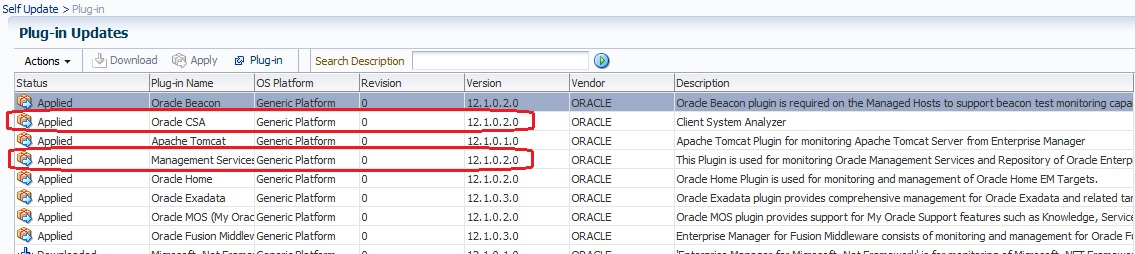
That seems better, but there are 2 plugins I couldn’t find in the plug-ins list (CSA and Management Repository and services). But, I can find them in the plugin list in the Self update interface:

6

The only way to publish them is to used the emcli tool with the plugin sweet name 😉 to deploy it on the agent:

[oracle@cloudcontrol12c ~]$ emcli deploy_plugin_on_agent -plugin="oracle.sysman.csa" -agent_names="cloudcontrol12c.localdomain:3872"
Agent side plug-in deployment is in progress
Use "emcli get_plugin_deployment_status -plugin_id=oracle.sysman.csa" to track plug-in deployment status.

[oracle@cloudcontrol12c ~]$ emcli deploy_plugin_on_agent -plugin="oracle.sysman.emrep" -agent_names="cloudcontrol12c.localdomain:3872"
Agent side plug-in deployment is in progress
Use "emcli get_plugin_deployment_status -plugin_id=oracle.sysman.emrep" to track plug-in deployment status.

Note: same remark, deploy plugins one by one.

After a while, both plugins are deployed on my agent:

[oracle@cloudcontrol12c ~]$ /opt/oracle/agent12c/agent_inst/bin/emctl listplugins agent
Oracle Enterprise Manager Cloud Control 12c Release 2
Copyright (c) 1996, 2012 Oracle Corporation. All rights reserved.
---------------------------------------------------------------
oracle.sysman.oh    12.1.0.2.0 /opt/oracle/agent12c/core/12.1.0.2.0/../../plugins/oracle.sysman.oh.agent.plugin_12.1.0.2.0
oracle.sysman.db 12.1.0.3.0 /opt/oracle/agent12c/core/12.1.0.2.0/../../plugins/oracle.sysman.db.agent.plugin_12.1.0.3.0
oracle.sysman.emas 12.1.0.3.0 /opt/oracle/agent12c/core/12.1.0.2.0/../../plugins/oracle.sysman.emas.agent.plugin_12.1.0.3.0
oracle.em.soav 12.1.0.2.0 /opt/oracle/agent12c/core/12.1.0.2.0/../../plugins/oracle.em.soav.agent.plugin_12.1.0.2.0
oracle.sysman.beacon 12.1.0.2.0 /opt/oracle/agent12c/core/12.1.0.2.0/../../plugins/oracle.sysman.beacon.agent.plugin_12.1.0.2.0
oracle.sysman.csa 12.1.0.2.0 /opt/oracle/agent12c/core/12.1.0.2.0/../../plugins/oracle.sysman.csa.agent.plugin_12.1.0.2.0
oracle.sysman.emrep 12.1.0.2.0 /opt/oracle/agent12c/core/12.1.0.2.0/../../plugins/oracle.sysman.emrep.agent.plugin_12.1.0.2.0

Now, I can discover all the targets. If internal targets (like EM Console, EM Repository etc.) are not automatically discovered. You can add them manually, or to use addinternaltargets command of the agent:

[oracle@cloudcontrol12c ~]$ /opt/oracle/agent12c/agent_inst/bin/emctl config agent addinternaltargets
Oracle Enterprise Manager Cloud Control 12c Release 2
Copyright (c) 1996, 2012 Oracle Corporation. All rights reserved.
[oracle@cloudcontrol12c ~]$ /opt/oracle/agent12c/agent_inst/bin/emctl upload agent
Oracle Enterprise Manager Cloud Control 12c Release 2
Copyright (c) 1996, 2012 Oracle Corporation. All rights reserved.
---------------------------------------------------------------
EMD upload completed successfully

EM 12c agent diagnostic with emctl

On an Oracle Enterprise Manager 12c platform, agents represent a main part of the architecture. Sometimes, you need information about its status to diagnose a problem.

In this blog post, I will present commands based on emctl executable and tips you can use to get health and performance indicators.

  • The first and well known command is “emctl status agent”. This command shows a summary of the agent status

In this summary, you can see the agent availability status, uploads and XML related files status, OMS address etc.

[oracle@oel agent_inst]$ emctl status agent
Oracle Enterprise Manager Cloud Control 12c Release 2
Copyright (c) 1996, 2012 Oracle Corporation. All rights reserved.
---------------------------------------------------------------
Agent Version : 12.1.0.2.0
OMS Version : 12.1.0.2.0
Protocol Version : 12.1.0.1.0
Agent Home : /u01/app/oracle/product/agent12c/agent_inst
Agent Binaries : /u01/app/oracle/product/agent12c/core/12.1.0.2.0
Agent Process ID : 24845
Parent Process ID : 24799
Agent URL : https://oel.localdomain:3872/emd/main/
Repository URL : https://cloudcontrol12c.localdomain:4900/empbs/upload
Started at : 2012-12-16 13:23:55
Started by user : oracle
Last Reload : 2012-12-16 14:16:11
Last successful upload : 2012-12-16 14:33:04
Last attempted upload : 2012-12-16 14:33:04
Total Megabytes of XML files uploaded so far : 0.62
Number of XML files pending upload : 0
Size of XML files pending upload(MB) : 0
Available disk space on upload filesystem : 20.09%
Collection Status : Collections enabled
Heartbeat Status : Ok
Last attempted heartbeat to OMS : 2012-12-16 14:36:04
Last successful heartbeat to OMS : 2012-12-16 14:36:04
Next scheduled heartbeat to OMS : 2012-12-16 14:37:04

---------------------------------------------------------------
Agent is Running and Ready
  • emctl status agent target TGT_NAME,TGT_TYPE

This command is useful to see status of a specific target (target type is based on EM12c internal name), and metric collected for this specific target.

[oracle@oel agent_inst]$ emctl status agent target orcl,oracle_database
Oracle Enterprise Manager Cloud Control 12c Release 2
Copyright (c) 1996, 2012 Oracle Corporation. All rights reserved.
---------------------------------------------------------------
Target Name : orcl
Target Type : oracle_database
Current severity state
----------------------
Metric Column name Key State Timestamp
--------------------------------------------------------------------------------
DeferredTrans deftrans_count n/a CLEAR Sun Dec 16 13:46:44 CET 2012
DeferredTrans errortrans_count n/a CLEAR Sun Dec 16 13:46:44 CET 2012
Response State n/a CLEAR Sun Dec 16 13:46:26 CET 2012
Response Status n/a CLEAR Sun Dec 16 13:46:26 CET 2012
Temporary_File_Status STATUS 1 CLEAR Sun Dec 16 14:00:44 CET 2012
UserAudit username SYS_oel WARNING Sun Dec 16 14:32:46 CET 2012
UserLocks maxBlockedDBTime TM CLEAR Sun Dec 16 13:52:08 CET 2012
UserLocks maxBlockedDBTime TX CLEAR Sun Dec 16 13:52:08 CET 2012
UserLocks maxBlockedDBTime UL CLEAR Sun Dec 16 13:52:08 CET 2012
UserLocks maxBlockedSess TM CLEAR Sun Dec 16 13:52:08 CET 2012
UserLocks maxBlockedSess TX CLEAR Sun Dec 16 13:52:08 CET 2012
UserLocks maxBlockedSess UL CLEAR Sun Dec 16 13:52:08 CET 2012
archFull archUsedPercent NOARCHIVELOG CLEAR Sun Dec 16 13:58:01 CET 2012
audit_failed_logins failed_login_count 2012-12-16 12:58:30 GMT CLEAR Sun Dec 16 13:58:30 CET 2012
audit_failed_logins failed_login_count 2012-12-16 13:28:30 GMT CLEAR Sun Dec 16 14:28:30 CET 2012
dbjob_status broken n/a CLEAR Sun Dec 16 14:03:01 CET 2012
dbjob_status failed n/a CLEAR Sun Dec 16 14:03:01 CET 2012
dumpFull dumpAvail background CLEAR Sun Dec 16 13:52:51 CET 2012
dumpFull dumpAvail core CLEAR Sun Dec 16 13:52:51 CET 2012
dumpFull dumpAvail user CLEAR Sun Dec 16 13:52:51 CET 2012
dumpFull dumpUsedPercent background CLEAR Sun Dec 16 13:52:51 CET 2012
dumpFull dumpUsedPercent core CLEAR Sun Dec 16 13:52:51 CET 2012
dumpFull dumpUsedPercent user CLEAR Sun Dec 16 13:52:51 CET 2012
wait_sess_cls dbtime_waitclass_pct Concurrency WARNING Sun Dec 16 14:21:05 CET 2012
wait_sess_cls dbtime_waitclass_pct Other CLEAR Sun Dec 16 14:02:04 CET 2012

---------------------------------------------------------------
Agent is Running and Ready
  • emctl status agent scheduler

This command shows all past and future schedule for the agent. Schedules can be general (e.g. Ping OMS or SchedulerHeartBeat) or target specific (metric collection : oracle_database:orcl:tbspAllocation)

[oracle@oel agent_inst]$ emctl status agent scheduler
Oracle Enterprise Manager Cloud Control 12c Release 2
Copyright (c) 1996, 2012 Oracle Corporation. All rights reserved.
---------------------------------------------------------------
Number of currently running scheduled items :: 0
Number of currently ready scheduled items :: 0
Number of scheduled items :: 134
Schedule Attempts Delay Percentage :: 0.000%
Running entries::
Ready entries::
Scheduled entries::
2012-12-16 14:32:26.901 : oracle_database:orcl:observer_11g
2012-12-16 14:32:27.297 : oracle_database:orcl:Response
2012-12-16 14:32:27.570 : oracle_emd:oel.localdomain:3872:z#TaskRuntimeMap
2012-12-16 14:32:28.542 : SchedulerHeartbeat
2012-12-16 14:32:32.981 : oracle_emd:oel.localdomain:3872:EMDStatusCollection
2012-12-16 14:32:39.979 : oracle_listener:LISTENER_oel.localdomain:Load
2012-12-16 14:32:45.888 : oracle_emd:oel.localdomain:3872:z#AgentStat_AgentHeapUsage
2012-12-16 14:32:46.485 : oracle_database:orcl:service_10i
2012-12-16 14:32:46.547 : oracle_database:orcl:UserAudit
2012-12-16 14:32:47.066 : HTTP Listener
2012-12-16 14:32:52.613 : oracle_emd:oel.localdomain:3872:z#UploadSystemStats
2012-12-16 14:32:59.369 : AgentSystemMonitorTask
2012-12-16 14:33:00.312 : oracle_database:orcl:rac_global_cache_10i
2012-12-16 14:33:01.830 : oracle_database:orcl:dbjob_status
2012-12-16 14:33:03.276 : oracle_emd:oel.localdomain:3872:z#ThreadPoolStatistics
2012-12-16 14:33:03.868 : Ping OMS
2012-12-16 14:33:04.300 : oracle_emd:oel.localdomain:3872:EMDUploadSystemMonitor

.../...

2012-12-16 14:47:03.241 : host:oel.localdomain:NetworkLinux
2012-12-16 14:47:19.120 : osm_instance:+ASM_oel.localdomain:Instance_Volumes_Summary
2012-12-16 14:47:21.555 : host:oel.localdomain:DiskActivityLinux
2012-12-16 14:53:59.251 : CollectionManager.PersistSchedule
2012-12-16 14:58:30.259 : oracle_database:orcl:audit_failed_logins
2012-12-16 15:06:24.048 : oracle_database:orcl:DatabaseVaultRealmConfigurationIssue_collection
2012-12-16 15:10:11.728 : oracle_database:orcl:segment_advisor_count
2012-12-16 15:11:06.604 : oracle_database:orcl:DatabaseVaultCommandRuleViolation_collection
2012-12-16 15:11:50.888 : oracle_database:orcl:DatabaseVaultCommandRuleConfigurationIssue_collection
2012-12-16 15:13:14.610 : oracle_database:orcl:DatabaseVaultRealmViolation_collection
2012-12-16 15:16:51.178 : oracle_listener:LISTENER_1526_oel.localdomain:TNSERRORS
2012-12-16 15:18:17.660 : oracle_database:orcl:DatabaseVaultPolicyChanges_collection
2012-12-16 15:20:28.584 : osm_instance:+ASM_oel.localdomain:ofs_performance_metrics
2012-12-16 15:23:16.786 : oracle_listener:LISTENER_oel.localdomain:TNSERRORS
2012-12-16 15:31:11.126 : MetricReporter.Task
2012-12-16 18:00:46.334 : oracle_database:orcl:haconfig1_collection
2012-12-16 18:02:10.092 : oracle_database:orcl:audit_failed_logins_historical
2012-12-16 21:47:39.678 : oracle_database:orcl:feature_usage_collection_item
2012-12-16 21:50:39.668 : osm_instance:+ASM_oel.localdomain:Disk_Path
2012-12-16 21:51:21.248 : oracle_database:orcl:exadataCollection
2012-12-16 21:53:43.531 : host:oel.localdomain:Swap_Area_StatusLinux
2012-12-16 22:00:41.994 : host:oel.localdomain:HostStorageSupport
2012-12-16 22:01:04.098 : oracle_database:orcl:invalid_objects_rollup
2012-12-16 22:15:12.757 : oracle_database:orcl:ocm_instrumentation
2012-12-16 22:15:27.932 : oracle_database:orcl:problemSegTbsp
2012-12-17 13:23:59.377 : PurgeADR
2012-12-17 13:43:26.423 : host:oel.localdomain:host_storage
2012-12-17 13:48:53.710 : oracle_database:orcl:ha_dg_target_summary
2012-12-17 13:49:58.180 : oracle_listener:LISTENER_1526_oel.localdomain:has_resources
2012-12-17 13:51:04.127 : oracle_database:orcl:oracle_storage
2012-12-17 13:51:44.509 : host:oel.localdomain:oracle_security
2012-12-17 13:52:09.276 : oracle_database:orcl:oracle_dbconfig
2012-12-17 13:52:28.613 : oracle_emd:oel.localdomain:3872:oracle_emd_config
2012-12-17 13:53:48.140 : oracle_home:agent12c1_5_oel:oracle_home_config
2012-12-17 13:56:38.819 : oracle_database:orcl:mgmt_database_listener_config
2012-12-17 13:59:21.165 : oracle_listener:LISTENER_oel.localdomain:has_resources
2012-12-17 13:59:53.042 : host:oel.localdomain:ll_host_config
2012-12-17 14:01:43.076 : osm_instance:+ASM_oel.localdomain:osm_osmconfig
2012-12-17 14:02:28.165 : oracle_home:Ora11g_gridinfrahome2_3_oel:oracle_home_config
2012-12-17 14:03:13.080 : host:oel.localdomain:DiscoverTargets
2012-12-17 14:03:14.031 : oracle_listener:LISTENER_oel.localdomain:mgmt_listener_config
2012-12-17 14:08:21.054 : oracle_database:orcl:has_resources
2012-12-17 14:10:19.581 : osm_instance:+ASM_oel.localdomain:osm_osminstconfig
2012-12-17 14:11:45.115 : oracle_listener:LISTENER_1526_oel.localdomain:mgmt_listener_config
2012-12-17 14:12:37.800 : osm_instance:+ASM_oel.localdomain:has_resources
2012-12-17 14:12:46.933 : oracle_database:orcl:mgmt_sql
2012-12-17 14:16:38.959 : oracle_home:OraDb11g_home2_4_oel:oracle_home_config
2012-12-18 21:42:55.497 : oracle_emd:oel.localdomain:3872:EMDCertExp
2012-12-18 21:48:46.106 : oracle_emd:oel.localdomain:3872:EMDUserLimits
2012-12-18 22:03:43.800 : oracle_emd:oel.localdomain:3872:EMDIdentity
2012-12-18 22:13:08.810 : oracle_database:orcl:tbspAllocation
2012-12-23 13:47:26.765 : osm_instance:+ASM_oel.localdomain:oracle_osm

---------------------------------------------------------------
Agent is Running and Ready
  • emctl startschedule agent TGT_NAME,TGT_TYPE

This command is used to schedule a collection on a specified target.

[oracle@oel agent_inst]$ emctl startschedule agent orcl,oracle_database
Oracle Enterprise Manager Cloud Control 12c Release 2
Copyright (c) 1996, 2012 Oracle Corporation. All rights reserved.
Start Schedule Target succeeded
  • emctl startschedule agent -type TGT_TYPE

This command is the same than previous one, but it schedules collection for all target of type mentioned by TGT_TYPE (e.g. oracle_database or oracle_emd)

[oracle@oel agent_inst]$ emctl startschedule agent -type oracle_database
Oracle Enterprise Manager Cloud Control 12c Release 2
Copyright (c) 1996, 2012 Oracle Corporation. All rights reserved.
Start Schedule TargetType succeeded
  • emctl getmetric agent TGT_NAME,TGT_TYPE,METRIC

This command gets real time metric for a specific target.

[oracle@oel agent_inst]$ emctl getmetric agent oel.localdomain:3872,oracle_emd,EMDStatus
Oracle Enterprise Manager Cloud Control 12c Release 2
Copyright (c) 1996, 2012 Oracle Corporation. All rights reserved.
Timestamp,Transfer time from Agent to OMS (msec),% of Collection Interval spent in Execution,CPU_Used,Java_Used_Pct,Collections scheduled for next hour,Ping response (mSec),UploadQueueSize
2012-12-16 14:22:32,164.328,0.047,0.122,37.2,1276,58.390,21603
2012-12-16 14:23:32,163.176,0.041,0.203,37.3,1275,58.817,27822
2012-12-16 14:24:32,158.634,0.041,0.126,30.9,1275,58.213,-5633
2012-12-16 14:25:32,158.634,0.042,0.084,34.6,1275,58.371,-4844
2012-12-16 14:26:32,158.634,0.042,0.083,38.1,1275,58.524,-4596
2012-12-16 14:27:32,158.634,0.042,0.072,40.4,1275,58.016,-4286
2012-12-16 14:28:32,158.634,0.042,0.113,44.3,1275,58.477,-2151
2012-12-16 14:29:32,158.634,0.042,0.107,32.2,1275,58.667,-128
2012-12-16 14:30:32,157.769,0.042,0.122,39.7,1275,58.806,4493
2012-12-16 14:31:32,157.769,0.038,0.405,42.0,1275,59.221,5611
  • emctl status agent cpu

To be able to run this command, you have to set “topMetricReporter=true” in emd.properties file (located in $AGENT_HOME/sysman/config)

[oracle@oel agent_inst]$ emctl status agent cpu -depth 5
Oracle Enterprise Manager Cloud Control 12c Release 2
Copyright (c) 1996, 2012 Oracle Corporation. All rights reserved.
---------------------------------------------------------------
Report generated at: /u01/app/oracle/product/agent12c/agent_inst/sysman/emd/topMetric/1355665421178_metricSummaryReport.html
---------------------------------------------------------------
Agent is Running and Ready

[oracle@oel agent_inst]$ emctl status agent cpu -full_cpu_report
Oracle Enterprise Manager Cloud Control 12c Release 2
Copyright (c) 1996, 2012 Oracle Corporation. All rights reserved.
---------------------------------------------------------------
Report generated at: /u01/app/oracle/product/agent12c/agent_inst/sysman/emd/topMetric/1355665536091_metricSummaryReport.html
---------------------------------------------------------------
Agent is Running and Ready

This command will give you cpu statistics for every task and top metrics. It can be used to print full details (-full_cpu_report) or a top-n values (-depth N). The command generates an html based report :
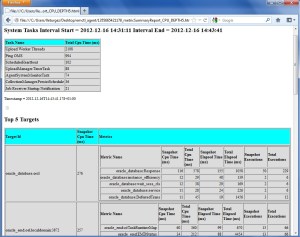
status_cpu_depth5jpg

  • emctl status agent dbconnections
[oracle@oel agent_inst]$ emctl status agent dbconnections
Oracle Enterprise Manager Cloud Control 12c Release 2
Copyright (c) 1996, 2012 Oracle Corporation. All rights reserved.
---------------------------------------------------------------
DBConnection Cache contents as of: Sun Dec 16 14:46:52 CET 2012
------------------------------------------------------------
Connection Cache Name = (DESCRIPTION=(ADDRESS=(PROTOCOL=TCP)(HOST=oel.localdomain)(Port=1521))(CONNECT_DATA=(SERVICE_NAME=+ASM)(INSTANCE_NAME=+ASM)(UR=A)))
 :276b5b206e103eb650eec1cec74a7d1
MinCacheLimit = 0
MaxPoolSize = 10
InitialLimit = 0
ConnectionWaitTimeout = 300
ValidationConnection = true
InactivityTimeout = 300
AbandonedTimeout = 0
TimeToLiveTimeout = 300
PropertyCheckInterval = 300
Number of active connections = 0
Number of available connections = 1
Number of abandoned connections = 0
Average connection waittime (mSecs) = 1
Peak connection waittime (mSecs) = 3
Average useage time (mSecs) = 998
Pending requests = 0
Total connections returned = 18
Connection Last Established at 2012-12-16 14:45:22
Connection Last Relinqueshed at 2012-12-16 14:45:22
------------------------------------
  • emctl pingOMS

This command shows every connection details established by the agent to targets (ASM or database).

[oracle@oel agent_inst]$ emctl pingOMS
 Oracle Enterprise Manager Cloud Control 12c Release 2
 Copyright (c) 1996, 2012 Oracle Corporation. All rights reserved.
 ---------------------------------------------------------------
 EMD pingOMS completed successfully

This commands tries to ping the OMS and checks the connectivity to the Oracle Management Server.

  • emctl listplugins agent

This command shows plugins deployed on the agent: name, version and installation directory.

[oracle@oel agent_inst]$ emctl listplugins agent
Oracle Enterprise Manager Cloud Control 12c Release 2
Copyright (c) 1996, 2012 Oracle Corporation. All rights reserved.
---------------------------------------------------------------
oracle.sysman.oh 12.1.0.2.0 /u01/app/oracle/product/agent12c/plugins/oracle.sysman.oh.agent.plugin_12.1.0.2.0
oracle.sysman.db 12.1.0.2.0 /u01/app/oracle/product/agent12c/core/12.1.0.2.0/../../plugins/oracle.sysman.db.agent.plugin_12.1.0.2.0
  • emctl dumpstate agent
[oracle@oel agent_inst]$ emctl dumpstate agent
Oracle Enterprise Manager Cloud Control 12c Release 2
Copyright (c) 1996, 2012 Oracle Corporation. All rights reserved.
Dumpstate succeeded
[oracle@oel agent_inst]$ ls -ltr /u01/app/oracle/product/agent12c/agent_inst/sysman/emd/dumps/
total 8696
-rw-r----- 1 oracle oinstall 4440752 Dec 16 13:51 SystemDump_1355662309788.xml
-rw-r----- 1 oracle oinstall 4433309 Dec 16 14:32 SystemDump_1355664774563.xml

This command dumps agent state. The dump is a complex XML file generated in $AGENT_HOME/sysman/emd/dumps

  • EM Agent browser

All information mentioned above can be obtained by using the EM Agent Browser. These information are available with a web browser through a specific URL. This URL is build on the agent URL (see emctl status agent) by adding the “browser” keyword between emd and main :

Agent URL         : https://oel.localdomain:3872/emd/main

Agent Browser URL :  https://oel.localdomain:3872/emd/browser/main

Access to this browser is authenticated by agent unix hostname owner (e.g. oracle in my case).

Below two screenshot of what you can see. Using this browser can be very useful if some metrics are not collected, or if your agent is in a pending status.
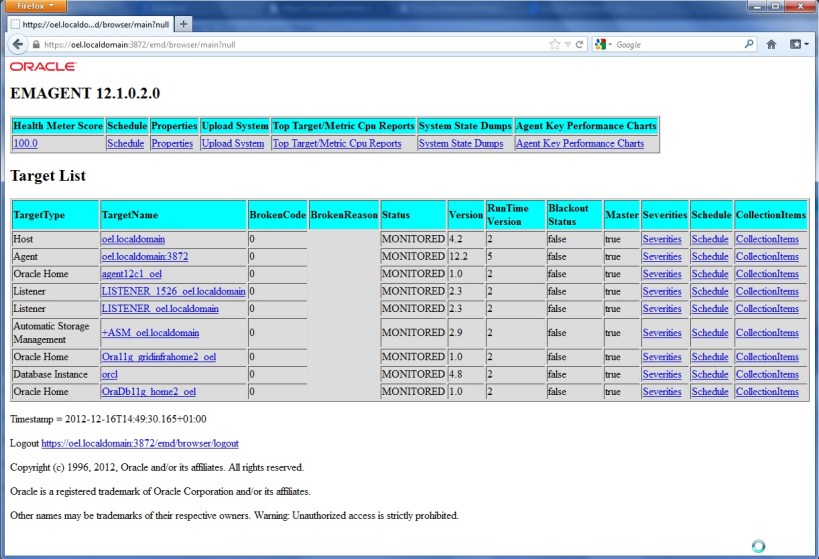
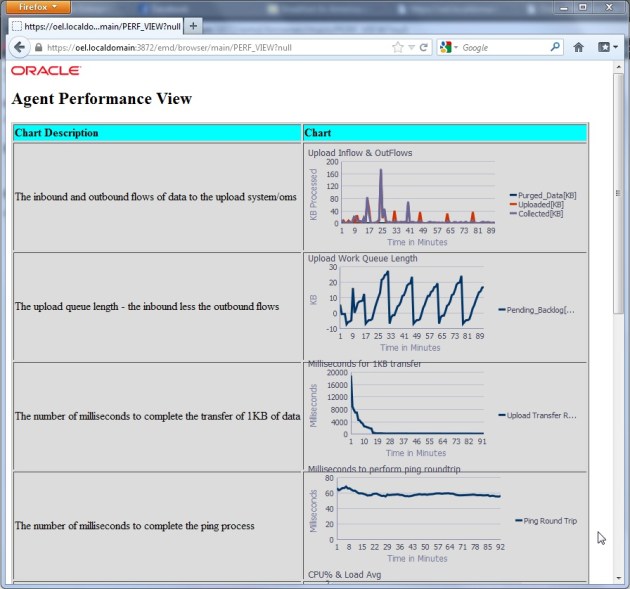
emd_browser1

emd_browser2